Our pass rate is high to 98.9% and the similarity percentage between our NSE7_EFW-6.4 study guide and real exam is 90% based on our seven-year educating experience. Do you want achievements in the Fortinet NSE7_EFW-6.4 exam in just one try? I am currently studying for the Fortinet NSE7_EFW-6.4 exam. Latest Fortinet NSE7_EFW-6.4 Test exam practice questions and answers, Try Fortinet NSE7_EFW-6.4 Brain Dumps First.
Check NSE7_EFW-6.4 free dumps before getting the full version:
NEW QUESTION 1
A FortiGate device has the following LDAP configuration: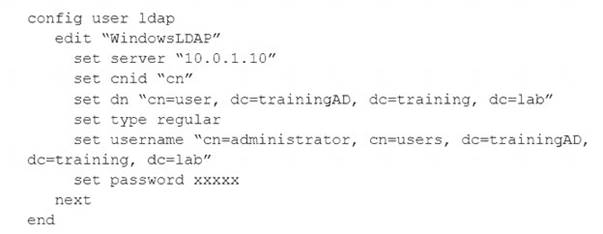
The LDAP user student cannot authenticate. The exhibit shows the output of the authentication real time debug while testing the student account: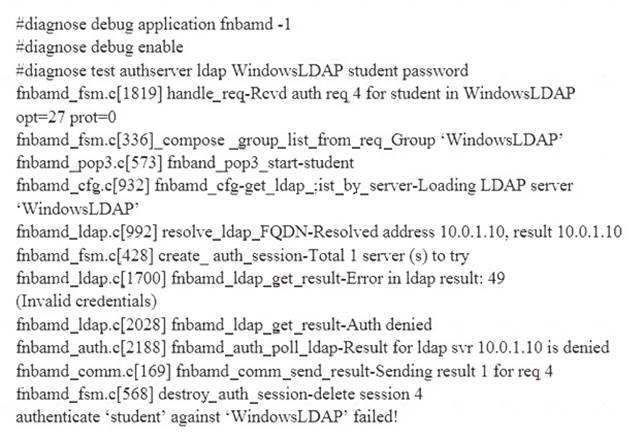
Based on the above output, what FortiGate LDAP settings must the administer check? (Choose two.)
- A. cnid.
- B. username.
- C. password.
- D. dn.
Answer: BC
Explanation:
https://kb.fortinet.com/kb/viewContent.do?externalId=13141
NEW QUESTION 2
Which statement is true regarding File description (FD) conserve mode?
- A. IPS inspection is affected when FortiGate enters FD conserve mode.
- B. A FortiGate enters FD conserve mode when the amount of available description is less than 5%.
- C. FD conserve mode affects all daemons running on the device.
- D. Restarting the WAD process is required to leave FD conserve mode.
Answer: B
NEW QUESTION 3
Which two tasks are automated using the Install Wizard on FortiManager? (Choose two.)
- A. Preview pending configuration changes for managed devices.
- B. Add devices to FortiManager.
- C. Import policy packages from managed devices.
- D. Install configuration changes to managed devices.
- E. Import interface mappings from managed devices.
Answer: AD
Explanation:
https://help.fortinet.com/fmgr/50hlp/56/5-6-2/FortiManager_Admin_Guide/1000_Device%20Manager/1200_ins
There are 4 main wizards:Add Device: is used to add devices to central management and import their configurations.
Install: is used to install configuration changes from Device Manager or Policies & Objects to the managed devices. It allows you to preview the changes and, if the administrator doesn’t agree with the changes, cancel and modify them.
Import policy: is used to import interface mapping, policy database, and objects associated with the managed devices into a policy package under the Policy & Object tab. It runs with the Add Device wizard by default and may be run at any time from the managed device list.
Re-install policy: is used to perform a quick install of the policy package. It doesn’t give the ability to preview the changes that will be installed to the managed device.
NEW QUESTION 4
Refer to exhibit, which contains the output of a BGP debug command.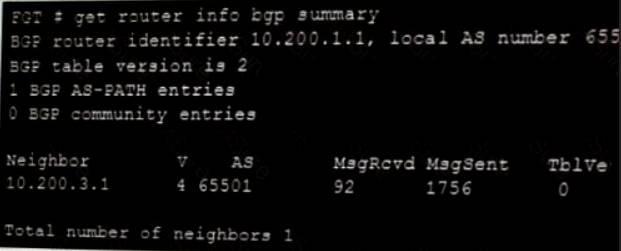
Which statement explains why the state of the 10.200.3.1 peer is Connect?
- A. The local router is receiving BGP keepalives from the remote peer, but the local peer has not received the OpenConfirm yet.
- B. The TCP session to 10.200.3.1 has not completed the 3-way handshake.
- C. The local router is receiving the BGP keepalives from the peer, but it has not received a BGP prefix yet.
- D. The local router has received the BGP prefixes from the remote peer.
Answer: B
Explanation:
BGP neighbor states and how they change:• Idle: Initial state• Connect: Waiting for a successful three-way TCP connection• Active: Unable to establish the TCP session• OpenSent: Waiting for an OPEN message from the peer• OpenConfirm: Waiting for the keepalive message from the peer• Established: Peers have successfully exchanged OPEN and keepalive messages
NEW QUESTION 5
View the exhibit, which contains the output of a BGP debug command, and then answer the question below.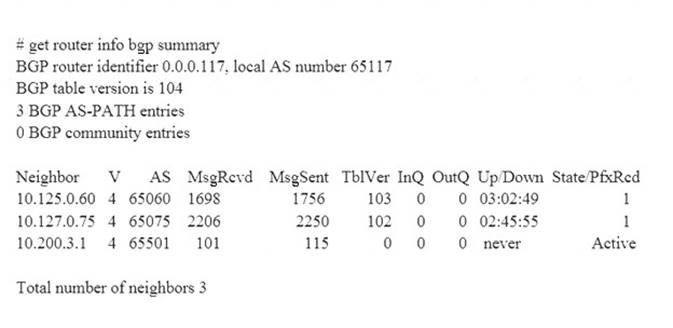
Which of the following statements about the exhibit are true? (Choose two.)
- A. For the peer 10.125.0.60, the BGP state of is Established.
- B. The local BGP peer has received a total of three BGP prefixes.
- C. Since the BGP counters were last reset, the BGP peer 10.200.3.1 has never been down.
- D. The local BGP peer has not established a TCP session to the BGP peer 10.200.3.1.
Answer: AD
NEW QUESTION 6
An administrator wants to capture ESP traffic between two FortiGates using the built-in sniffer. If the administrator knows that there is no NAT device located between both FortiGates, what command should the administrator execute?
- A. diagnose sniffer packet any ‘udp port 500’
- B. diagnose sniffer packet any ‘udp port 4500’
- C. diagnose sniffer packet any ‘esp’
- D. diagnose sniffer packet any ‘udp port 500 or udp port 4500’
Answer: C
Explanation:
Capture IKE Traffic without NAT:diagnose sniffer packet ‘host and udp port 500’
—————————————————————————————————————-Capture ESP
Traffic without NAT:diagnose sniffer packet any ‘host and esp’
—————————————————————————————————————-Capture IKE
and ESP with NAT-T:diagnose sniffer packet any ‘host and (udp port 500 or udp port 4500)’
NEW QUESTION 7
Refer to the exhibit, which shows a FortiGate configuration.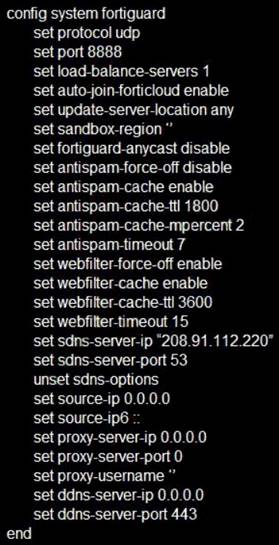
An administrator is troubleshooting a web filter issue on FortiGate. The administrator has configured a web filter profile and applied it to a policy; however, the web filter is not inspecting any traffic that is passing
through the policy.
What must the administrator change to fix the issue?
- A. The administrator must increase webfilter-timeout.
- B. The administrator must disable webfilter-force-off.
- C. The administrator must change protocol to TCP.
- D. The administrator must enable fortiguard-anycast.
Answer: D
NEW QUESTION 8
Which two statements about bulk configuration changes made using FortiManager CLI scripts are correct? (Choose two.)
- A. When run on the Device Database, you must use the installation wizard to apply the changes to the managed FortiGate device.
- B. When run on the Remote FortiGate directly, administrators do not have the option to review the changes prior to installation.
- C. When run on the All FortiGate in ADOM, changes are automatically installed without the creation of a new revision history.
- D. When run on the Policy Package, ADOM database, changes are applied directly to the managed FortiGate device.
Answer: AB
NEW QUESTION 9
How does FortiManager handle FortiGuard requests from FortiGate devices, when it is configured as a local FDS?
- A. FortiManager can download and maintain local copies of FortiGuard databases.
- B. FortiManager supports only FortiGuard push to managed devices.
- C. FortiManager will respond to update requests only if they originate from a managed device.
- D. FortiManager does not support rating requests.
Answer: A
NEW QUESTION 10
View the exhibit, which contains a screenshot of some phase-1 settings, and then answer the question below.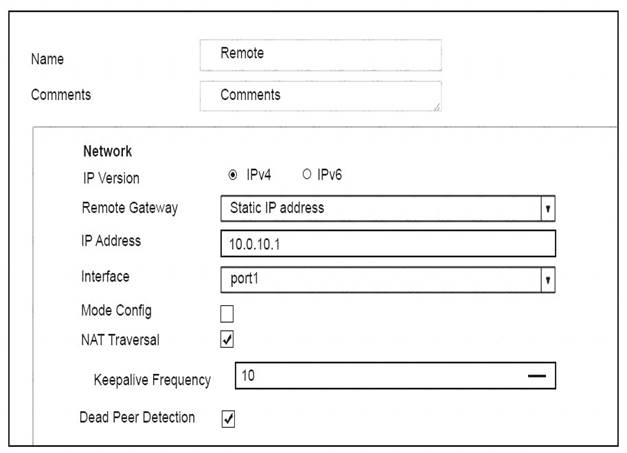
The VPN is up, and DPD packets are being exchanged between both IPsec gateways; however, traffic cannot pass through the tunnel. To diagnose, the administrator enters these CLI commands:
However, the IKE real time debug does not show any output. Why?
- A. The debug output shows phases 1 and 2 negotiations onl
- B. Once the tunnel is up, it does not show any more output.
- C. The log-filter setting was set incorrectl
- D. The VPN’s traffic does not match this filter.
- E. The debug shows only error message
- F. If there is no output, then the tunnel is operating normally.
- G. The debug output shows phase 1 negotiation onl
- H. After that, the administrator must enable the following real time debug: diagnose debug application ipsec -1.
Answer: B
NEW QUESTION 11
An administrator has configured a dial-up IPsec VPN with one phase 2, extended authentication (XAuth) and IKE mode configuration. The administrator has also enabled the IKE real time debug:
diagnose debug application ike-1 diagnose debug enable
In which order is each step and phase displayed in the debug output each time a new dial-up user is connecting to the VPN?
- A. Phase1; IKE mode configuration; XAuth; phase 2.
- B. Phase1; XAuth; IKE mode configuration; phase2.
- C. Phase1; XAuth; phase 2; IKE mode configuration.
- D. Phase1; IKE mode configuration; phase 2; XAuth.
Answer: B
Explanation:
https://help.fortinet.com/fos50hlp/54/Content/FortiOS/fortigate-ipsecvpn-54/IPsec_VPN_Concepts/IKE_Packet
NEW QUESTION 12
What does the dirty flag mean in a FortiGate session?
- A. Traffic has been blocked by the antivirus inspection.
- B. The next packet must be re-evaluated against the firewall policies.
- C. The session must be removed from the former primary unit after an HA failover.
- D. Traffic has been identified as from an application that is not allowed.
Answer: B
Explanation:
https://kb.fortinet.com/kb/viewContent.do?externalId=FD40119&sliceId=1
NEW QUESTION 13
Examine the following traffic log; then answer the question below.
date-20xx-02-01 time=19:52:01 devname=master device_id="xxxxxxx" log_id=0100020007 type=event subtype=system pri critical vd=root service=kemel status=failure msg="NAT port is exhausted."
What does the log mean?
- A. There is not enough available memory in the system to create a new entry in the NAT port table.
- B. The limit for the maximum number of simultaneous sessions sharing the same NAT port has been reached.
- C. FortiGate does not have any available NAT port for a new connection.
- D. The limit for the maximum number of entries in the NAT port table has been reached.
Answer: B
NEW QUESTION 14
View the exhibit, which contains the output of a diagnose command, and the answer the question below.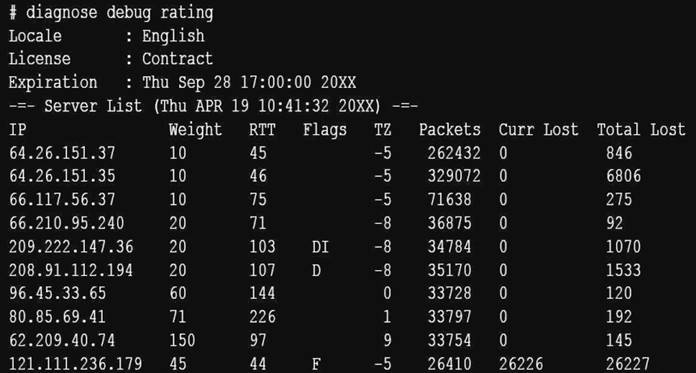
Which statements are true regarding the Weight value?
- A. Its initial value is calculated based on the round trip delay (RTT).
- B. Its initial value is statically set to 10.
- C. Its value is incremented with each packet lost.
- D. It determines which FortiGuard server is used for license validation.
Answer: C
NEW QUESTION 15
Examine the output from the ‘diagnose vpn tunnel list’ command shown in the exhibit; then answer the question below.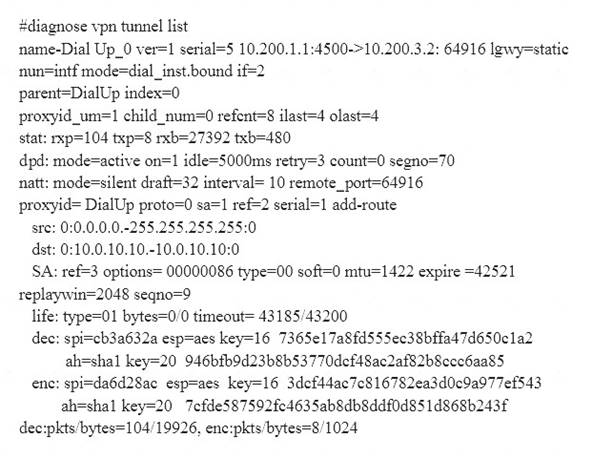
Which command can be used to sniffer the ESP traffic for the VPN DialUP_0?
- A. diagnose sniffer packet any ‘port 500’
- B. diagnose sniffer packet any ‘esp’
- C. diagnose sniffer packet any ‘host 10.0.10.10’
- D. diagnose sniffer packet any ‘port 4500’
Answer: D
Explanation:
NAT-T is enabled. natt: mode=silentProtocol ESP is used. ESP is encapsulated in UDP port 4500 when NAT-T is enabled.
NEW QUESTION 16
View the IPS exit log, and then answer the question below.
# diagnose test application ipsmonitor 3 ipsengine exit log”
pid = 93 (cfg), duration = 5605322 (s) at Wed Apr 19 09:57:26 2017 code = 11, reason: manual
What is the status of IPS on this FortiGate?
- A. IPS engine memory consumption has exceeded the model-specific predefined value.
- B. IPS daemon experienced a crash.
- C. There are communication problems between the IPS engine and the management database.
- D. All IPS-related features have been disabled in FortiGate’s configuration.
Answer: D
Explanation:
The command diagnose test application ipsmonitor includes many options that are useful for troubleshooting purposes.Option 3 displays the log entries generated every time an IPS engine process stopped. There are various reasons why these logs are generated:Manual: Because of the configuration, IPS no longer needs to run (that is, all IPS-releated features have been disabled)
NEW QUESTION 17
Refer to the exhibit, which contains the partial output of the get vpn ipsec tunnel details command.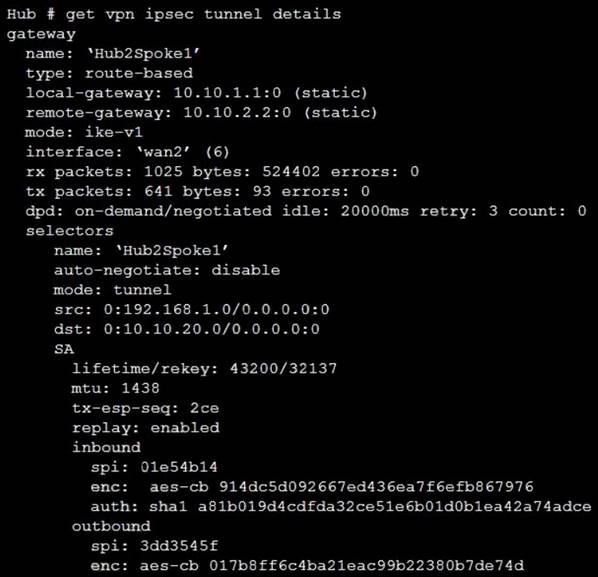
Based on the output, which two statements are correct? (Choose two.)
- A. Phase 2 authentication is set to sha1 on both sides.
- B. Anti-replay is disabled.
- C. Hub2Spoke1 is a policy-based VPN.
- D. Hub2Spoke1 is configured on interface wan2.
Answer: AD
NEW QUESTION 18
Examine the output of the 'diagnose debug rating' command shown in the exhibit; then answer the question below.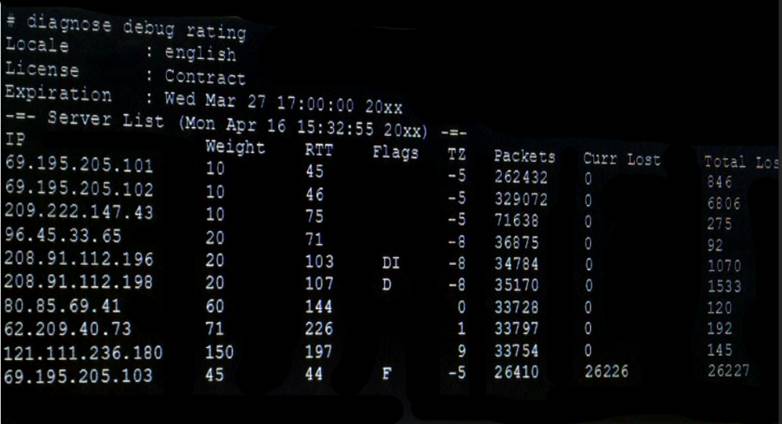
Which statement are true regarding the output in the exhibit? (Choose two.)
- A. There are three FortiGuard servers that are not responding to the queries sent by the FortiGate.
- B. The TZ value represents the delta between each FortiGuard server's time zone and the FortiGate's time zone.
- C. FortiGate will send the FortiGuard queries to the server with highest weight.
- D. A server's round trip delay (RTT) is not used to calculate its weight.
Answer: BC
NEW QUESTION 19
......
P.S. Easily pass NSE7_EFW-6.4 Exam with 115 Q&As Certshared Dumps & pdf Version, Welcome to Download the Newest Certshared NSE7_EFW-6.4 Dumps: https://www.certshared.com/exam/NSE7_EFW-6.4/ (115 New Questions)