Master the microsoft 70 698 content and be ready for exam day success quickly with this 70 698 exam. We guarantee it!We make it a reality and give you real exam 70 698 in our Microsoft 70-698 braindumps. Latest 100% VALID 70 698 exam at below page. You can use our Microsoft 70-698 braindumps and pass your exam.
Free 70-698 Demo Online For Microsoft Certifitcation:
NEW QUESTION 1
You are reconfiguring storage on a computer running Windows 10.
You need to add an existing disk that is already installed in the computer to an existing storage pool. Which Windows utility or Windows PowerShell cmdlet should you use?
- A. Set-StoragePool
- B. Diskpart
- C. Resize-StorageTier
- D. Add-PhysicalDisk
Answer: D
Explanation: You should use the Add-PhysicalDisk cmdlet.
The Add-PhysicalDisk cmdlet lets you add a physical disk to the specified storage pool.
You should not use the Diskpart tool. This tool enables you to manage disk objects (disks, partitions, or volumes) by using scripts or direct input at a command prompt. However, it does not support the ability to add a hard disk to a storage pool.
You should not use the Set-StoragePool cmdlet. The Set-StoragePool cmdlet modifies the properties of a specified storage pool, but not the disks assigned to the storage pool.
You should not use the Set-StorageTier cmdlet. This cmdlet is used to increase the size of a storage tier created from a storage pool. It does not let you modify the storage pool.
References:
https://docs.microsoft.com/en-us/powershell/module/storage/add-physicaldisk?view=win10-ps
NEW QUESTION 2
In this section, you will see one or more sets of questions with the same scenario and problem. Each question presents a unique solution to the problem, and you must determine whether the solution meets the stated goals. Any of the solutions might solve the problem. It is also possible that none of the solutions solve the problem.
Once you answer a question in this section, you will NOT be able to return to it. As a result, these questions will not appear in the review screen.
Note: This question is part of a series of questions that present the same scenario. Each question in the series contains a unique solution. Determine whether the solution meets the stated goals.
Your network contains a single Active Directory domain named contoso.com. The domain contains two computers named Computer1 and Computer2.
A user named User1 is a member of the local Administrators group on Computer1 and Computer2.
User1 fails to access the Event Viewer logs on Computer2 from Computer1. User1 can connect to Computer2 remotely by using Computer Management.
You need to ensure that User1 can use Event Viewer on Computer1 to remotely view the Event Viewer logs on Computer2.
Solution: You modify the Windows Firewall settings on Computer2. Does this meet the goal?
- A. Yes
- B. No
Answer: A
Explanation: https://technet.microsoft.com/en-us/library/cc766438(v=ws.11).aspx
NEW QUESTION 3
Note: This question is part of a series of questions that use the same scenario. For your convenience, the scenario is repeated in each question. Each question presents a different goal and answer choices, but the text of the scenario is exactly the same in each question in this series.
Start of repeated scenario
Your network contains a single Active Directory domain named contoso.com. All computers are members of the domain and run the 64-bit version of Windows 10 Enterprise.
On a test computer named Computer_Test1, you pin several company-specific applications in a group named Contoso Apps, and then you export the start menu layout to a file named contoso.xml.
You install Client Hyper-V on a computer named Computer6. You identity the following requirements.
•Install the Hyper V feature on a computer named Computer1.
•Use virtual smart card authentication on a computer named Computer2.
•Enable Secure Boot on a computer named Computer3.
•Connect a computer named Computer4 to a projector by using Miracast.
•Ensure that a user named User 1 can use keyboard shortcuts by pressing one key at a time.
•Ensure that you can share the clipboard between Computer6 and the virtual machines running on Computer6.
•Add the Contoso Apps group to the Start menu of a computer named Computer7.
End of repeated scenario.
You need to meet the requirement of User1.
Which Ease of Access setting should you configure?
- A. Toggle Keys
- B. Sticky Keys
- C. Filter Keys
- D. Mouse Keys
Answer: B
Explanation: http://www.pcmech.com/article/how-to-manage-ease-of-access-features-in-windows-10/
NEW QUESTION 4
You have a computer named Computer1 that has a 1-TB volume named E.
You need to receive a notification when volume E has less than 100 GB of free space. Which tool should you use?
- A. Event Viewer
- B. Disk Cleanup
- C. Performance Monitor
- D. System Configuration
- E. Resource Monitor
Answer: C
Explanation: https://technet.microsoft.com/en-us/library/cc722414(v=ws.11).aspx
NEW QUESTION 5
You have a computer that runs Windows 10.
An application named App1 starts when the computer starts.
You need to prevent App1 from starting when the computer starts. Which tool should you use?
- A. System Configuration
- B. Advanced System Settings
- C. Computer Management
- D. Task Manager
Answer: D
Explanation: http://www.howtogeek.com/162446/how-to-manage-startup-applications-in-windows-8/
NEW QUESTION 6
company manages Windows 8.1 Pro and Windows 10 Pro client devices by using Group Policy objects (GPOs). The company plans to migrate from GPOs to mobile device management (MDM) policies.
You need to create an HTML report of the GPO settings that are cross-referenced with supported MDM policies.
Solution: You run DISM on the client computers and generate a report. Does the solution meet the goal?
- A. Yes
- B. No
Answer: B
NEW QUESTION 7
You need to create a script to verify the activation status on 100 computers. What should you use in the script?
- A. the sfc.exe command and the/scannow parameter
- B. the sfc.exe commandand the/verifyonly parameter
- C. the slmgr.vbs script and the /ipk parameter
- D. the slmgr.vbs script and the /dli parameter
Answer: D
Explanation: https://technet.microsoft.com/en-us/library/dn502540(v=ws.11).aspx
NEW QUESTION 8
You have 10 computers that run Windows 10 Pro.
The computers currently receive updates as part of the Current Branch.
You need to configure the computers to receive updates as part of Current Branch for Business. What should you do?
- A. Select the Defer upgrades check box.
- B. Upgrade to Windows 10 Enterprise.
- C. Change the product key.
- D. Clear the Give me updates for other Microsoft products when I update check box.
Answer: A
Explanation: http://windowsitpro.com/windows-10/configure-machine-use-current-branch-business-windows-10
NEW QUESTION 9
A company plans to use Active Directory-based activation for all client devices. The company has the following servers:
You need to install and configure the Volume Activation Services role. Which server and product key type should you use? To answer, configure the appropriate options in the dialog box in the answer area.
NOTE: Each correct selection is worth one point.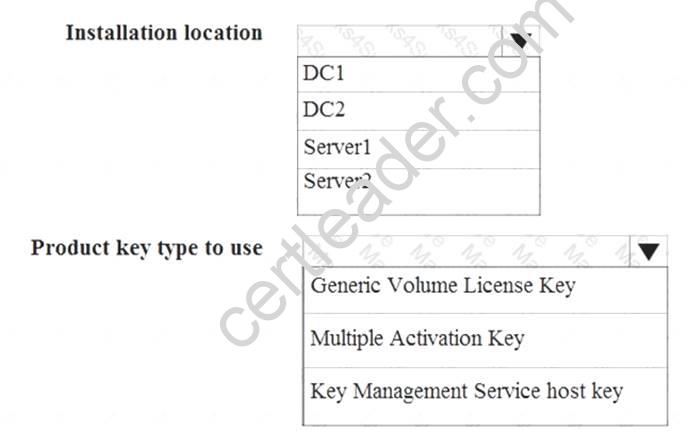
Answer:
Explanation: 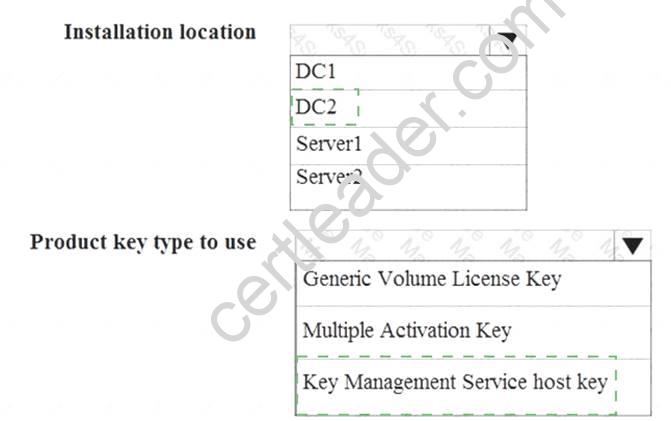
NEW QUESTION 10
You have a computer that runs Windows 10 Pro.
You receive a SMART alert that the hard disk drive will fail soon. You connect a second external hard disk drive to the computer.
You need to create a backup that you can use to restore the operating system and the user documents to a replacement drive.
What should you use?
- A. vssadmin.exe
- B. wbadmin.exe
- C. Start-WBBackup
- D. Start-OBBackup
Answer: B
Explanation: http://www.backup-utility.com/windows-10/windows-10-wbadmin-4348.html
NEW QUESTION 11
You have a laptop named Computer1 that runs Windows 10.
Computer1 connects to a wireless network named WiFi1 and a wireless network named WiFi2. WiFi1 has poor signal and the connection drops frequently. WiFi2 is available only during certain times of the day. WiFi2 has a stronger signal that is more reliable than WiFi1.
You need to configure Computer1 to use WiFi2 whenever possible. Wifi1 should be used when WiFi2 is unavailable.
Which three settings should you configure? Each correct answer presents part of the solution.
- A. From the properties of WiFi2, select Connect even if the network is not broadcasting its name (SSID)
- B. From the properties of WiFi1, select Connect automatically when this network is in range.
- C. From the properties of WiFi1, select Enable WLAN connectionsettings.
- D. From the properties of WiFi2, select Connect automatically when this network is in range.
- E. From the properties of WiFi1, select Look for other wireless networks while connected to this network.
- F. From the properties of WiFi2, select Look for other wireless networks while connected to this network.
Answer: CDF
NEW QUESTION 12
You deploy a new computer named Computer1.
You have a file named Data.docx that is stored in Microsoft OneDrive.
From File Explorer, you attempt to open Data.docx, but you discover that the file is corrupt. You need to access a previous version of Data. docx.
What should you use?
- A. File History
- B. the Recycle Bin
- C. One Drive online
- D. Backup and Restore (Windows 7)
Answer: A
NEW QUESTION 13
You have a computer named Computer1 that runs Windows 10. Computer1 is infected by a virus.
You fail to access the Settings app on Computer1 due to the virus.
You need to restart the computer and ensure that Computer1 displays the advanced startup options when the computer restarts.
What are two possible ways to achieve the goal? Each correct answer presents a complete solution.
- A. From Windows PowerShell, runRestart-Computer Computer1 - Wait - For PowerShell.
- B. From System Configuration select safe boot select minimal, and then click Restart from the Start menu.
- C. From system Configuration, select selective startup, and then click Restart from the start menu.
- D. From a command prompt, run shutdown.exe /r/o.
- E. From Power on the start menu, hold the SHIFT key while you click Restart.
Answer: DE
Explanation: https://support.microsoft.com/en-us/instantanswers/f40a95aa-1e34-4907-98ba-a308fd10a786/get-to-safe-mode-a
http://www.howtogeek.com/126016/three-ways-to-access-the-windows-8-boot-options-menu/
NEW QUESTION 14
You are the administrator for a company. All devices run Windows 10 Enterprise and are joined to an Active Directory Domain Services domain.
Administrators are unable to test network connectivity to Windows 10 devices because ping is being blocked. You need to be able to ping the devices.
Solution: Create and enable an ICMPv4 Echo Request In allow rule for the Public profile. Does the solution meet the goal?
- A. Yes
- B. No
Answer: B
Explanation: References:
https://www.howtogeek.com/howto/windows-vista/allow-pings-icmp-echo-request-through-your-windows-vista
NEW QUESTION 15
A company has client computers that run Windows 10. Each computer has two hard drives.
You need to create a dynamic volume on each computer that maximizes write performance with data fault tolerance.
Which kind of dynamic volume should you create?
- A. Striped Volume
- B. RAID 5 Volume
- C. Spanned Volume
- D. Mirrored Volume
Answer: D
Explanation: https://technet.microsoft.com/en-us/library/cc737048(v=ws.10).aspx#w2k3tr_ddisk_what_zcub.
NEW QUESTION 16
Note: This question is part of a series of questions that use the same set of answer choices. Each answer choice may be used once, more than once, or not at all.
You have a computer that has a dual-boot configuration. Windows 10 Pro is installed on the local disk. Windows 10 Enterprise is installed in a VHDX file named Disk1.vhdx.
You start the computer to Windows 10 Pro, and then you download a driver package.
You need to ensure that the next time the Windows 10 Enterprise installation starts, the driver is installed already.
What should you run first?
- A. Add-WindowsImage
- B. bcdboot.exe
- C. bcdedit.exe
- D. bootcfg.exe
- E. bootim.exe
- F. bootsect.exe
- G. diskpart.exe
- H. Expand-WindowsImage
Answer: G
Explanation: https://technet.microsoft.com/en-us/library/dd799267(v=ws.10).aspx#BKMK_addDrivers
NEW QUESTION 17
Note: This question is part of a series of questions that use the same set of answer choices. Each answer choice may be used once, more than once, or not at all.
You have a computer named Computer1. Computer1 has a virtual hard disk (VHD) named Disk1.vhcix. Windows is installed on Disk1.vhdx.disk1.vhdx is visible in File Explorer as drive E.
You need to configure Computer1 to start from VHDX. Hardware virtualization must not be available when Computer1 starts from VHDX.
What should you run?
- A. Add-Windows Image
- B. bcdboot.exe
- C. bcdedit.exe
- D. bootcfg.exe
- E. bootim.exe
- F. bootsect.exe
- G. diskpart.exe
- H. Expand-Windows Image
Answer: B
Explanation: https://msdn.microsoft.com/en-us/windows/hardware/commercialize/manufacture/desktop/boot-to-vhd--native-b
NEW QUESTION 18
IPv6 has a vastly larger address space than IPv4. This expansion provides flexibility in allocating addresses and routing traffic and eliminates the primary need for network address translation (NAT).
Do you know how many more bits there are in an IPv4 address compared to an IPv6 address?
- A. 4 times more
- B. 6 times more
- C. Twice as many
- D. 8 times more
Answer: A
Explanation: https://techlog360.com/ipv4-vs-ipv6/
NEW QUESTION 19
You have a computer named Computer1 that has the Hyper V feature enabled.
You have two virtual machines named VM1 and VM2 hosted on Computer1. VM1 can communicate with VM2 and Compute1. VM1 tails to connect to the Internet- Computer1 can connect to the Internet.
You need to ensure that VM1 can connect to the Internet. What should you do?
- A. On Computer 1, modify the network settings.
- B. Enable port mirroring on VM1.
- C. Create an external virtual switchand configure VM1 to use the switch.
- D. On VM1, select Enable virtual LAN identification.
Answer: C
Explanation: http://www.technig.com/connect-hyper-v-machines-to-internet/
NEW QUESTION 20
Your network contains a single Active Directory domain. The domain contains a computer that runs Windows 10.
You plan to use the computer to test applications.
You need to install Windows Insider Preview builds on the computer. What should you do?
- A. From Group Policy, configure the Add features to Windows 10 settings.
- B. From theSettings app, configure the Advanced options for Windows Update.
- C. From Group Policy, configure the Windows Update settings.
- D. From the Settings app, select Developer mode.
Answer: B
Explanation: http://www.howtogeek.com/224826/how-to-become-a-windows-insider-and-test-new-windows-10-features/
Thanks for reading the newest 70-698 exam dumps! We recommend you to try the PREMIUM Surepassexam 70-698 dumps in VCE and PDF here: https://www.surepassexam.com/70-698-exam-dumps.html (181 Q&As Dumps)