Testking offers free demo for PL-100 exam. "Microsoft Power Platform App Maker", also known as PL-100 exam, is a Microsoft Certification. This set of posts, Passing the Microsoft PL-100 exam, will help you answer those questions. The PL-100 Questions & Answers covers all the knowledge points of the real exam. 100% real Microsoft PL-100 exams and revised by experts!
Check PL-100 free dumps before getting the full version:
NEW QUESTION 1
You are creating a multi-page canvas app that loads tabular data from an external data source. Once loaded, the data must be available to all screens within the canvas app.
You need to reduce the number of times that the app must retrieve data from the data source. Which two data stores can you use? Each correct answer presents a complete solution. NOTE: Each correct selection is worth one point.
- A. parameter
- B. global variable
- C. collection
- D. environment variable
Answer: CD
Explanation:
Reference:
https://docs.microsoft.com/en-us/powerapps/maker/canvas-apps/working-with-data-sources
NEW QUESTION 2
You are an app maker. You are creating a canvas app. You do not have access to Power BI.
You need to add charts to the app.
Which three chart types can you add directly to the canvas app? Each correct answer presents a complete solution.
NOTE: Each correct selection is worth one point.
- A. pie
- B. area
- C. funnel
- D. column
- E. line
Answer: ADE
Explanation:
You can use line charts, pie charts, and bar charts to display your data in a canvas app. Add a bar chart to display your data:
* 1. On the Home tab, add a screen.
* 2. On the Insert tab, select Charts, and then select Column Chart. Reference:
https://docs.microsoft.com/en-us/powerapps/maker/canvas-apps/use-line-pie-bar-chart
NEW QUESTION 3
You create a model-driven app for a company. The app will be used to manage events that the company organizes.
The Events entity ownership type is set to User or team. Members of the marketing team are assigned the MarketingTeam security role. All privileges for the role are set to User access.
All employees must be able to view event records. Only members of the marketing team are permitted to create or edit event records. You create a role named OtherEmployees.
You need to configure the MarketingTeam and OtherEmployees security roles.
Which three actions should you perform? Each correct selection presents a part of the solution.
NOTE: Each correct selection is worth one point.
- A. Set the access level for the OtherEmployees security role to Organization for the Read permission.
- B. Set the access level for the MarketingTeam security role to Organization for the Read permission.
- C. Set the access level for the OtherEmployees security role to None Selected for the Read permission.
- D. Set the access level for the MarketingTeam security role to None Selected for the Read permission.
- E. Set the access level for the MarketingTeam security role to None Selected for the Create and White permission.
- F. Set the access level for the OtherEmployees security role to None Selected for the Create and Write permission.
Answer: ABE
NEW QUESTION 4
You need to roll back the mobile app to an earlier version.
What should you do? To answer, select the appropriate options in the answer area. NOTE: Each correct selection is worth one point.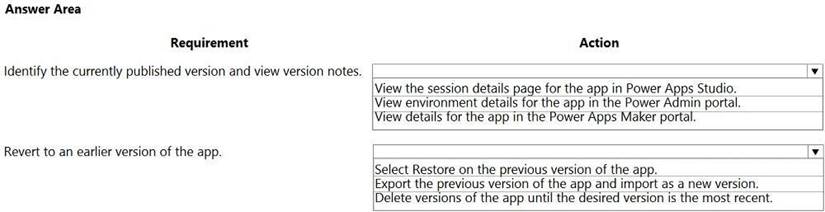
- A. Mastered
- B. Not Mastered
Answer: A
Explanation:
Box 1: View the sessions details page for the app in Power Apps Studio
Use PowerApps Studio, select the App, and choose and you will be directed to the app’s Versions tab in PowerApps portal. There should be one version marked Live.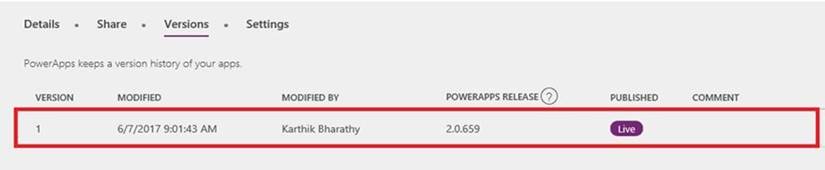
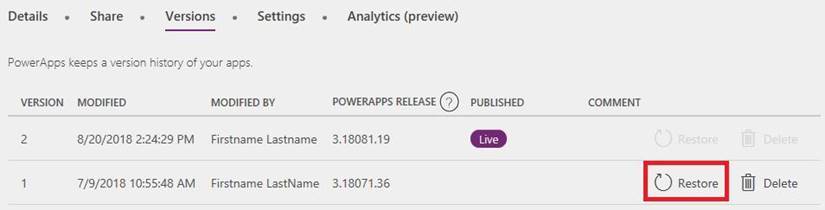
Box 2: Select Restore on the previous version of the app. Restore an app from your account Open powerapps.com, and then click or tap Apps in the left navigation bar. Near the right edge, click or tap the info icon for the app that you want to restore. Click or tap the Versions tab, and then click or tap Restore for the version that you want to restore.
Reference:
https://powerapps.microsoft.com/sk-sk/blog/saveandpublish/ https://docs.microsoft.com/en-us/powerapps/maker/canvas-apps/restore-an-app
NEW QUESTION 5
You create a canvas app within a Power Platform environment.
You need to identify potential accessibility issues for the canvas app before making the app available to other users.
Which tool should you use?
- A. Portal Checker
- B. App Checker
- C. Solution Checker
Answer: B
Explanation:
Find accessibility issues
* 1. In the upper-right corner of Power Apps Studio, select the icon for the App checker.
* 2. In the menu that appears, select Accessibility.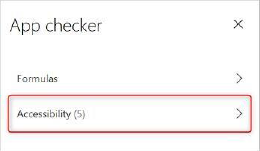
A list of issues appears, sorted first by severity and then by screen. Reference:
https://docs.microsoft.com/en-us/powerapps/maker/canvas-apps/accessibility-checker
NEW QUESTION 6
Note: This question is part of a series of questions that present the same scenario. Each question in the series contains a unique solution that might meet the stated goals. Some question sets might have more than one correct solution, while others might not have a correct solution.
After you answer a question in this section, you will NOT be able to return to it. As a result, these questions will not appear in the review screen.
You are creating a canvas app that displays a list of accounts.
Users must be able to select an account and view details for the account. The app must include a feature that brings the user back to the list of accounts.
You add a blank screen named Screen_Accounts and add a gallery named Gallery_Accounts to the screen. You set the data source of Gallery_Accounts to Accounts and add another blank screen named Screen_AccountDetail.
You need to complete the app. Solution: Add an edit form to Screen_AccountDetail and set the Default Mode of the form to New Set the OnSelect property of Gallery_Accounts to Navigate(Screen_AccountDetail). Set the data source of the form to Accounts. Set the Item property of the form to Selected. Add a back icon on Screen_AccountDetail and set its OnSelect property to Navigate(Screen_Accounts).
Does the solution meet the goal?
- A. Yes
- B. No
Answer: B
Explanation:
FormMode.New: the form is populated with default values and the user can modify the values of the fields. Once complete, the user can add the record to the data source.
Reference:
https://docs.microsoft.com/en-us/powerapps/maker/canvas-apps/functions/function-form
NEW QUESTION 7
You are configuring security to enable users to analyze data by using Microsoft Excel templates.
You create a security role named TemplateAdministrator and configure the role as shown below and assign the role to a user named User1.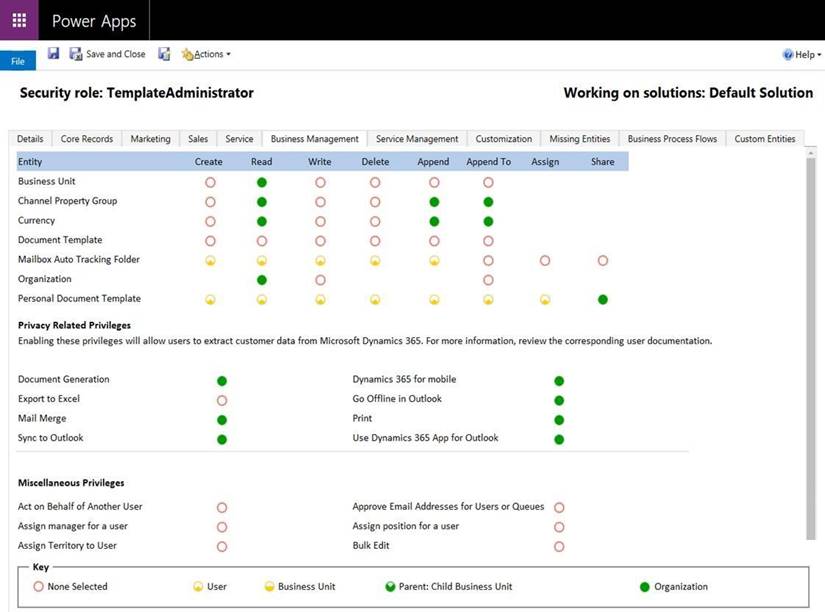
Use the drop-down menus to select the answer choice that answers each question based on the information presented in the graphic.
NOTE: Each correct selection is worth one point.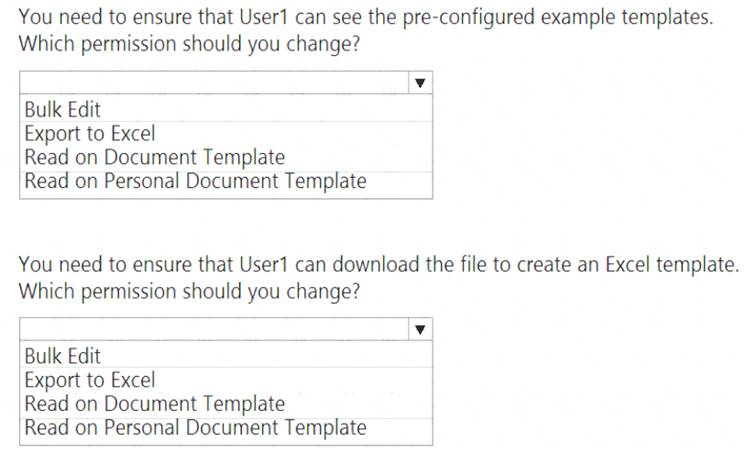
- A. Mastered
- B. Not Mastered
Answer: A
Explanation: 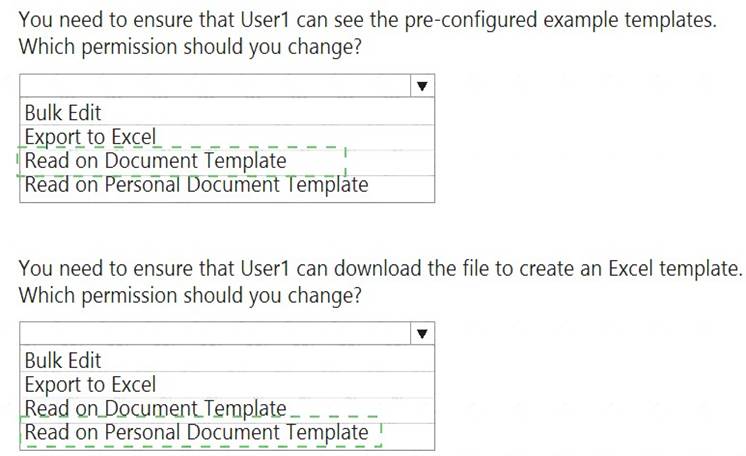
NEW QUESTION 8
A company has a Common Data Service custom entity that stores customer account data. You need to create a relationship between the custom entity and the Account entity. Which two tools can you use? Each correct answer presents a complete solution.
NOTE: Each correct selection is worth one point.
- A. Power Platform Admin center
- B. Power Apps solution explorer
- C. Power Apps Maker portal
- D. SQL Server Management Studio
- E. Visual Studio Code
Answer: BC
Explanation:
There are two designers you can use to create and edit 1:N (one-to-many) or N:1 (many-to-one) relationships: You can create and edit 1:N (one-to-many) or N:1 (many-to-one) entity relationships in Power Apps portal You can create and edit create and edit 1:N (one-to-many) or N:1 (many-to-one) entity relationships using solution explorer
Reference:
https://docs.microsoft.com/en-us/powerapps/maker/common-data-service/create-edit-1n-relationships
NEW QUESTION 9
You need to provide the app to Tailwind Traders. What should you do?
- A. Within Managed Properties, set the value of the Allow customizations option to tru
- B. Export the app as a managed solution.
- C. Use the Share App feature.
- D. Within Managed Properties, set the value of the Allow customizations option to fals
- E. Export the app as a managed solution.
- F. Within Managed Properties, set the value of the Allow customizations option to fals
- G. Export the app as an unmanaged solution.
Answer: C
Explanation:
Scenario: The completed app and all supporting components must be provided to Tailwind Traders. Tailwind Traders must not be able to make changes to any of the components.
Managed Solution: A managed solution is a finalized solution that can be distributed and installed. They are created by exporting an unmanaged solution by setting restrictions to prevent any further customizations. The whole point of Managed is locking down the Component states so they cannot be edited. Deleting the Managed Solution will remove all its customisations as well as data contained. Managed Solutions become read only once deployed so they cannot be manipulated.
Reference:
https://powerusers.microsoft.com/t5/Power-Apps-Pro-Dev-ISV/Managed-vs-Unmanaged/td-p/495685
NEW QUESTION 10
You need to set the value for a global variable named RunningTotal to 5 and navigate to the previous screen named MainScreen.
Which formula should you use?
- A. UpdateContext( { RunningTotal: 5 } ); Navigate( MainScreen, ScreenTransition.Cover, RunningTotal );
- B. If( Value(TextBox1.Text) >= 0, (Set( RunningTotal, 5); Back();), Color.Green )
- C. UpdateContext( { RunningTotal:5 } ); Back()
- D. Set( RunningTotal, 5 ); Back();
Answer: D
Explanation:
You set the value of the global variable with the Set function. Set( MyVar, 1 ) sets the global variable MyVar to a value of 1.
Use the Back and Navigate function to change which screen is displayed. Reference:
https://docs.microsoft.com/en-us/powerapps/maker/canvas-apps/working-with-variables https://docs.microsoft.com/en-us/powerapps/maker/canvas-apps/functions/function-navigate
NEW QUESTION 11
You create a custom field on the Account entity.
Members of TeamA must have full access to the field. Members of TeamB must have no access to the field. You need to configure security.
Which three actions should you perform in sequence? To answer, move the appropriate actions from the list of actions to the answer area and arrange them in the correct order.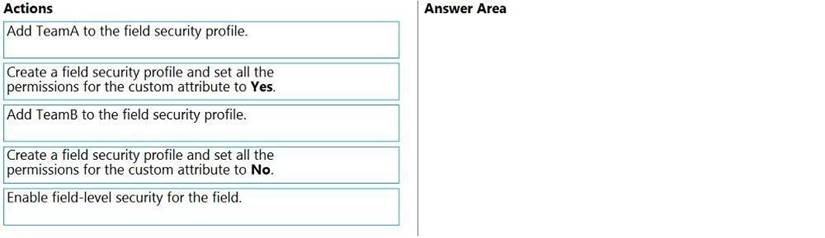
- A. Mastered
- B. Not Mastered
Answer: A
Explanation:
Step 1: Enable field security for the field
Step 2: Create a field security profile and set all the permissions for the custom attribute to Yes. Step 3: Add TeamA to the field security profile.
Note: Field-level security is available for the default fields on most out-of-box entities, custom fields, and custom fields on custom entities. Field-level security is managed by the security profiles. To implement field-level security, a system administrator performs the following tasks. Enable field security on one or more fields for a given entity. Associate one more existing security profiles, or create one or more new security profiles to grant the appropriate access to specific users or teams.
NEW QUESTION 12
You are an app maker.
You want to create apps and track customizations as part of the default solution. You need to determine the impact of performing the work in the default solution. What should you conclude?
- A. The default solution does not contain all components and customizations from all solutions in the environment.
- B. The prefix used when creating components as part of the default solution can be set to a specific value.
- C. The default solution cannot be exported and distributed to another environment.
Answer: C
Explanation:
Default Solution. This is a special solution that contains all components in the system. The default solution is useful for discovering all the components and configurations in your system.
Why you shouldn't use the default solutions to manage customizations
There are a few reasons why you shouldn't create apps and make customizations in either of the default solutions: The default solution can't be exported; therefore, you can't distribute the default solution to another
environment.
The default solution contains all components and customizations from all solutions in the environment.
By default, all enabled users can create apps and customize components in the Common Data Services Default Solution.
It's difficult to locate or identify the customizations you've made in the environment by using either default solution.
When you use either default solution to create components, you'll also use the default publisher assigned to the solution. This often results in the wrong publisher prefix being applied to some components.
Reference:
https://docs.microsoft.com/en-us/power-platform/alm/use-solutions-for-your-customizations
NEW QUESTION 13
......
Thanks for reading the newest PL-100 exam dumps! We recommend you to try the PREMIUM Thedumpscentre.com PL-100 dumps in VCE and PDF here: https://www.thedumpscentre.com/PL-100-dumps/ (47 Q&As Dumps)