AZ-100 Exam Questions are updated and AZ-100 Exam Questions are verified by experts. Once you have completely prepared with our AZ-100 Exam Questions you will be ready for the real AZ-100 exam without a problem. We have AZ-100 Braindumps. PASSED AZ-100 Study Guides First attempt! Here What I Did.
Online AZ-100 free questions and answers of New Version:
NEW QUESTION 1
Your company has an Azure subscription named Subscription1.
The company also has two on-premises servers named Server1 and Server2 that run Windows Server 2021. Server1 is configured as a DNS server that has a primary DNS zone named adatum.com. Adatum.com contains 1,000 DNS records.
You manage Server1 and Subscription1 from Server2. Server2 has the following tools installed:  The DNS Manager console Azure PowerShell Azure CLI 2.0
You need to move the adatum.com zone to Subscription1. The solution must minimize administrative effort. What should you use?
- A. Azure PowerShell
- B. Azure CLI
- C. the Azure portal
- D. the DNS Manager console
Answer: B
Explanation: Azure DNS supports importing and exporting zone files by using the Azure command-line interface (CLI). Zone file import is not currently supported via Azure PowerShell or the Azure portal.
References: https://docs.microsoft.com/en-us/azure/dns/dns-import-export
NEW QUESTION 2
You plan to use the Azure Import/Export service to copy files to a storage account.
Which two files should you create before you prepare the drives for the import job? Each correct answer presents part of the solution.
NOTE: Each correct selection is worth one point.
- A. an XML manifest file
- B. a driveset CSV file
- C. a dataset CSV file
- D. a PowerShell PS1 file
- E. a JSON configuration file
Answer: BC
Explanation: B: Modify the driveset.csv file in the root folder where the tool resides.
C: Modify the dataset.csv file in the root folder where the tool resides. Depending on whether you want to import a file or folder or both, add entries in the dataset.csv file
References: https://docs.microsoft.com/en-us/azure/storage/common/storage-import-export-data-to-files
NEW QUESTION 3
Note: This question is part of a series of questions that present the same scenario. Each question in the series contains a unique solution that might meet the stated goals. Some question sets might have more than one correct solution, while others might not have a correct solution.
After you answer a question in this section, you will NOT be able to return to it. As a result, these questions will not appear in the review screen.
You have an Azure subscription that contains 10 virtual networks. The virtual networks are hosted in separate resource groups.
Another administrator plans to create several network security groups (NSGs) in the subscription.
You need to ensure that when an NSG is created, it automatically blocks TCP port 8080 between the virtual networks.
Solution: You assign a built-in policy definition to the subscription. Does this meet the goal?
- A. Yes
- B. No
Answer: B
NEW QUESTION 4
You have an Azure subscription that contains 100 virtual machines. You regularly create and delete virtual machines.
You need to identify unused disks that can be deleted. What should you do?
- A. From Microsoft Azure Storage Explorer, view the Account Management properties.
- B. From the Azure portal, configure the Advisor recommendations.
- C. From Cloudyn, open the Optimizer tab and create a report.
- D. From Cloudyn, create a Cost Management report.
Answer: A
Explanation: References:
https://cloud.netapp.com/blog/reduce-azure-storage-costs
NEW QUESTION 5
You have an Azure subscription named Subscription1. Subscription1 contains the virtual machines in the following table.
Subscription1 contains a virtual network named VNet1 that has the subnets in the following table.
VM3 has a network adapter named NIC3. IP forwarding is enabled on NIC3. Routing is enabled on VM3. You create a route table named RT1. RT1 is associated to Subnet1 and Subnet2 and contains the routes in the following table.
You apply RT1 to Subnet1.
For each of the following statements, select Yes if the statement is true. Otherwise, select No. NOTE: Each correct selection is worth one point.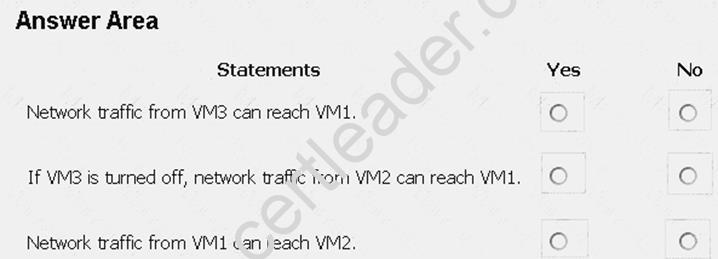
Answer:
Explanation: Box 1: Yes
Traffic from VM1 and VM2 can reach VM3 thanks to the routing table, and as IP forwarding is enabled on VM3, traffic from VM3 can reach VM1.
Box 2: No
VM3, which has IP forwarding, must be turned on, in order for traffic from VM2 to reach VM1. Box 3: Yes
The traffic from VM1 will reach VM3, which thanks to IP forwarding, will send the traffic to VM2. References: https://www.quora.com/What-is-IP-forwarding
NEW QUESTION 6
You have an Azure subscription named Subscription1.
You create an Azure Storage account named contosostorage, and then you create a file share named data. Which UNC path should you include in a script that references files from the data file share? To answer, drag the appropriate values to the correct targets. Each value may be used once, more than once, or not at all. You may need to drag the split bar between panes or scroll to view content.
NOTE: Each correct selection is worth one point.
Answer:
Explanation: Box 1: contosostorage The name of account
Box 2: file.core.windows.net
Box 3: data
The name of the file share is data. Example:
References: https://docs.microsoft.com/en-us/azure/storage/files/storage-how-to-use-files-windows
NEW QUESTION 7
You create a virtual machine scale set named Scale1. Scale1 is configured as shown in the following exhibit.
Use the drop-down menus to select the answer choice that completes each statement based on the information presented in the graphic.
Answer:
Explanation: Box 1:
The Autoscale scale out rule increases the number of VMs by 2 if the CPU threshold is 80% or higher. The initial instance count is 4 and rises to 6 when the 2 extra instances of VMs are added.
Box 2:
The Autoscale scale in rule decreases the number of VMs by 4 if the CPU threshold is 30% or lower. The initial instance count is 4 and thus cannot be reduced to 0 as the minimum instances is set to 2. Instances are only added when the CPU threshold reaches 80%.
References:
https://docs.microsoft.com/en-us/azure/azure-monitor/platform/autoscale-overview https://docs.microsoft.com/en-us/azure/azure-monitor/platform/autoscale-best-practices https://docs.microsoft.com/en-us/azure/azure-monitor/platform/autoscale-common-scale-patterns
NEW QUESTION 8
You need to resolve the licensing issue before you attempt to assign the license again. What should you do?
- A. From the Groups blade, invite the user accounts to a new group.
- B. From the Profile blade, modify the usage location.
- C. From the Directory role blade, modify the directory role.
Answer: B
Explanation: License cannot be assigned to a user without a usage location specified. Scenario: Licensing Issue
You attempt to assign a license in Azure to several users and receive the following error message: "Licenses not assigned. License agreement failed for one user."
You verify that the Azure subscription has the available licenses.
NEW QUESTION 9
You have an Azure subscription named Subscription1. Subscription1 contains the resource groups in the following table.
RG1 has a web app named WebApp1. WebApp1 is located in West Europe. You move WebApp1 to RG2. What is the effect of the move?
- A. The App Service plan to WebApp1 moves to North Europ
- B. Policy2 applies to WebApp1.
- C. The App Service plan to WebApp1 moves to North Europ
- D. Policy1 applies to WebApp1.
- E. The App Service plan to WebApp1 remains to West Europ
- F. Policy2 applies to WebApp1.
- G. The App Service plan to WebApp1 remains to West Europ
- H. Policy1 applies to WebApp1.
Answer: C
Explanation: You can move an app to another App Service plan, as long as the source plan and the target plan are in the same resource group and geographical region.
The region in which your app runs is the region of the App Service plan it's in. However, you cannot change an App Service plan's region.
References: https://docs.microsoft.com/en-us/azure/app-service/app-service-plan-manage
NEW QUESTION 10
Click to expand each objective. To connect to the Azure portal, type https://portal.azure.com in the browser address bar.



When you are finished performing all the tasks, click the ‘Next’ button.
Note that you cannot return to the lab once you click the ‘Next’ button. Scoring occur in the background while you complete the rest of the exam.
Overview
The following section of the exam is a lab. In this section, you will perform a set of tasks in a live environment. While most functionality will be available to you as it would be in a live environment, some functionality (e.g., copy and paste, ability to navigate to external websites) will not be possible by design. Scoring is based on the outcome of performing the tasks stated in the lab. In other words, it doesn’t matter how you accomplish the task, if you successfully perform it, you will earn credit for that task.
Labs are not timed separately, and this exam may have more than one lab that you must complete. You can use as much time as you would like to complete each lab. But, you should manage your time appropriately to
ensure that you are able to complete the lab(s) and all other sections of the exam in the time provided.
Please note that once you submit your work by clicking the Next button within a lab, you will NOT be able to return to the lab.
To start the lab
You may start the lab by clicking the Next button.
You plan to deploy several Azure virtual machines and to connect them to a virtual network named VNET1007.
You need to ensure that future virtual machines in VNET1007 can register their name in an internal DNS zone named corp7523690.com. The zone must NOT be hosted on a virtual machine.
What should you do from Azure Cloud Shell?
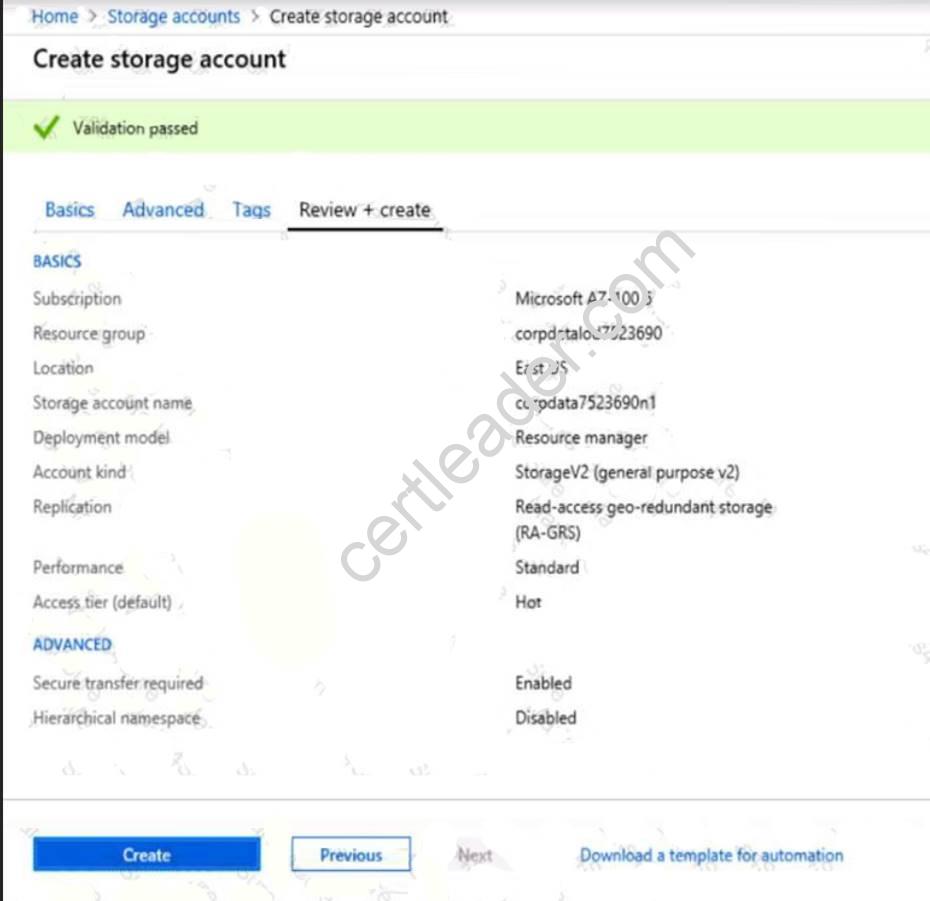
To complete this task, start Azure Cloud Shell and select PowerShell(Linux). Click Show Advanced Settings, and then enter corp7523690n1 in the Storage account text box and File1 in the File share text box. Click Create storage, and then complete the task.
Answer:
Explanation: Step 1: New-AzureRMResourceGroup -name MyResourceGroup
Before you create the DNS zone, create a resource group to contain the DNS zone.
Step 2: New-AzureRmDnsZone -Name corp7523690.com -ResourceGroupName MyResourceGroup A DNS zone is created by using the New-AzureRmDnsZone cmdlet. This creates a DNS zone called
corp7523690.com in the resource group called MyResourceGroup.
References: https://docs.microsoft.com/en-us/azure/dns/dns-getstarted-powershell
NEW QUESTION 11
You have an Azure Active Directory (Azure AD) tenant that has the initial domain name. You have a domain name of contoso.com registered at a third-party registrar.
You need to ensure that you can create Azure AD users that have names containing a suffix of @contoso.com.
Which three actions should you perform in sequence? To answer, move the appropriate cmdlets from the list of cmdlets to the answer area and arrange them in the correct order.
Answer:
Explanation: The process is simple: Add the custom domain name to your directory Add a DNS entry for the domain name at the domain name registrar Verify the custom domain name in Azure AD
References: https://docs.microsoft.com/en-us/azure/dns/dns-web-sites-custom-domain
NEW QUESTION 12
Click to expand each objective. To connect to the Azure portal, type https://portal.azure.com in the browser address bar.



When you are finished performing all the tasks, click the ‘Next’ button.
Note that you cannot return to the lab once you click the ‘Next’ button. Scoring occur in the background while you complete the rest of the exam.
Overview
The following section of the exam is a lab. In this section, you will perform a set of tasks in a live environment. While most functionality will be available to you as it would be in a live environment, some functionality (e.g., copy and paste, ability to navigate to external websites) will not be possible by design. Scoring is based on the outcome of performing the tasks stated in the lab. In other words, it doesn’t matter how you accomplish the task, if you successfully perform it, you will earn credit for that task.
Labs are not timed separately, and this exam may have more than one lab that you must complete. You can use as much time as you would like to complete each lab. But, you should manage your time appropriately to ensure that you are able to complete the lab(s) and all other sections of the exam in the time provided.
Please note that once you submit your work by clicking the Next button within a lab, you will NOT be able to return to the lab.
To start the lab
You may start the lab by clicking the Next button.
You plan to create 100 Azure virtual machines on each of the following three virtual networks:  VNET1005a VNET1005b VNET1005c
All the network traffic between the three virtual networks will be routed through VNET1005a.
You need to create the virtual networks, and then to ensure that all the Azure virtual machines can connect to other virtual machines by using their private IP address. The solution must NOT require any virtual network gateways and must minimize costs.
What should you do from the Azure portal before you configure IP routing?
Answer:
Explanation: Step 1: Click Create a resource in the portal.
Step 2: Enter Virtual network in the Search the Marketplace box at the top of the New pane that appears. Click Virtual network when it appears in the search results.
Step 3: Select Classic in the Select a deployment model box in the Virtual Network pane that appears, then click Create.
Step 4: Enter the following values on the Create virtual network (classic) pane and then click Create: Name: VNET1005a
Address space: 10.0.0.0/16 Subnet name: subnet0 Resource group: Create new
Subnet address range: 10.0.0.0/24
Subscription and location: Select your subscription and location.
Step 5: Repeat steps 3-5 for VNET1005b (10.1.0.0/16, 10.1.0.0/24), and for VNET1005c 10.2.0.0/16, 10.2.0.0/24).
References: https://docs.microsoft.com/en-us/azure/virtual-network/create-virtual-network-classic
NEW QUESTION 13
You are planning the move of App1 to Azure. You create a network security group (NSG).
You need to recommend a solution to provide users with access to App1. What should you recommend?
- A. Create an outgoing security rule for port 443 from the Interne
- B. Associate the NSG to all the subnets.
- C. Create an incoming security rule for port 443 from the Interne
- D. Associate the NSG to all the subnets.
- E. Create an incoming security rule for port 443 from the Interne
- F. Associate the NSG to the subnet that contains the web servers.
- G. Create an outgoing security rule for port 443 from the Interne
- H. Associate the NSG to the subnet thatcontains the web servers.
Answer: C
Explanation: As App1 is public-facing we need an incoming security rule, related to the access of the web servers. Scenario: You have a public-facing application named App1. App1 is comprised of the following three tiers: a SQL database, a web front end, and a processing middle tier.
Each tier is comprised of five virtual machines. Users access the web front end by using HTTPS only.
NEW QUESTION 14
Overview
The following section of the exam is a lab. In this section, you will perform a set of tasks in a live environment. While most functionality will be available to you as it would be in a live environment, some functionality (e.g., copy and paste, ability to navigate to external websites) will not be possible by design.
Scoring is based on the outcome of performing the tasks stated in the lab. In other words, it doesn’t matter how you accomplish the task, if you successfully perform it, you will earn credit for that task.
Labs are not timed separately, and this exam may have more than one lab that you must complete. You can use as much time as you would like to complete each lab. But, you should manage your time appropriately to ensure that you are able to complete the lab(s) and all other sections of the exam in the time provided.
Please note that once you submit your work by clicking the Next button within a lab, you will NOT be able to return to the lab.
To start the lab
You may start the lab by clicking the Next button.
Your company plans to host in Azure the source files of several line-of-business applications.
You need to create an Azure file share named corpsoftware in the storagelod8095859 storage account. The solution must ensure the corpsoftware can store only up to 250 GB of data.
What should you do from the Azure portal?
Answer:
Explanation: Step 1. Go to the Storage Account blade on the Azure portal:
Step 2. Click on add File Share button:
Step 3. Provide Name (storagelod8095859) and Quota (250 GB).
References:
https://docs.microsoft.com/en-us/azure/storage/files/storage-how-to-create-file-share
NEW QUESTION 15
Click to expand each objective. To connect to the Azure portal, type https://portal.azure.com in the browser address bar.


When you are finished performing all the tasks, click the ‘Next’ button.
Note that you cannot return to the lab once you click the ‘Next’ button. Scoring occur in the background while you complete the rest of the exam.
Overview
The following section of the exam is a lab. In this section, you will perform a set of tasks in a live environment. While most functionality will be available to you as it would be in a live environment, some functionality (e.g., copy and paste, ability to navigate to external websites) will not be possible by design. Scoring is based on the outcome of performing the tasks stated in the lab. In other words, it doesn’t matter how you accomplish the task, if you successfully perform it, you will earn credit for that task.
Labs are not timed separately, and this exam may have more than one lab that you must complete. You can use as much time as you would like to complete each lab. But, you should manage your time appropriately to ensure that you are able to complete the lab(s) and all other sections of the exam in the time provided.
Please note that once you submit your work by clicking the Next button within a lab, you will NOT be able to return to the lab.
To start the lab
You may start the lab by clicking the Next button.
You plan to protect on-premises virtual machines and Azure virtual machines by using Azure Backup. You need to prepare the backup infrastructure in Azure. The solution must minimize the cost of storing the backups in Azure.
What should you do from the Azure portal?
Answer:
Explanation: First, create Recovery Services vault.
Step 1: On the left-hand menu, select All services and in the services list, type Recovery Services. As you type, the list of resources filters. When you see Recovery Services vaults in the list, select it to open the Recovery Services vaults menu.
Step 2: In the Recovery Services vaults menu, click Add to open the Recovery Services vault menu.
Step 3: In the Recovery Services vault menu, for example, Type myRecoveryServicesVault in Name.
The current subscription ID appears in Subscription. If you have additional subscriptions, you could choose another subscription for the new vault.
For Resource group select Use existing and choose myResourceGroup. If myResourceGroup doesn't exist, select Create new and type myResourceGroup.
From the Location drop-down menu, choose West Europe. Click Create to create your Recovery Services vault.
References: https://docs.microsoft.com/en-us/azure/backup/tutorial-backup-vm-at-scale
NEW QUESTION 16
You have a resource group named RG1. RG1 contains an Azure Storage account named storageaccount1 and a virtual machine named VM1 that runs Windows Server 2021. Storageaccount1 contains the disk files for VM1. You apply a ReadOnly lock to RG1.
What can you do from the Azure portal?
- A. Generate an automation script for RG1.
- B. View the keys of storageaccount1.
- C. Upload a blob to storageaccount1.
- D. Start VM1.
Answer: B
Explanation: ReadOnly means authorized users can read a resource, but they can't delete or update the resource. Applying this lock is similar to restricting all authorized users to the permissions granted by the Reader role.
References: https://docs.microsoft.com/en-us/azure/azure-resource-manager/resource-group-lock-resources
NEW QUESTION 17
You need to meet the user requirement for Admin1. What should you do?
- A. From the Subscriptions blade, select the subscription, and then modify the Properties.
- B. From the Subscriptions blade, select the subscription, and then modify the Access control (IAM) settings.
- C. From the Azure Active Directory blade, modify the Properties.
- D. From the Azure Active Directory blade, modify the Groups.
Answer: A
Explanation: Change the Service administrator for an Azure subscription
Sign in to Account Center as the Account administrator.
Select a subscription.
On the right side, select Edit subscription details.
Scenario: Designate a new user named Admin1 as the service administrator of the Azure subscription. References:
https://docs.microsoft.com/en-us/azure/billing/billing-add-change-azure-subscription-administrator
NEW QUESTION 18
You have an Azure Linux virtual machine that is protected by Azure Backup. One week ago, two files were deleted from the virtual machine.
You need to restore the deleted files to an on-premises computer as quickly as possible.
Which four actions should you perform in sequence? To answer, move the appropriate actions from the list of actions to the answer area and arrange them in the correct order.
Answer:
Explanation: To restore files or folders from the recovery point, go to the virtual machine and choose the desired recovery point.
Step 0. In the virtual machine's menu, click Backup to open the Backup dashboard. Step 1. In the Backup dashboard menu, click File Recovery.
Step 2. From the Select recovery point drop-down menu, select the recovery point that holds the files you want. By default, the latest recovery point is already selected.
Step 3: To download the software used to copy files from the recovery point, click Download Executable (for Windows Azure VM) or Download Script (for Linux Azure VM, a python script is generated).
Step 4: Copy the files by using AzCopy
AzCopy is a command-line utility designed for copying data to/from Microsoft Azure Blob, File, and Table storage, using simple commands designed for optimal performance. You can copy data between a file system and a storage account, or between storage accounts.
References:
https://docs.microsoft.com/en-us/azure/backup/backup-azure-restore-files-from-vm https://docs.microsoft.com/en-us/azure/storage/common/storage-use-azcopy
100% Valid and Newest Version AZ-100 Questions & Answers shared by DumpSolutions, Get Full Dumps HERE: https://www.dumpsolutions.com/AZ-100-dumps/ (New 106 Q&As)