Your success in AZ-100 Exam Questions and Answers is our sole target and we develop all our AZ-100 Exam Questions and Answers in a way that facilitates the attainment of this target. Not only is our AZ-100 Exam Dumps material the best you can find, it is also the most detailed and the most updated. AZ-100 Dumps Questions for Microsoft AZ-100 are written to the highest standards of technical accuracy.
Also have AZ-100 free dumps questions for you:
NEW QUESTION 1
You need to recommend a solution for App1. The solution must meet the technical requirements. What should you include in the recommendation? To answer, select the appropriate options in the answer area.
NOTE: Each correct selection is worth one point.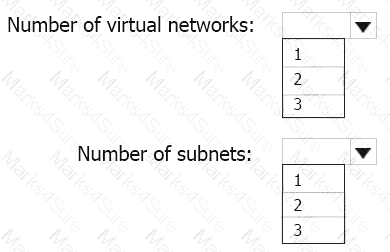
Answer:
Explanation: This reference architecture shows how to deploy VMs and a virtual network configured for an N-tier application, using SQL Server on Windows for the data tier.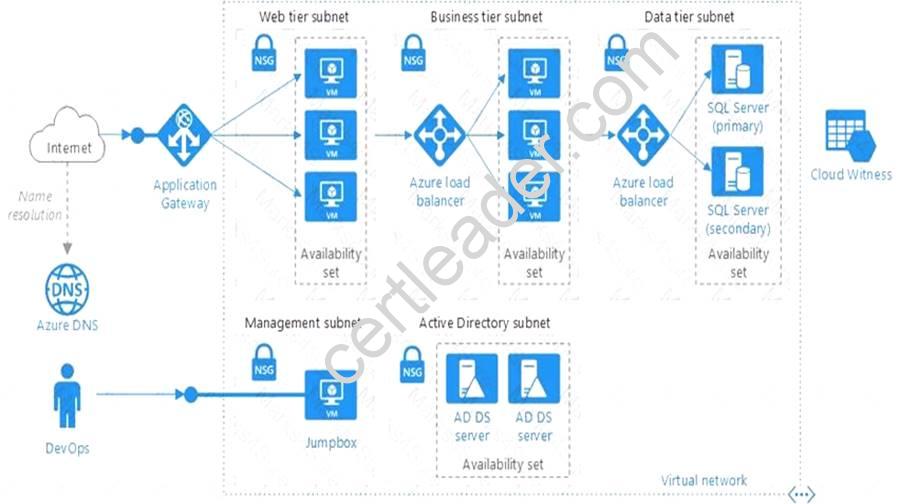
Scenario: You have a public-facing application named App1. App1 is comprised of the following three tiers:
A SQL database
A web front end
A processing middle tier
Each tier is comprised of five virtual machines. Users access the web front end by using HTTPS only.
Technical requirements include:
Move all the virtual machines for App1 to Azure.
Minimize the number of open ports between the App1 tiers.
References: https://docs.microsoft.com/en-us/azure/architecture/reference-architectures/n-tier/n-tier-sql-server
NEW QUESTION 2
Which blade should you instruct the finance department auditors to use?
- A. Partner information
- B. Overview
- C. Payment methods
- D. Invoices
Answer: D
Explanation: You can opt in and configure additional recipients to receive your Azure invoice in an email. This feature may not be available for certain subscriptions such as support offers, Enterprise Agreements, or Azure in Open.
Select your subscription from the Subscriptions page. Opt-in for each subscription you own. Click Invoices then Email my invoice.
Click Opt in and accept the terms.
Scenario: During the testing phase, auditors in the finance department must be able to review all Azure costs from the past week.
References: https://docs.microsoft.com/en-us/azure/billing/billing-download-azure-invoice-daily-usage-date
NEW QUESTION 3
You have 100 Azure subscriptions. All the subscriptions are associated to the same Azure Active Directory (Azure AD) tenant named contoso.com.
You are a global administrator.
You plan to create a report that lists all the resources across all the subscriptions. You need to ensure that you can view all the resources in all the subscriptions.
What should you do?
- A. From the Azure portal, modify the profile settings of your account.
- B. From Windows PowerShell, run the Add-AzureADAdministrativeUnitMember cmdlet.
- C. From Windows PowerShell, run the New-AzureADUserAppRoleAssignment cmdlet.
- D. From the Azure portal, modify the properties of the Azure AD tenant.
Answer: C
Explanation: The New-AzureADUserAppRoleAssignment cmdlet assigns a user to an application role in Azure Active Directory (AD). Use it for the application report.
References:
https://docs.microsoft.com/en-us/powershell/module/azuread/new-azureaduserapproleassignment?view=azuread
NEW QUESTION 4
You have an Azure subscription named Subscription1. Subscription1 contains the virtual machines in the following table.
Subscription1 contains a virtual network named VNet1 that has the subnets in the following table.
VM3 has a network adapter named NIC3. IP forwarding is enabled on NIC3. Routing is enabled on VM3. You create a route table named RT1. RT1 is associated to Subnet1 and Subnet2 and contains the routes in the following table.
You apply RT1 to Subnet1.
For each of the following statements, select Yes if the statement is true. Otherwise, select No. NOTE: Each correct selection is worth one point.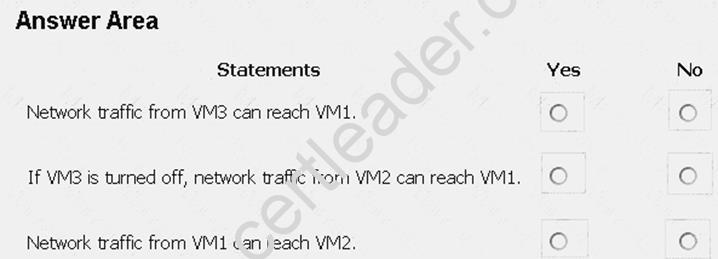
Answer:
Explanation: Box 1: Yes
Traffic from VM1 and VM2 can reach VM3 thanks to the routing table, and as IP forwarding is enabled on VM3, traffic from VM3 can reach VM1.
Box 2: No
VM3, which has IP forwarding, must be turned on, in order for traffic from VM2 to reach VM1. Box 3: Yes
The traffic from VM1 will reach VM3, which thanks to IP forwarding, will send the traffic to VM2. References: https://www.quora.com/What-is-IP-forwarding
NEW QUESTION 5
You have an Azure subscription that contains a virtual machine named VM1. VM1 hosts a line-of-business application that is available 24 hours a day. VM1 has one network interface and one managed disk. VM1 uses the D4s v3 size.
You plan to make the following changes to VM1:  Change the size to D8s v3. Add a 500-GB managed disk. Add the Puppet Agent extension. Attach an additional network interface. Which change will cause downtime for VM1?
- A. Add a 500-GB managed disk.
- B. Attach an additional network interface.
- C. Add the Puppet Agent extension.
- D. Change the size to D8s v3.
Answer: D
Explanation: While resizing the VM it must be in a stopped state.
References: https://azure.microsoft.com/en-us/blog/resize-virtual-machines/
NEW QUESTION 6
You have an Azure Storage accounts as shown in the following exhibit.
Use the drop-down menus to select the answer choice that completes each statement based on the information presented in the graphic.
NOTE: Each correct selection is worth one point.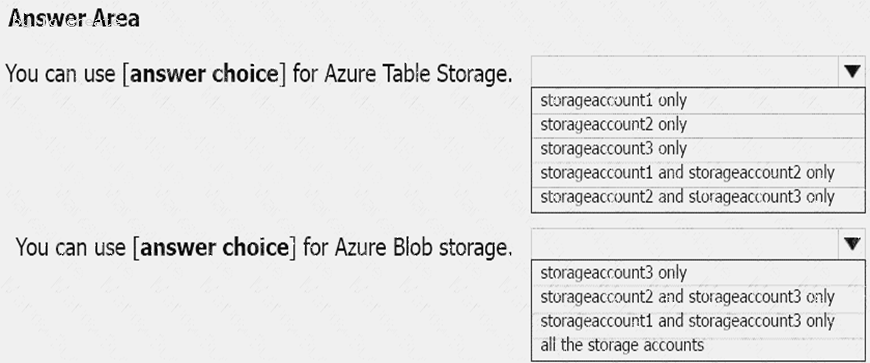
Answer:
Explanation: Box 1: storageaccount1 and storageaccount2 only Box 2: All the storage accounts
Note: The three different storage account options are: General-purpose v2 (GPv2) accounts, General-purpose v1 (GPv1) accounts, and Blob storage accounts. General-purpose v2 (GPv2) accounts are storage accounts that support all of the latest features for blobs, files, queues, and tables. Blob storage accounts support all the same block blob features as GPv2, but are limited to supporting only block blobs. General-purpose v1 (GPv1) accounts provide access to all Azure Storage services, but may not have the latest features or the lowest per gigabyte pricing.
References: https://docs.microsoft.com/en-us/azure/storage/common/storage-account-options
NEW QUESTION 7
You have an Azure subscription. The subscription includes a virtual network named VNet1. Currently, VNet1 does not contain any subnets.
You plan to create subnets on VNet1 and to use application security groups to restrict the traffic between the subnets. You need to create the application security groups and to assign them to the subnets.
Which four cmdlets should you run in sequence? To answer, move the appropriate cmdlets from the list of cmdlets to the answer area and arrange them in the correct order.
Answer:
Explanation: Step 1: New-AzureRmNetworkSecurityRuleConfig
Step 2: New-AzureRmNetworkSecurityGroup
Step 3: New-AzureRmVirtualNetworkSubnetConfig
Step 4: New-AzureRmVirtualNetwork
Example: Create a virtual network with a subnet referencing a network security group New-AzureRmResourceGroup -Name TestResourceGroup -Location centralus
$rdpRule = New-AzureRmNetworkSecurityRuleConfig -Name rdp-rule -Description "Allow RDP" -Access Allow -Protocol Tcp -Direction Inbound -Priority 100 -SourceAddressPrefix Internet -SourcePortRange *
-DestinationAddressPrefix * -DestinationPortRange 3389
$networkSecurityGroup = New-AzureRmNetworkSecurityGroup -ResourceGroupName TestResourceGroup
-Location centralus -Name "NSG-FrontEnd" -SecurityRules $rdpRule
$frontendSubnet = New-AzureRmVirtualNetworkSubnetConfig -Name frontendSubnet -AddressPrefix "10.0.1.0/24" -NetworkSecurityGroup $networkSecurityGroup
$backendSubnet = New-AzureRmVirtualNetworkSubnetConfig -Name backendSubnet -AddressPrefix "10.0.2.0/24" -NetworkSecurityGroup $networkSecurityGroup
New-AzureRmVirtualNetwork -Name MyVirtualNetwork -ResourceGroupName TestResourceGroup
-Location centralus -AddressPrefix "10.0.0.0/16" -Subnet $frontendSubnet,$backendSubnet
References:
https://docs.microsoft.com/en-us/powershell/module/azurerm.network/new-azurermvirtualnetwork?view=azurer
NEW QUESTION 8
Note: This question is part of a series of questions that present the same scenario. Each question in the series contains a unique solution that might meet the stated goals. Some question sets might have more than one correct solution, while others might not have a correct solution.
After you answer a question in this section, you will NOT be able to return to it. As a result, these questions will not appear in the review screen.
You have an Azure subscription that contains 10 virtual networks. The virtual networks are hosted in separate resource groups.
Another administrator plans to create several network security groups (NSGs) in the subscription.
You need to ensure that when an NSG is created, it automatically blocks TCP port 8080 between the virtual networks.
Solution: You configure a custom policy definition, and then you assign the policy to the subscription.
Does this meet the goal?
- A. Yes
- B. No
Answer: A
Explanation: Resource policy definition used by Azure Policy enables you to establish conventions for resources in your organization by describing when the policy is enforced and what effect to take. By defining conventions, you can control costs and more easily manage your resources.
References: https://docs.microsoft.com/en-us/azure/azure-policy/policy-definition
NEW QUESTION 9
You have an Azure subscription that contains 100 virtual machines. You regularly create and delete virtual machines.
You need to identify unused disks that can be deleted. What should you do?
- A. From Microsoft Azure Storage Explorer, view the Account Management properties.
- B. From the Azure portal, configure the Advisor recommendations.
- C. From Cloudyn, open the Optimizer tab and create a report.
- D. From Cloudyn, create a Cost Management report.
Answer: A
Explanation: References:
https://cloud.netapp.com/blog/reduce-azure-storage-costs
NEW QUESTION 10
You have two Azure Active Directory (Azure AD) tenants named contoso.com and fabrikam.com. You have a Microsoft account that you use to sign in to both tenants.
You need to configure the default sign-in tenant for the Azure portal. What should you do?
- A. From the Azure portal, configure the portal settings.
- B. From the Azure portal, change the directory.
- C. From Azure Cloud Shell, run Set-AzureRmContext.
- D. From Azure Cloud Shell, run Set-AzureRmSubscription.
Answer: B
Explanation: Change the subscription directory in the Azure portal.
The classic portal feature Edit Directory, that allows you to associate an existing subscription to your Azure Active Directory (AAD), is now available in Azure portal. It used to be available only to Service Admins with Microsoft accounts, but now it's available to users with AAD accounts as well.
To get started: Go to Subscriptions. Select a subscription. Select Change directory.
NEW QUESTION 11
You have an Azure subscription that contains the resources in the following table.
To which subnets can you apply NSG1?
- A. the subnets on VNet2 only
- B. the subnets on VNet1 only
- C. the subnets on VNet2 and VNet3 only
- D. the subnets on VNet1, VNet2, and VNet3
- E. the subnets on VNet3 only
Answer: E
Explanation: All Azure resources are created in an Azure region and subscription. A resource can only be created in a virtual network that exists in the same region and subscription as the resource.
References: https://docs.microsoft.com/en-us/azure/virtual-network/virtual-network-vnet-plan-design-arm
NEW QUESTION 12
You have an Azure subscription.
You have an on-premises virtual machine named VM1. The settings for VM1 are shown in the exhibit. (Click the Exhibit button.)
You need to ensure that you can use the disks attached to VM1 as a template for Azure virtual machines.
What should you modify on VM1?
- A. Integration Services
- B. the network adapters
- C. the memory
- D. the hard drive
- E. the processor
Answer: D
Explanation: From the exhibit we see that the disk is in the VHDX format.
Before you upload a Windows virtual machines (VM) from on-premises to Microsoft Azure, you must prepare the virtual hard disk (VHD or VHDX). Azure supports only generation 1 VMs that are in the VHD file format and have a fixed sized disk. The maximum size allowed for the VHD is 1,023 GB. You can convert a generation 1 VM from the VHDX file system to VHD and from a dynamically expanding disk to fixed-sized.
References:
https://docs.microsoft.com/en-us/azure/virtual-machines/windows/prepare-for-upload-vhd-image?toc=%2fazure
NEW QUESTION 13
Click to expand each objective. To connect to the Azure portal, type https://portal.azure.com in the browser address bar.



When you are finished performing all the tasks, click the ‘Next’ button.
Note that you cannot return to the lab once you click the ‘Next’ button. Scoring occur in the background while you complete the rest of the exam.
Overview
The following section of the exam is a lab. In this section, you will perform a set of tasks in a live environment. While most functionality will be available to you as it would be in a live environment, some functionality (e.g., copy and paste, ability to navigate to external websites) will not be possible by design. Scoring is based on the outcome of performing the tasks stated in the lab. In other words, it doesn’t matter how you accomplish the task, if you successfully perform it, you will earn credit for that task.
Labs are not timed separately, and this exam may have more than one lab that you must complete. You can use as much time as you would like to complete each lab. But, you should manage your time appropriately to
ensure that you are able to complete the lab(s) and all other sections of the exam in the time provided.
Please note that once you submit your work by clicking the Next button within a lab, you will NOT be able to return to the lab.
To start the lab
You may start the lab by clicking the Next button.
You plan to deploy several Azure virtual machines and to connect them to a virtual network named VNET1007.
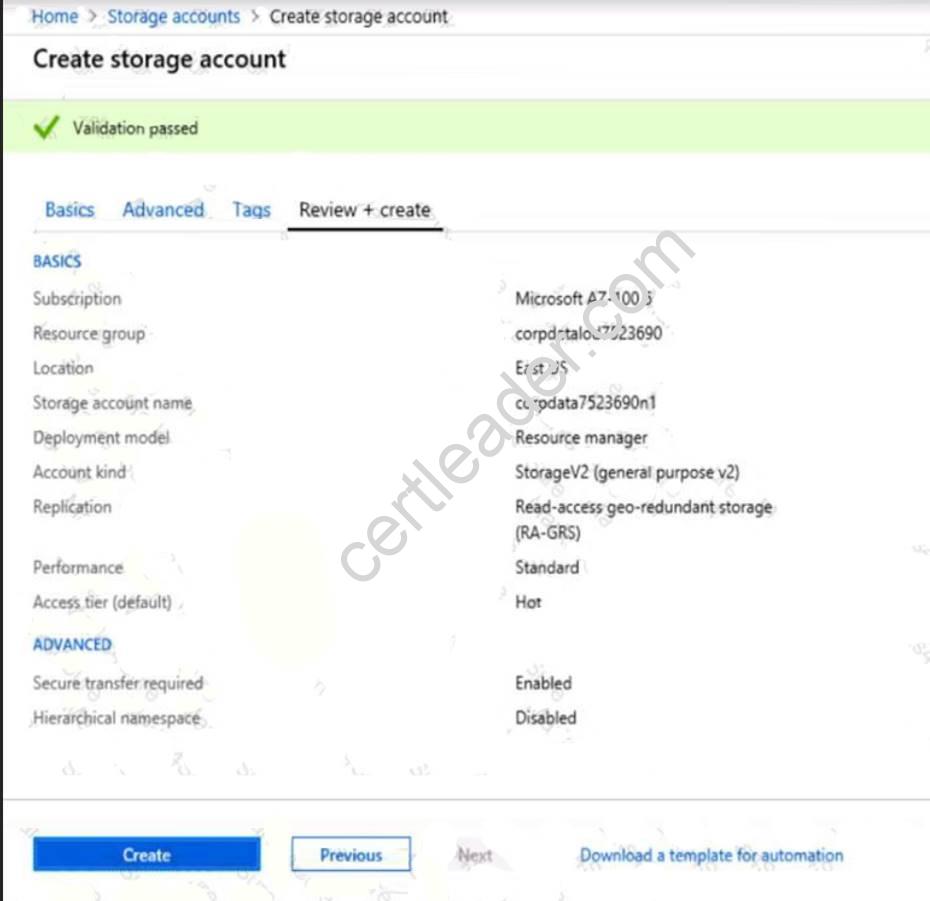
You need to ensure that future virtual machines in VNET1007 can register their name in an internal DNS zone named corp7523690.com. The zone must NOT be hosted on a virtual machine.
What should you do from Azure Cloud Shell?
To complete this task, start Azure Cloud Shell and select PowerShell(Linux). Click Show Advanced Settings, and then enter corp7523690n1 in the Storage account text box and File1 in the File share text box. Click Create storage, and then complete the task.
Answer:
Explanation: Step 1: New-AzureRMResourceGroup -name MyResourceGroup
Before you create the DNS zone, create a resource group to contain the DNS zone.
Step 2: New-AzureRmDnsZone -Name corp7523690.com -ResourceGroupName MyResourceGroup A DNS zone is created by using the New-AzureRmDnsZone cmdlet. This creates a DNS zone called
corp7523690.com in the resource group called MyResourceGroup.
References: https://docs.microsoft.com/en-us/azure/dns/dns-getstarted-powershell
NEW QUESTION 14
You have an Azure subscription that contains the resources in the following table.
Store1 contains a file share named Data. Data contains 5,000 files.
You need to synchronize the files in Data to an on-premises server named Server1.
Which three actions should you perform? Each correct answer presents part of the solution. NOTE: Each correct selection is worth one point.
- A. Download an automation script.
- B. Create a container instance.
- C. Create a sync group.
- D. Register Server1.
- E. Install the Azure File Sync agent on Server1.
Answer: CDE
Explanation: Step 1 (E): Install the Azure File Sync agent on Server1
The Azure File Sync agent is a downloadable package that enables Windows Server to be synced with an Azure file share
Step 2 (D): Register Server1.
Register Windows Server with Storage Sync Service
Registering your Windows Server with a Storage Sync Service establishes a trust relationship between your server (or cluster) and the Storage Sync Service.
Step 3 (C): Create a sync group and a cloud endpoint.
A sync group defines the sync topology for a set of files. Endpoints within a sync group are kept in sync with each other. A sync group must contain one cloud endpoint, which represents an Azure file share and one or more server endpoints. A server endpoint represents a path on registered server.
References: https://docs.microsoft.com/en-us/azure/storage/files/storage-sync-files-deployment-guide
NEW QUESTION 15
Overview
The following section of the exam is a lab. In this section, you will perform a set of tasks in a live environment. While most functionality will be available to you as it would be in a live environment, some functionality (e.g., copy and paste, ability to navigate to external websites) will not be possible by design.
Scoring is based on the outcome of performing the tasks stated in the lab. In other words, it doesn’t matter how you accomplish the task, if you successfully perform it, you will earn credit for that task.
Labs are not timed separately, and this exam may have more than one lab that you must complete. You can use as much time as you would like to complete each lab. But, you should manage your time appropriately to ensure that you are able to complete the lab(s) and all other sections of the exam in the time provided.
Please note that once you submit your work by clicking the Next button within a lab, you will NOT be able to return to the lab.
To start the lab
You may start the lab by clicking the Next button.
Your company plans to host in Azure the source files of several line-of-business applications.
You need to create an Azure file share named corpsoftware in the storagelod8095859 storage account. The solution must ensure the corpsoftware can store only up to 250 GB of data.
What should you do from the Azure portal?
Answer:
Explanation: Step 1. Go to the Storage Account blade on the Azure portal:
Step 2. Click on add File Share button:
Step 3. Provide Name (storagelod8095859) and Quota (250 GB).
References:
https://docs.microsoft.com/en-us/azure/storage/files/storage-how-to-create-file-share
NEW QUESTION 16
You have an Azure Linux virtual machine that is protected by Azure Backup. One week ago, two files were deleted from the virtual machine.
You need to restore the deleted files to an on-premises computer as quickly as possible.
Which four actions should you perform in sequence? To answer, move the appropriate actions from the list of actions to the answer area and arrange them in the correct order.
Answer:
Explanation: To restore files or folders from the recovery point, go to the virtual machine and choose the desired recovery point.
Step 0. In the virtual machine's menu, click Backup to open the Backup dashboard. Step 1. In the Backup dashboard menu, click File Recovery.
Step 2. From the Select recovery point drop-down menu, select the recovery point that holds the files you want. By default, the latest recovery point is already selected.
Step 3: To download the software used to copy files from the recovery point, click Download Executable (for Windows Azure VM) or Download Script (for Linux Azure VM, a python script is generated).
Step 4: Copy the files by using AzCopy
AzCopy is a command-line utility designed for copying data to/from Microsoft Azure Blob, File, and Table storage, using simple commands designed for optimal performance. You can copy data between a file system and a storage account, or between storage accounts.
References:
https://docs.microsoft.com/en-us/azure/backup/backup-azure-restore-files-from-vm https://docs.microsoft.com/en-us/azure/storage/common/storage-use-azcopy
NEW QUESTION 17
You have an Azure subscription named Subscription1. Subscription1 contains the virtual networks in the following table.
Subscription1 contains the virtual machines in the following table:
The firewalls on all the virtual machines are configured to allow all ICMP traffic. You add the peerings in the following table.
For each of the following statements, select Yest if the statement is true. Otherwise, select No. NOTE: Each correct selection is worth one point.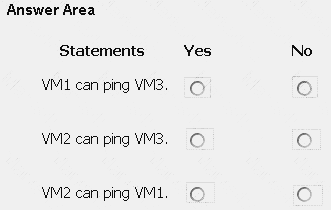
Answer:
Explanation: Box 1: Yes
Vnet1 and Vnet3 are peers. Box 2: Yes
Vnet2 and Vnet3 are peers. Box 3: No
Peering connections are non-transitive.
References:
https://docs.microsoft.com/en-us/azure/architecture/reference-architectures/hybrid-networking/hub-spoke
NEW QUESTION 18
You have an Azure Active Directory (Azure AD) tenant named contosocloud.onmicrosoft.com. Your company has a public DNS zone for contoso.com.
You add contoso.com as a custom domain name to Azure AD. You need to ensure that Azure can verify the domain name. Which type of DNS record should you create?
- A. PTR
- B. MX
- C. NSEC3
- D. RRSIG
Answer: B
NEW QUESTION 19
You have an Azure subscription named Subscription1. Subscription1 contains a virtual machine named VM1. You have a computer named Computer1 that runs Windows 10. Computer1 is connected to the Internet.
You add a network interface named Interface1 to VM1 as shown in the exhibit (Click the Exhibit button.)
From Computer1, you attempt to connect to VM1 by using Remote Desktop, but the connection fails. You need to establish a Remote Desktop connection to VM1.
What should you do first?
- A. Start VM1.
- B. Attach a network interface.
- C. Delete the DenyAllOutBound outbound port rule.
- D. Delete the DenyAllInBound inbound port rule.
Answer: A
Thanks for reading the newest AZ-100 exam dumps! We recommend you to try the PREMIUM Surepassexam AZ-100 dumps in VCE and PDF here: https://www.surepassexam.com/AZ-100-exam-dumps.html (106 Q&As Dumps)