100% Guarantee of SOA-C01 download materials and training for Amazon-Web-Services certification for IT professionals, Real Success Guaranteed with Updated SOA-C01 pdf dumps vce Materials. 100% PASS AWS Certified SysOps Administrator - Associate exam Today!
Free demo questions for Amazon-Web-Services SOA-C01 Exam Dumps Below:
NEW QUESTION 1
A user has launched an RDS postgreSQL DB with AWS. The user did not specify the maintenance window during creation. The user has configured RDS to update the DB instance type from micro to large. If the user wants to have it during the maintenance window, what will AWS do?
- A. AWS will not allow to update the DB until the maintenance window is configured
- B. AWS will select the default maintenance window if the user has not provided it
- C. AWS will ask the user to specify the maintenance window during the update
- D. It is not possible to change the DB size from micro to large with RDS
Answer: B
Explanation:
AWS RDS has a compulsory maintenance window which by default is 30 minutes. If the user does not specify the maintenance window during the creation of RDS then AWS will select a 30-minute maintenance window randomly from an 8-hour block of time per region. In this case, Amazon RDS assigns a 30-minute maintenance window on a randomly selected day of the week.
NEW QUESTION 2
An AWS account owner has setup multiple IAM users. One IAM user only has CloudWatch access. He has setup the alarm action which stops the EC2 instances when the CPU utilization is below the threshold limit. What will happen in this case?
- A. It is not possible to stop the instance using the CloudWatch alarm
- B. CloudWatch will stop the instance when the action is executed
- C. The user cannot set an alarm on EC2 since he does not have the permission
- D. The user can setup the action but it will not be executed if the user does not have EC2 rights
Answer: D
Explanation:
Amazon CloudWatch alarms watch a single metric over a time period that the user specifies and performs one or more actions based on the value of the metric relative to a given threshold over a number of time periods. The user can setup an action which stops the instances when their CPU utilization is below a certain threshold for a certain period of time. The EC2 action can either terminate or stop the instance as part of the EC2 action. If the IAM user has read/write permissions for Amazon CloudWatch but not for Amazon EC2, he can still create an alarm. However, the stop or terminate actions will not be performed on the Amazon EC2 instance.
NEW QUESTION 3
A company uses AWS Organization with a multi-account structure. A Syslog Administrator was notified that an IAM user with the System Administrator policy applied was not able to launch any Amazon EC2 instance using a public?
Why is this occurring?
- A. The account is an AWS Organization master account, and by default it cannot provision EC2 instances.
- B. The account is an AWS Organization member account, and a service control policy is denying provisioning of EC2 instances.
- C. The account AWS Organization master account, and it does not have an access key activated for the IAM account.
- D. The account is an AWS Organization master account, and it does not have an access key activated for the IAM account.
Answer: B
Explanation:
https://docs.aws.amazon.com/organizations/latest/userguide/orgs_manage_policies_scp.html
NEW QUESTION 4
A user has created a VPC with the public and private subnets using the VPC wizard. The VPC has CIDR 20.0.0.0/16. The public subnet uses CIDR 20.0.1.0/24. The user is planning to host a web server in the public subnet (port 80. and a DB server in the private subnet (port 3306.. The user is configuring a security group for the public subnet (WebSecGrp. and the private subnet (DBSecGrp.. Which of the below mentioned entries is required in the web server security group (WebSecGrp.?
- A. Configure Destination as DB Security group ID (DbSecGr
- B. for port 3306 Outbound
- C. 80 for Destination 0.0.0.0/0 Outbound
- D. Configure port 3306 for source 20.0.0.0/24 InBound
- E. Configure port 80 InBound for source 20.0.0.0/16
Answer: A
Explanation:
A user can create a subnet with VPC and launch instances inside that subnet. If the user has created a public private subnet to host the web server and DB server respectively, the user should configure that the instances in the public subnet can receive inbound traffic directly from the internet. Thus, the user should configure port 80 with source 0.0.0.0/0 in InBound. The user should configure that the instance in the public subnet can send traffic to the private subnet instances on the DB port. Thus, the user should configure the DB security group of the private subnet (DbSecGrp. as the destination for port 3306 in Outbound.
NEW QUESTION 5
A user is trying to understand the detailed CloudWatch monitoring concept. Which of the below mentioned services provides detailed monitoring with CloudWatch without charging the user extra?
- A. AWS Auto Scaling
- B. AWS Route 53
- C. AWS EMR
- D. AWS SNS
Answer: B
Explanation:
CloudWatch is used to monitor AWS as well as the custom services. It provides either basic or detailed monitoring for the supported AWS products. In basic monitoring, a service sends data points to CloudWatch every five minutes, while in detailed monitoring a service sends data points to CloudWatch every minute. Services, such as RDS, ELB, OpsWorks, and Route 53 can provide the monitoring data every minute without charging the user.
NEW QUESTION 6
A user has deployed an application on his private cloud. The user is using his own monitoring tool. He wants to configure that whenever there is an error, the monitoring tool should notify him via SMS. Which of the below mentioned AWS services will help in this scenario?
- A. None because the user infrastructure is in the private cloud
- B. AWS SNS
- C. AWS SES
- D. AWS SMS
Answer: B
Explanation:
Amazon Simple Notification Service (Amazon SNS. is a fast, flexible, and fully managed push messaging service. Amazon SNS can be used to make push notifications to mobile devices. Amazon SNS can deliver notifications by SMS text message or email to the Amazon Simple Queue Service
(SQS. queues or to any HTTP endpoint. In this case user can use the SNS apis to send SMS.
NEW QUESTION 7
A company wants to send 70% of its inbound traffic to the us-east-1 region and 30% to the us-east region under normal; conditions. If all the servers go down in one of the regions, the company wants all the traffic to be re-routed to the other region.
- A. Configure an Application Load Balancer Target Group with weighted rules and a health check enabled
- B. Use a Network Load Balancer with sticky sessions enabled and weighted round room with a 70/30 ratio
- C. Create two CNAMF records in Amazon Route R3 enable dynamic traffic shaping with a 7G730 ratio
- D. Use a Route 53 weighted routing policy with a 70 /30 ratio and configure a heath check
Answer: D
Explanation:
https://docs.aws.amazon.com/Route53/latest/DeveloperGuide/resource-record-sets-values- weighted-alias.html
NEW QUESTION 8
A sys admin is using server side encryption with AWS S3. Which of the below mentioned statements helps the user understand the S3 encryption functionality?
- A. The server side encryption with the user supplied key works when versioning is enabled
- B. The user can use the AWS console, SDK and APIs to encrypt or decrypt the content for server side encryption with the user supplied key
- C. The user must send an AES-128 encrypted key
- D. The user can upload his own encryption key to the S3 console
Answer: A
Explanation:
AWS S3 supports client side or server side encryption to encrypt all data at rest. The server side encryption can either have the S3 supplied AES-256 encryption key or the user can send the key along with each API call to supply his own encryption key. The encryption with the user supplied key (SSE-C. does not work with the AWS console. The S3 does not store the keys and the user has to send a key with each request. The SSE-C works when the user has enabled versioning.
NEW QUESTION 9
George has shared an EC2 AMI created in the US East region from his AWS account with Stefano. George copies the same AMI to the US West region. Can Stefano access the copied AMI of George??s account from the US West region?
- A. No, copy AMI does not copy the permission
- B. It is not possible to share the AMI with a specific account
- C. Yes, since copy AMI copies all private account sharing permissions
- D. Yes, since copy AMI copies all the permissions attached with the AMI
Answer: A
Explanation:
Within EC2, when the user copies an AMI, the new AMI is fully independent of the source AMI; there is no link to the original (source. AMI. AWS does not copy launch the permissions, user-defined tags or the Amazon S3 bucket permissions from the source AMI to the new AMI. Thus, in this case by default Stefano will not have access to the AMI in the US West region.
NEW QUESTION 10
An Organization has been backing up their database backup to Amazon S3. A lifecycle rule has been created to transition these backups to Amazon Glacier storage class. The application development now to restore a backup.
Which step can an Administrator take to restore the backup to Amazon S3 storage?
- A. Create a new lifecycle rule to restore the backup from GLACIER storage class to Amazon S3 storage.
- B. Use the Amazon Glacier console to restore the backup from CLACIER storage class to Amazon S3 storage.
- C. Modify the existing lifecycle rule to restore the backup GKACIER storage class to Amazon S3 storage.
- D. Use the Amazon S3 console to restore the backup from CLACIER storage class to Amazon storage.
Answer: D
Explanation:
Restoring an Archived S3 Object
This topic explains how to use the Amazon S3 console to restore an object that has been archived to Glacier.
To restore archived S3 objects
Sign in to the AWS Management Console and open the Amazon S3 console at https://console.aws.amazon.com/s3/.
In the Bucket name list, choose the name of the bucket that contains the objects that you want to restore.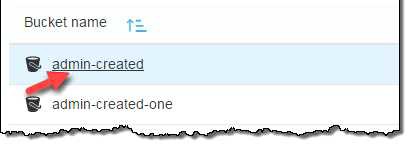
In the Name list, select the objects that you want to restore, choose Actions, and then choose Restore from Glacier.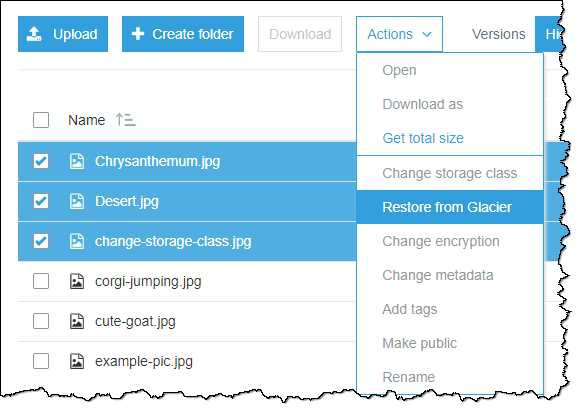
In the Initiate restore dialog box, type the number of days that you want your archived data to be
accessible.
Choose one of the following retrieval options from the Retrieval options menu. Choose Bulk retrieval or Standard retrieval, and then choose Restore.
Choose Expedited retrieval.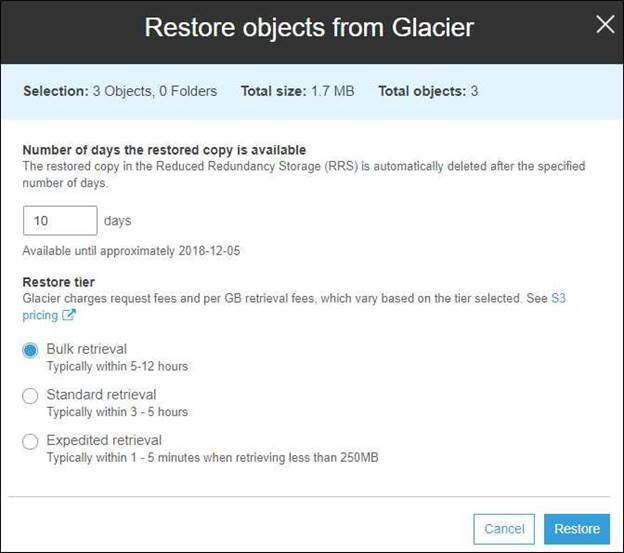
If you have provisioned capacity, choose Restore to start a provisioned retrieval. If you have provisioned capacity, all of your expedited retrievals are served by your provisioned capacity. For more information about provisioned capacity, see Provisioned Capacity.
If you don't have provisioned capacity and you don't want to buy it, choose Restore.
If you don't have provisioned capacity, but you want to buy it, choose Add capacity unit, and then choose Buy. When you get the Purchase succeeded message, choose Restore to start provisioned retrieval.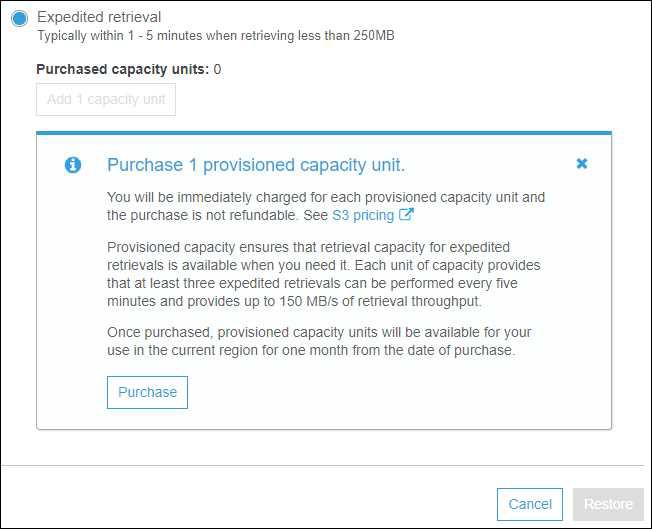
NEW QUESTION 11
A user has configured ELB with Auto Scaling. The user suspended the Auto Scaling AlarmNotification (which notifies Auto Scaling for CloudWatch alarms. process for a while. What will Auto Scaling do during this period?
- A. AWS will not receive the alarms from CloudWatch
- B. AWS will receive the alarms but will not execute the Auto Scaling policy
- C. Auto Scaling will execute the policy but it will not launch the instances until the process is resumed
- D. It is not possible to suspend the AlarmNotification process
Answer: B
Explanation:
Auto Scaling performs various processes, such as Launch, Terminate Alarm Notification etc. The user can also suspend individual process. The AlarmNotification process type accepts notifications from the Amazon CloudWatch alarms that are associated with the Auto Scaling group. If the user suspends this process type, Auto Scaling will not automatically execute the scaling policies that would be triggered by the alarms.
NEW QUESTION 12
A user is using a small MySQL RDS DB. The user is experiencing high latency due to the Multi AZ feature. Which of the below mentioned options may not help the user in this situation?
- A. Schedule the automated back up in non-working hours
- B. Use a large or higher size instance
- C. Use PIOPS
- D. Take a snapshot from standby Replica
Answer: D
Explanation:
An RDS DB instance which has enabled Multi AZ deployments may experience increased write and commit latency compared to a Single AZ deployment, due to synchronous data replication. The user may also face changes in latency if deployment fails over to the standby replica. For production workloads, AWS recommends the user to use provisioned IOPS and DB instance classes (m1.large and larger. as they are optimized for provisioned IOPS to give a fast, and consistent performance. With Multi AZ feature, the user can not have option to take snapshot from replica.
NEW QUESTION 13
An organization is planning to use AWS for 5 different departments. The finance department is responsible to pay for all the accounts. However, they want the cost separation for each account to map with the right cost centre. How can the finance department achieve this?
- A. Create 5 separate accounts and make them a part of one consolidate billing
- B. Create 5 separate accounts and use the IAM cross account access with the roles for better management
- C. Create 5 separate IAM users and set a different policy for their access
- D. Create 5 separate IAM groups and add users as per the department??s employees
Answer: A
Explanation:
AWS consolidated billing enables the organization to consolidate payments for multiple Amazon Web Services (AWS. accounts within a single organization by making a single paying account. Consolidated billing enables the organization to see a combined view of the AWS charges incurred by each account as well as obtain a detailed cost report for each of the individual AWS accounts associated with the paying account.
NEW QUESTION 14
A .NET application that you manage is running in Elastic Beanstalk. Your developers tell you they will need access to application log files to debug issues that arise. The infrastructure will scale up and down.
How can you ensure the developers will be able to access only the log files?
- A. Access the log files directly from Elastic Beanstalk
- B. Enable log file rotation to S3 within the Elastic Beanstalk configuration
- C. Ask your developers to enable log file rotation in the applications web.config file
- D. Connect to each Instance launched by Elastic Beanstalk and create a Windows Scheduled task to rotate the log files to S3.
Answer: A
Explanation:
Reference:
http://docs.aws.amazon.com/elasticbeanstalk/latest/dg/using-features.loggingS3.title.html
NEW QUESTION 15
A user has created a launch configuration for Auto Scaling where CloudWatch detailed monitoring is disabled. The user wants to now enable detailed monitoring. How can the user achieve this?
- A. Update the Launch config with CLI to set InstanceMonitoringDisabled = false
- B. The user should change the Auto Scaling group from the AWS console to enable detailed monitoring
- C. Update the Launch config with CLI to set InstanceMonitoring.Enabled = true
- D. Create a new Launch Config with detail monitoring enabled and update the Auto Scaling group
Answer: D
Explanation:
CloudWatch is used to monitor AWS as well as the custom services. To enable detailed instance monitoring for a new Auto Scaling group, the user does not need to take any extra steps. When the user creates the AutoScaling launch config as the first step for creating an Auto Scaling group, each launch configuration contains a flag named InstanceMonitoring.Enabled. The default value of this flag is true. When the user has created a launch configuration with InstanceMonitoring.Enabled = false it will involve multiple steps to enable detail monitoring. The steps are:
Create a new Launch config with detailed monitoring enabled Update the Auto Scaling group with a new launch config Enable detail monitoring on each EC2 instance
NEW QUESTION 16
A user has a weighing plant. The user measures the weight of some goods every 5 minutes and sends data to AWS CloudWatch for monitoring and tracking. Which of the below mentioned parameters is mandatory for the user to include in the request list?
- A. Value
- B. Namespace
- C. Metric Name
- D. Timezone
Answer: B
Explanation:
AWS CloudWatch supports the custom metrics. The user can always capture the custom data and upload the data to CloudWatch using CLI or APIs. The user can publish the data to CloudWatch as single data points or as an aggregated set of data points called a statistic set. The user has to always include the namespace as part of the request. The user can supply a file instead of the metric name. If the user does not supply the timezone, it accepts the current time. If the user is sending the data as a single data point it will have parameters, such as value. However, if the user is sending as an aggregate it will have parameters, such as statistic-values.
NEW QUESTION 17
A user is trying to understand AWS SNS. To which of the below mentioned end points is SNS unable to send a notification?
- A. Email JSON
- B. HTTP
- C. AWS SQS
- D. AWS SES
Answer: D
Explanation:
Amazon Simple Notification Service (Amazon SNS. is a fast, flexible, and fully managed push messaging service. Amazon SNS can deliver notifications by SMS text message or email to the Amazon Simple Queue Service (SQS. queues or to any HTTP endpoint. The user can select one the following transports as part of the subscription requests: ??HTTP??, ??HTTPS??,??Email??, ??Email-JSON??, ??SQS??, ??and SMS??.
NEW QUESTION 18
A SysOps Administrator has set up a new Application Load Balancer (ALB) in front of a pair of private web server in multiple Availability Zones. After deployment an updates CloudFormation template with many changes, user now goes to one web server only.
What is the NOST likely reason that the traffic is not being balanced between both servers?
- A. The faulty is returning HTTP 200 has been removed.
- B. Sticky session have been disabled in the ALB for the working sever.
- C. The ALB using a custom ping path that is not found on the faulty server.
- D. The web client are using HTTP/2, which is terminated at the ALB.
Answer: B
Explanation:
Until now, the behavior of load balancers has been to route each request independently to the Amazon EC2 instance with the least load. With the stickiness feature, you can configure the load balancer to bind user sessions to specific application instances. All requests coming from the user during the session will be sent to the same application instance. Elastic Load Balancing supports two mechanisms to provide session stickiness: load balancer-generated HTTP cookies, which allow browser-based session lifetimes, and application-generated HTTP cookies, which allow application- specific session lifetimes. You can learn more about this feature by visiting the ELB Developers Guide.
NEW QUESTION 19
A user has enabled termination protection on an EC2 instance. The user has also set Instance initiated shutdown behaviour to terminate. When the user shuts down the instance from the OS, what will happen?
- A. The OS will shutdown but the instance will not be terminated due to protection
- B. It will terminate the instance
- C. It will not allow the user to shutdown the instance from the OS
- D. It is not possible to set the termination protection when an Instance initiated shutdown is set to Terminate
Answer: B
Explanation:
It is always possible that someone can terminate an EC2 instance using the Amazon EC2 console, command line interface or API by mistake. If the admin wants to prevent the instance from being accidentally terminated, he can enable termination protection for that instance. The user can also setup shutdown behaviour for an EBS backed instance to guide the instance on what should be done when he initiates shutdown from the OS using Instance initiated shutdown behaviour. If the instance initiated behaviour is set to terminate and the user shuts off the OS even though termination protection is enabled, it will still terminate the instance.
NEW QUESTION 20
A user has configured the Auto Scaling group with the minimum capacity as 3 and the maximum capacity as 5. When the user configures the AS group, how many instances will Auto Scaling launch?
- A. 3
- B. 5
- C. 2
Answer: A
Explanation:
The default launch is going to configure 3 instances. It will only go to 5 under certain conditions. It won??t launch initially 5 instances. This question doesn??t give enough information to answer fully.
NEW QUESTION 21
A user has launched an EBS backed EC2 instance. What will be the difference while performing the
restart or stop/start options on that instance?
- A. For restart it does not charge for an extra hour, while every stop/start it will be charged as a separate hour
- B. Every restart is charged by AWS as a separate hour, while multiple start/stop actions during a single hour will be counted as a single hour
- C. For every restart or start/stop it will be charged as a separate hour
- D. For restart it charges extra only once, while for every stop/start it will be charged as a separate hour
Answer: A
Explanation:
For an EC2 instance launched with an EBS backed AMI, each time the instance state is changed from stop to start/ running, AWS charges a full instance hour, even if these transitions happen multiple times within a single hour. Anyway, rebooting an instance AWS does not charge a new instance billing hour.
NEW QUESTION 22
An organization has configured Auto Scaling for hosting their application. The system admin wants to understand the Auto Scaling health check process. If the instance is unhealthy, Auto Scaling launches an instance and terminates the unhealthy instance. What is the order execution?
- A. Auto Scaling launches a new instance first and then terminates the unhealthy instance
- B. Auto Scaling performs the launch and terminate processes in a random order
- C. Auto Scaling launches and terminates the instances simultaneously
- D. Auto Scaling terminates the instance first and then launches a new instance
Answer: D
Explanation:
Auto Scaling keeps checking the health of the instances at regular intervals and marks the instance for replacement when it is unhealthy. The ReplaceUnhealthy process terminates instances which are marked as unhealthy and subsequently creates new instances to replace them. This process first terminates the instance and then launches a new instance.
NEW QUESTION 23
You have a server with a 5O0GB Amazon EBS data volume. The volume is 80% full. You need to back up the volume at regular intervals and be able to re-create the volume in a new Availability Zone in the shortest time possible. All applications using the volume can be paused for a period of a few minutes with no discernible user impact.
Which of the following backup methods will best fulfill your requirements?
- A. Take periodic snapshots of the EBS volume
- B. Use a third party Incremental backup application to back up to Amazon Glacier
- C. Periodically back up all data to a single compressed archive and archive to Amazon S3 using a parallelized multi-part upload
- D. Create another EBS volume in the second Availability Zone attach it to the Amazon EC2 instance, and use a disk manager to mirror me two disks
Answer: A
Explanation:
Since an EBS volume should be in the same AZ as the EC2 instance. You cannot connect a EBS volume in another AZ. http://docs.aws.amazon.com/AWSEC2/latest/UserGuide/ebs-restoring-volume.html EBS volumes can only be attached to EC2 instances within the same Availability Zone.
NEW QUESTION 24
......
P.S. Surepassexam now are offering 100% pass ensure SOA-C01 dumps! All SOA-C01 exam questions have been updated with correct answers: https://www.surepassexam.com/SOA-C01-exam-dumps.html (639 New Questions)