for Oracle certification, Real Success Guaranteed with Updated . 100% PASS 1Z0-053 Oracle Database 11g: Administration II exam Today!
Online Oracle 1Z0-053 free dumps demo Below:
NEW QUESTION 1
While performing a regular check on your recovery catalog you realized that the catalog database is running out of space and you do not have options to increase the space. However, you have another database where more space is available and you want to move your existing recovery catalog to this database.
The options that can be considered while moving the recovery catalog are as follows:
1. Using one of the Oracle expdp utilities to export the catalog data
2. Creating a recovery catalog user and granting the necessary privileges in the other database
3. Creating the recovery catalog using the CREATE CATALOG command
4. Using the corresponding impdp utility to import the catalog data into the other database
5. Registering the target database in the new catalog database using the REGISTER DATABASE command.
Identify the option with the correct sequence for moving the recovery catalog.
- A. 2, 3, 5
- B. 1, 2, 4
- C. 1, 2, 4, 5
- D. 1, 2, 3, 4, 5
Answer: B
Explanation: The exp/imp tools can export and import the complete data structure and data extents to the destination database, so that you don't need to do create catalog and register database.
Topic 4, Configuring Backup Specifications
NEW QUESTION 2
What RMAN command must you use before you can back up a database using the recovery catalog?
- A. create catalog
- B. install database
- C. catalog database
- D. merge Catalog with database
- E. register database
Answer: E
NEW QUESTION 3
You are using Recovery Manager (RMAN) with a recovery catalog to back up your production database. The backups and the archived redo log files are copied to a tape drive on a daily basis. Because of media failure, you lost your production database completely along with the recovery catalog database. You want to recover the target database and make it functional. You consider performing the following steps to accomplish the task:
1. Restore an autobackup of the server parameter file.
2. Restore the control file
3. Start the target database instance
4. Mount the database
5. Restore the data files
6. Open the database with RESETLOGS option
7. Recover the data files
8. Set DBID for the target database
Which option illustrates the correct sequence that you must use?
- A. 8, 1, 3, 2, 4, 5, 7, 6
- B. 1, 8, 3, 4, 2, 5, 7, 6
- C. 1, 3, 4, 2, 8, 5, 6, 7
- D. 1, 3, 2, 4, 6, 5, 7, 8
Answer: A
Explanation: Recovering the Database After a Disaster
The procedure for disaster recovery is similar to the procedure for recovering the database with a backup control file in NOCATALOG mode. If you are restoring the database to a new host, then you should also review the considerations described in "Restoring a Database on a New Host".
This scenario assumes that the Linux server on which your database was running has been damaged beyond repair. Fortunately, you backed up the database to Oracle Secure Backup and have the tapes available. The scenario assumes the following:
✑ Oracle Database is already installed on the new host.
✑ You are restoring the database to a new Linux host with the same directory structure as the old host.
✑ You have one tape drive containing backups of all the data files and archived redo logs through log 1124, and autobackups of the control file and server parameter file.
✑ You do not use a recovery catalog with the database.
To recover the database on the new host:
1. If possible, restore or re-create all relevant network files such as tnsnames.ora and listener.ora and a password file.
2. Start RMAN and connect to the target database instance.
At this stage, no initialization parameter file exists. If you have set ORACLE_SID and ORACLE_HOME, then you can use operating system authentication to connect as SYSDBA. For example, start RMAN as follows:
% rman
RMAN> CONNECT TARGET
/
3. Specify the DBID for the target database with the SET DBID command, as described in "Restoring the Server Parameter File".
For example, enter the following command: SET DBID 676549873;
4. Run the STARTUP NOMOUNT command.
When the server parameter file is not available, RMAN attempts to start the instance with a dummy server parameter file.
5. Allocate a channel to the media manager and then restore the server parameter file from autobackup.
For example, enter the following command to restore the server parameter file from Oracle Secure Backup:
RUN
{
ALLOCATE CHANNEL c1 DEVICE TYPE sbt; RESTORE SPFILE FROM AUTOBACKUP;
}
6. Restart the instance with the restored server parameter file. STARTUP FORCE NOMOUNT;
7. Write a command file to perform the restore and recovery operation, and then execute the command file.
The command file should do the following:
a. Allocate a channel to the media manager.
b. Restore a control file autobackup (see "Performing Recovery with a Backup Control File and No Recovery Catalog").
c. Mount the restored control file.
d. Catalog any backups not recorded in the repository with the CATALOG command.
e. Restore the data files to their original locations. If volume names have changed, then run SET
NEWNAME commands before the restore operation and perform a switch after the restore operation to update the control file with the new locations for the data files, as shown in the following example.
f. Recover the data files. RMAN stops recovery when it reaches the log sequence number specified.
RMAN> RUN
{
# Manually allocate a channel to the media manager ALLOCATE CHANNEL t1 DEVICE TYPE sbt;
# Restore autobackup of the control file. This example assumes that you have
# accepted the default format for the autobackup name. RESTORE CONTROLFILE FROM AUTOBACKUP;
# The set until command is used in case the database
# structure has changed in the most recent backups, and you want to
# recover to that point in time. In this way RMAN restores the database
# to the same structure that the database had at the specified time. ALTER DATABASE MOUNT;
SET UNTIL SEQUENCE 1124 THREAD 1; RESTORE DATABASE;
RECOVER DATABASE;
}
The following example of the RUN command shows the same scenario except with new file names for the restored data files:
RMAN> RUN
{
# If you must restore the files to new locations,
# use SET NEWNAME commands:
SET NEWNAME FOR DATAFILE 1 TO '/dev/vgd_1_0/rlvt5_500M_1'; SET NEWNAME FOR DATAFILE 2 TO '/dev/vgd_1_0/rlvt5_500M_2'; SET NEWNAME FOR DATAFILE 3 TO '/dev/vgd_1_0/rlvt5_500M_3'; ALLOCATE CHANNEL t1 DEVICE TYPE sbt;
RESTORE CONTROLFILE FROM AUTOBACKUP; ALTER DATABASE MOUNT;
SET UNTIL SEQUENCE 124 THREAD 1; RESTORE DATABASE;
SWITCH DATAFILE ALL; # Update control file with new location of data files. RECOVER DATABASE;
}
8. If recovery was successful, then open the database and reset the online logs: ALTER DATABASE OPEN RESETLOGS;
NEW QUESTION 4
You issued the following command to mount the DATA disk group in restricted mode: ALTER DISKGROUP data MOUNT RESTRICT;
What is the implication of this command?
- A. The client RDBMS instance can access the file as a read-only file.
- B. A new disk cannot be added to a disk group.
- C. A disk in a disk group can be taken offline.
- D. The client RDBMS instance cannot access the files in the disk group.
Answer: D
Explanation: MOUNT (link)
Specify MOUNT to mount the disk groups in the local Oracle ASM instance. Specify ALL MOUNT to mount all disk groups specified in the ASM_DISKGROUPS initialization parameter. File operations can only be performed when a disk group is mounted. If Oracle ASM is running in a cluster or a standalone server managed by Oracle Restart, then the MOUNT clause automatically brings the corresponding resource online.
RESTRICTED | NORMAL Use these clauses to determine the manner in which the disk groups are mounted.
In the RESTRICTED mode, the disk group is mounted in single-instance exclusive mode. No other Oracle ASM instance in the same cluster can mount that disk group. In this mode the disk group is not usable by any Oracle ASM client.
In the NORMAL mode, the disk group is mounted in shared mode, so that other Oracle ASM instances and clients can access the disk group. This is the default.
NEW QUESTION 5
Identify the scenarios in which the RMAN CROSSCHECR command is useful. (Choose all that apply.)
- A. To check that the obsolete backups are deleted from the repository records and from the disk.
- B. To update the RMAN repository if you delete archived redo logs with operating system commands.
- C. To update outdated information about backups that disappeared from disk or tape or became corrupted and inaccessible.
- D. To synchronize the actual files on disk or in the media management catalog with the RMAN repository for which the backup was not taken using RMAN.
Answer: BC
Explanation: Crosscheck are useful because they can do the following: (Link)
✑ Update outdated information about backups that disappeared from disk or tape or became corrupted
✑ Update the repository if you delete archived redo logs or other files with operating system commands
Use the CROSSCHECK command to synchronize the physical reality of backups and copies with their logical records in the RMAN repository.
The CROSSCHECK command checks only objects marked AVAILABLE or EXPIRED in the repository by examining the files on disk for DISK channels or by querying the media manager for sbt channels.
Meaning of Crosscheck Status: EXPIRED
Object is not found either in file system (for DISK) or in the media manager (for sbt). A backup set is EXPIRED if any backup piece in the set is EXPIRED.
The CROSSCHECK command does not delete the repository records of the files that it does not find, but updates their repository records to EXPIRED. You can run DELETE EXPIRED to remove the repository records for expired files and any existing physical files whose status is EXPIRED.
If backups are EXPIRED, then you can re-execute the crosscheck later and determine whether expired backups are available. This precaution is especially useful when you use RMAN with a media manager. For example, if some backup pieces or copies were erroneously marked as EXPIRED because the PARMS channel settings were incorrect, then after ensuring that the files really do exist in the media manager, run the CROSSCHECK BACKUP command again to restore those files to AVAILABLE status. AVAILABLE
Object is available for use by RMAN. For a backup set to be AVAILABLE, all backup pieces in the set must have the status AVAILABLE.
NEW QUESTION 6
You want to track and store all transactional changes to a table over its lifetime.
To accomplish this task, you enabled Flashback Data Archive with the retention of 5 years. After some time, the business requirement changed and you were asked to change the
retention from 5 years to 3 years.
To accomplish this, you issued the following command:
ALTER FLASHBACK ARCHIVE fla1 MODIFY RETENTION 3 YEAR;
What is the implication of this command?
- A. The command produces an error because the retention time cannot be reduced.
- B. All historical data is retained but the subsequent flashback data archives are maintained for only three years.
- C. All historical data is purged and the new flashback data archives are maintained for three years.
- D. All historical data older than three years is purged from the flashback archive FLA1.
Answer: D
NEW QUESTION 7
You plan to collect the Automatic Workload Repository (AWR) data every Monday morning for a month. You want Oracle Database to automatically create a baseline every Monday and remove the old baseline. What is the correct action to achieve this?
- A. Create and populate a SQL Tuning Set from the AWR on every Monday.
- B. Change the RETENTION setting for the AWR snapshots to 7 days on Monday.
- C. Create a repeating baseline template.
- D. Insert a finding directive for future ADDM tasks.
Answer: C
NEW QUESTION 8
How would you grant the RVPC user access to specific RMAN database records in the
RMAN virtual private catalog?
- A. Issue the grant command from the SYS user (or equivalent) of the target database.
- B. Issue the grant command from the SYS user (or equivalent) of the recovery-catalog database.
- C. Issue the grant command from the recovery catalog-owning schema user account in the recovery catalog.
- D. Issue the grant command from RMAN when connected to the recovery catalog-owning schema.
- E. Issue the grant command from RMAN when connected to the target database.
Answer: D
NEW QUESTION 9
Examine the following commands and their output:
SQL> SELECT ename, sal FROM emp WHERE ename='JAMES'; ENAME SAL
----- ---- JAMES 1050
SQL> UPDATE emp SET sal=sal+sal*1.2 WHERE ename='JAMES'; 1 row updated.
SQL> SELECT ename, sal FROM emp WHERE ename='JAMES'; ENAME SAL
----- ---- JAMES 2310
View the exhibit and examine the Flashback Version Query that was executed after the preceding commands.
What could be the possible cause for the query not displaying any row? Exhibit: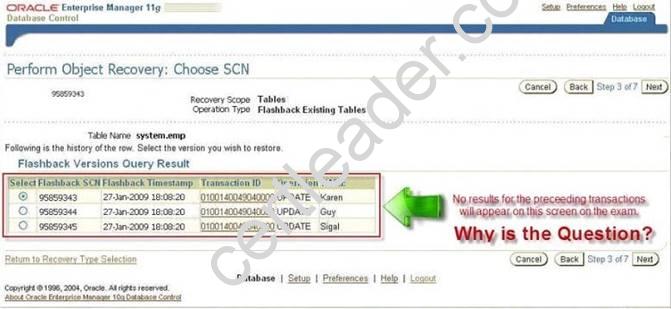
- A. Flashback logging is not enabled for the database.
- B. The changes made to the table are not committed.
- C. Supplemental logging is not enabled for the database.
- D. The database is not configured in ARCHIVELOG mode.
Answer: B
NEW QUESTION 10
Which dynamic view displays the status of block-change tracking?
- A. V$BLOCK_CHANGE
- B. V$BLOCK_CHANGE_TRACKING
- C. V$BLOCKCHANGE
- D. V$BLOCK_TRACKING
Answer: B
Explanation: V$BLOCK_CHANGE_TRACKING displays the status of block change tracking for the database.
Topic 11, Using Flashback Technology
NEW QUESTION 11
The database is configured in ARCHIVELOG mode and regular complete database backups are taken. The loss of which two types of files may require a recovery with the RESETLOGS option? (Choose two)
- A. Control files
- B. Password files
- C. Inactive online redo log file
- D. Archived log files required to perform recovery
- E. Newly created tablespace which is not backed up
Answer: AD
Explanation: The RESETLOGS options is required in:
1. Imcomplete Recovery
2. Change of control file
So that, the control file and archived redo logs are required.
NEW QUESTION 12
In your test database:
✑ You are using Recovery Manager (RMAN) to perform incremental backups of your test database
✑ The test database is running in NOARCHIVELOG mode
✑ One of the data files is corrupted
✑ All online redo log files are lost because of a media failure
Which option must you consider in this scenario?
- A. Configuring the database in ARCHVIELOG mode and then using incremental backup to recover the database
- B. Using incremental backup to recover the damaged data file and then manually creating the online redo log files
- C. Creating a new test database because the database is not recoverable due to the fact that the database is configured in NOARCHIVELOG mode
- D. Using incremental backups to recover the database by using the RECOVER DATABASE NOREDO command and then using the RESETLOGS option to open the database.
Answer: D
Explanation: Example 3-6 Recovering a NOARCHIVELOG Database
You can perform limited recovery of changes to a database running in NOARCHIVELOG mode by applying incremental backups. The incremental backups must be consistent, like all backups of a database run in NOARCHIVELOG mode, so you cannot back up the database when it is open.
Assume that you run database prod in NOARCHIVELOG mode with a recovery catalog.
You shut down the database consistently and make a level 0 backup of database prod to tape on Sunday afternoon. You shut down the database consistently and make a level 1 differential incremental backup to tape at 3:00 a.m. on Wednesday and Friday.
On Saturday, a media failure destroys half the data files and the online redo logs. Because the online logs are lost, you must specify the NOREDO option in the RECOVER command. Otherwise, RMAN searches for the redo logs after applying the Friday incremental backup and issues an error message when it does not find them.
After connecting RMAN to prod and the catalog database, recover as follows: STARTUP FORCE NOMOUNT;
RESTORE CONTROLFILE; # restore control file from consistent backup
ALTER DATABASE MOUNT;
RESTORE DATABASE; # restore data files from consistent backup
RECOVER DATABASE NOREDO; # specify NOREDO because online redo logs are lost
ALTER DATABASE OPEN RESETLOGS;
The recovered database reflects only changes up through the time of the Friday incremental backup. Because there are no archived redo log files, there is no way to recover changes made after the incremental backup.
NEW QUESTION 13
You are using recovery Manager (RMAN) with a recovery catalog to backup up your production database. The backups and the archived redo log files are copied to a tape drive on a daily basis. The database was open and transactions were recorded in the redo logs. Because of fire in the building you lost your servers having the production database and the recovery catalog database. The archive log files generated after the last backup are intact on one of the remote locations.
While performing a disaster recovery of the production database what is the next step that you must perform after restoring the data files and applying archived redo logs?
- A. Open the database in NORMAL mode
- B. Open the database in read-only mode
- C. Open the database in RESTRICTED mode
- D. Open the database with the RESETLOGS option
Answer: D
Explanation: Recovering the Database After a Disaster
The procedure for disaster recovery is similar to the procedure for recovering the database with a backup control file in NOCATALOG mode. If you are restoring the database to a new host, then you should also review the considerations described in "Restoring a Database on a New Host".
This scenario assumes that the Linux server on which your database was running has been damaged beyond repair. Fortunately, you backed up the database to Oracle Secure Backup and have the tapes available. The scenario assumes the following:
✑ Oracle Database is already installed on the new host.
✑ You are restoring the database to a new Linux host with the same directory structure as the old host.
✑ You have one tape drive containing backups of all the data files and archived redo logs through log 1124, and autobackups of the control file and server parameter file.
✑ You do not use a recovery catalog with the database.
To recover the database on the new host:
1. If possible, restore or re-create all relevant network files such as tnsnames.ora and listener.ora and a password file.
2. Start RMAN and connect to the target database instance.
At this stage, no initialization parameter file exists. If you have set ORACLE_SID and ORACLE_HOME, then you can use operating system authentication to connect as SYSDBA. For example, start RMAN as follows:
% rman
RMAN> CONNECT TARGET
/
3. Specify the DBID for the target database with the SET DBID command, as described in "Restoring the Server Parameter File".
For example, enter the following command: SET DBID 676549873;
4. Run the STARTUP NOMOUNT command.
When the server parameter file is not available, RMAN attempts to start the instance with a dummy server parameter file.
5. Allocate a channel to the media manager and then restore the server parameter file from autobackup. For example, enter the following command to restore the server parameter file from Oracle Secure Backup:
RUN
{
ALLOCATE CHANNEL c1 DEVICE TYPE sbt; RESTORE SPFILE FROM AUTOBACKUP;
}
6. Restart the instance with the restored server parameter file. STARTUP FORCE NOMOUNT;
7. Write a command file to perform the restore and recovery operation, and then execute the command file.
The command file should do the following:
a. Allocate a channel to the media manager.
b. Restore a control file autobackup (see "Performing Recovery with a Backup Control File and No Recovery Catalog").
c. Mount the restored control file.
d. Catalog any backups not recorded in the repository with the CATALOG command.
e. Restore the data files to their original locations. If volume names have changed, then run SET
NEWNAME commands before the restore operation and perform a switch after the restore operation to update the control file with the new locations for the data files, as shown in the following example.
f. Recover the data files. RMAN stops recovery when it reaches the log sequence number specified.
RMAN> RUN
{
# Manually allocate a channel to the media manager ALLOCATE CHANNEL t1 DEVICE TYPE sbt;
# Restore autobackup of the control file. This example assumes that you have
# accepted the default format for the autobackup name. RESTORE CONTROLFILE FROM AUTOBACKUP;
# The set until command is used in case the database
# structure has changed in the most recent backups, and you want to
# recover to that point in time. In this way RMAN restores the database
# to the same structure that the database had at the specified time. ALTER DATABASE MOUNT;
SET UNTIL SEQUENCE 1124 THREAD 1; RESTORE DATABASE;
RECOVER DATABASE;
}
The following example of the RUN command shows the same scenario except with new file names for the restored data files:
RMAN> RUN
{
# If you must restore the files to new locations,
# use SET NEWNAME commands:
SET NEWNAME FOR DATAFILE 1 TO '/dev/vgd_1_0/rlvt5_500M_1'; SET NEWNAME FOR DATAFILE 2 TO '/dev/vgd_1_0/rlvt5_500M_2'; SET NEWNAME FOR DATAFILE 3 TO '/dev/vgd_1_0/rlvt5_500M_3'; ALLOCATE CHANNEL t1 DEVICE TYPE sbt;
RESTORE CONTROLFILE FROM AUTOBACKUP; ALTER DATABASE MOUNT;
SET UNTIL SEQUENCE 124 THREAD 1; RESTORE DATABASE;
SWITCH DATAFILE ALL; # Update control file with new location of data files. RECOVER DATABASE;
}
8. If recovery was successful, then open the database and reset the online logs: ALTER DATABASE OPEN RESETLOGS;
NEW QUESTION 14
When running the tablespace point-in-time command
recover tablespace users
until time '10/06/2008:22:42:00'
auxiliary destination 'c:oracleauxiliary'; You receive the following error:
What is the likely cause of the error?
- A. The database is in ARCHIVELOG mode.
- B. There is not a current backup of the database available.
- C. The USERS tablespace has dependent objects in other tablespaces and can not be a part of a TSPITR alone.
- D. The USERS tablespace is not eligible for TSPITR because it has invalid objects.
- E. The recover tablespace command is incorrect and generates the error.
Answer: B
NEW QUESTION 15
You are using the control file to maintain information about the database backups that are being performed by Recovery Manager (RMAN).
Identify two scenarios is which you must have a recovery catalog. (Choose two.)
- A. To store the backup information of multiple database
- B. To restrict the amount of space that is used by the backups
- C. To maintain a backup for a certain time is set by the CONTROL_FILE_RECORD_KEEP_TIME parameter.
- D. To list the data files that were in a target database at a given time by using the AT option of REPORT SCHEMA command.
Answer: AD
NEW QUESTION 16
Tape streaming is not happening while performing RMAN tape backup. On investigation, you find that it is not because of the incremental backup or the empty file backup and that RMAN is sending data blocks to the tape drive fast enough.
What could be a solution to make tape streaming happen during the backup?
- A. Configure backup optimization
- B. Configure the channel to increase MAXOPENFILES
- C. Configure the channel to increase the capacity with the RATE parameter
- D. Configure the channel to adjust the tape buffer size with the BLKSIZE option
Answer: C
NEW QUESTION 17
You have 100 segments in the USERS tablespace. You realize that the USERS tablespace is running low on space.
You can use Segment Advisor to .
- A. identify the segments that you should shrink
- B. modify the storage parameters for the tablespace
- C. automatically shrink the segments with unused space
- D. check the alerts generated for the tablespace that is running low on space
Answer: A
NEW QUESTION 18
You are managing a 24*7 database. The backup strategy for the database is to perform user-managed backups.
Identify two prerequisites to perform the backups. (Choose two.)
- A. The database must be opened in restricted mode.
- B. The database must be configured to run in ARCHIVELOG mode.
- C. The tablespaces are required to be in backup mode before taking the backup.
- D. The tablespaces are required to be in read-only mode before taking the backup
Answer: BC
P.S. Exambible now are offering 100% pass ensure 1Z0-053 dumps! All 1Z0-053 exam questions have been updated with correct answers: https://www.exambible.com/1Z0-053-exam/ (698 New Questions)