Proper study guides for AZ-102 Microsoft Azure Administrator Certification Transition certified begins with AZ-102 Braindumps preparation products which designed to deliver the AZ-102 Dumps Questions by making you pass the AZ-102 test at your first time. Try the free AZ-102 Exam Dumps right now.
Microsoft AZ-102 Free Dumps Questions Online, Read and Test Now.
NEW QUESTION 1
SIMULATION
Click to expand each objective. To connect to the Azure portal, type https://portal.azure.com in the browser address bar.
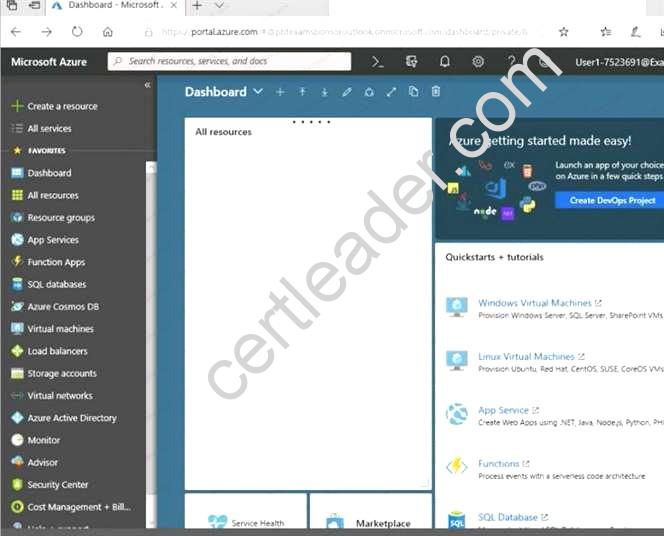
When you are finished performing all the tasks, click the ‘Next’ button.
Note that you cannot return to the lab once you click the ‘Next’ button. Scoring occur in the background while you complete the rest of the exam.
Overview
The following section of the exam is a lab. In this section, you will perform a set of tasks in a live environment. While most functionality will be available to you as it would be in a live environment, some functionality (e.g., copy and paste, ability to navigate to external websites) will not be possible by design. Scoring is based on the outcome of performing the tasks stated in the lab. In other words, it doesn’t matter how you accomplish the task, if you successfully perform it, you will earn credit for that task.
Labs are not timed separately, and this exam may have more than one lab that you must complete. You can use as much time as you would like to complete each lab. But, you should manage your time appropriately to ensure that you are able to complete the lab(s) and all other sections of the exam in the time provided.
Please note that once you submit your work by clicking the Next button within a lab, you will NOT be able to return to the lab.
To start the lab
You may start the lab by clicking the Next button.
You need to allow RDP connections over TCP port 3389 to VM1 from the internet. The solution must prevent connections from the Internet over all other TCP ports.
What should you do from the Azure portal?
Answer:
Explanation: Step 1: Create a new network security group Step 2: Select your new network security group.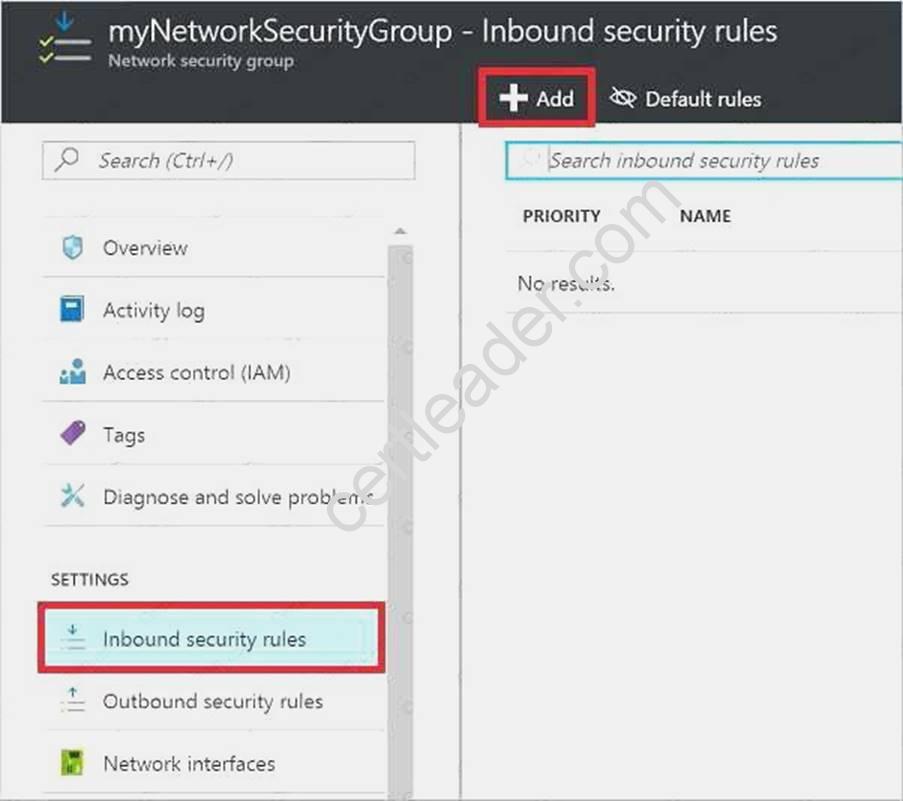
Step 3: Select Inbound security rules, . Under Add inbound security rule, enter the following Destination: Select Network security group, and then select the security group you created previously.
Destination port ranges: 3389 Protocol: Select TCP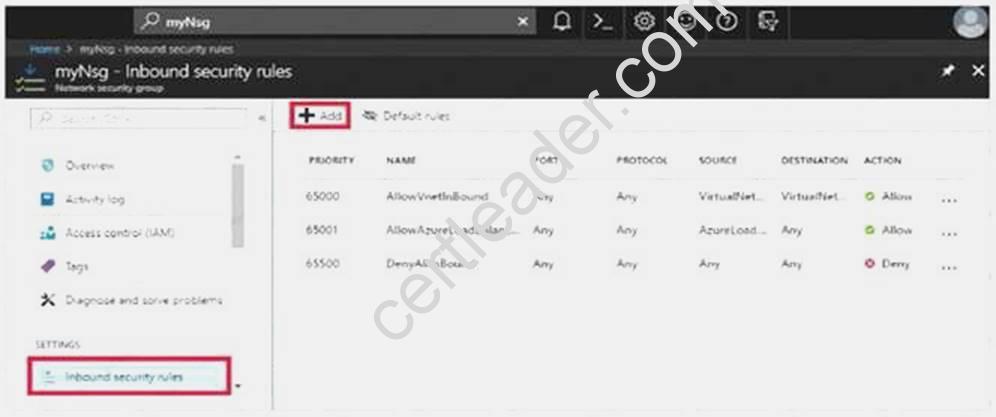
References: https://docs.microsoft.com/en-us/azure/virtual-network/tutorial-filter-network-traffic
NEW QUESTION 2
You plan to connect a virtual network named VNET1017 to your on-premises network by using both an Azure ExpressRoute and a site-to-site VPN connection.
You need to prepare the Azure environment for the planned deployment. The solution must maximize the IP address space available to Azure virtual machines.
What should you do from the Azure portal before you create the ExpressRoute are the VPN gateway?
Answer:
Explanation: We need to create a Gateway subnet Step 1:
Go to More Services > Virtual Networks Step 2:
Then click on the VNET1017, and click on subnets. Then click on gateway subnet.
Step 3:
In the next window define the subnet for the gateway and click OK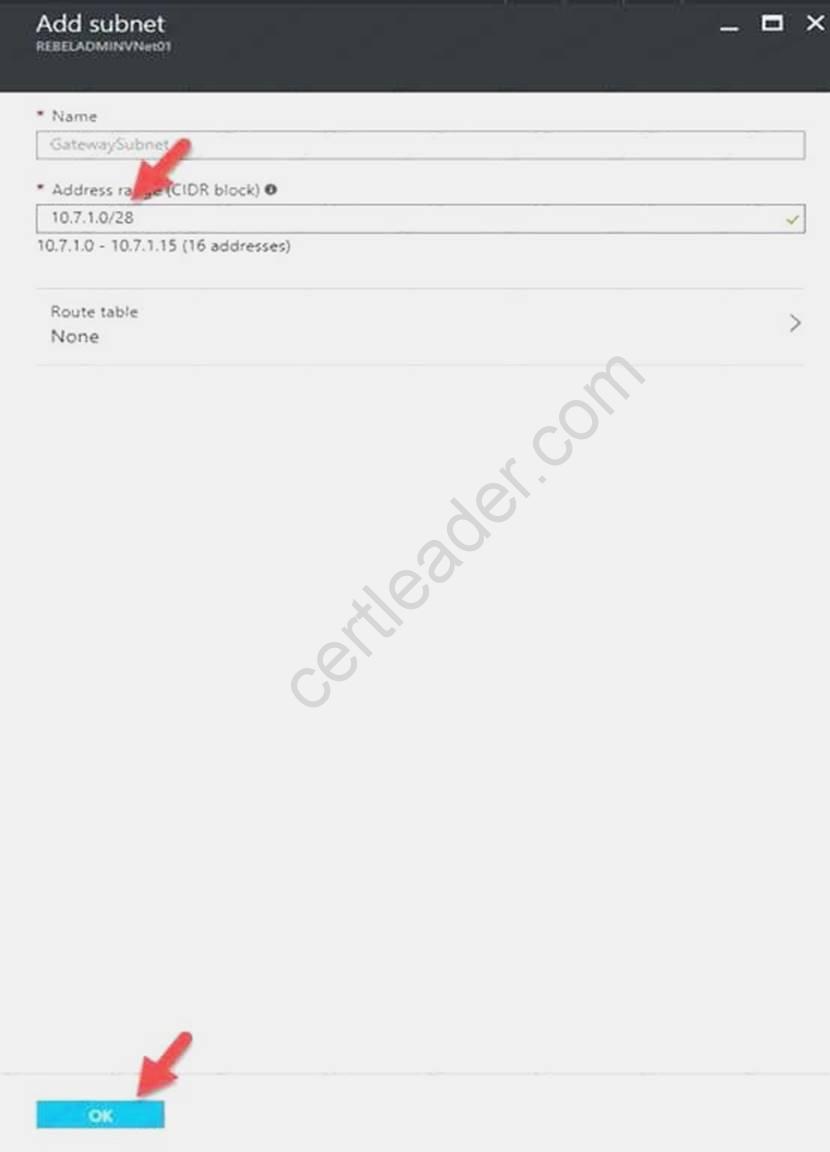
It is recommended to use /28 or /27 for gateway subnet.
As we want to maximize the IP address space we should use /27. References:
https://blogs.technet.microsoft.com/canitpro/2021/06/28/step-by-step-configuring-a-site-to-sitevpn- gateway-between-azure-and-on-premise/
NEW QUESTION 3
You discover that VM3 does NOT meet the technical requirements. You need to verify whether the issue relates to the NSGs.
What should you use?
- A. Diagram in VNet1
- B. the security recommendations in Azure Advisor
- C. Diagnostic settings in Azure Monitor
- D. Diagnose and solve problems in Traffic Manager Profiles
- E. IP flow verify in Azure Network Watcher
Answer: E
Explanation: Scenario: Contoso must meet technical requirements including:
Ensure that VM3 can establish outbound connections over TCP port 8080 to the applications servers in the Montreal office.
IP flow verify checks if a packet is allowed or denied to or from a virtual machine. The information consists of direction, protocol, local IP, remote IP, local port, and remote port. If the packet is denied by a security group, the name of the rule that denied the packet is returned. While any source or destination IP can be chosen, IP flow verify helps administrators quickly diagnose connectivity issues from or to the internet and from or to the on-premises environment.
References:
https://docs.microsoft.com/en-us/azure/network-watcher/network-watcher-ip-flow-verify-overview
NEW QUESTION 4
You have an azure subscription that contain a virtual named VNet1. VNet1. contains four subnets named Gatesway, perimeter, NVA, and production.
The NVA contain two network virtual appliance (NVAs) that will network traffic inspection between the perimeter subnet and the production subnet.
You need o implement an Azure load balancer for the NVAs. The solution must meet the following requirements:
The NVAs must run in an active-active configuration that uses automatic failover.
The NVA must load balance traffic to two services on the Production subnet. The services have different IP addresses
Which three actions should you perform? Each correct answer presents parts of the solution. NOTE: Each correct selection is worth one point.
- A. Add two load balancing rules that have HA Ports enabled and Floating IP disabled.
- B. Deploy a standard load balancer.
- C. Add a frontend IP configuration, two backend pools, and a health prob.
- D. Add a frontend IP configuration, a backend pool, and a health probe.
- E. Add two load balancing rules that have HA Ports and Floating IP enabled.
- F. Deploy a basic load balance
Answer: BCE
Explanation: A standard load balancer is required for the HA ports.
-Two backend pools are needed as there are two services with different IP addresses.
-Floating IP rule is used where backend ports are reused. Incorrect Answers:
F: HA Ports are not available for the basic load balancer. References:
https://docs.microsoft.com/en-us/azure/load-balancer/load-balancer-standard-overview https://docs.microsoft.com/en-us/azure/load-balancer/load-balancer-multivip-overview
NEW QUESTION 5
SIMULATION
Click to expand each objective. To connect to the Azure portal, type https://portal.azure.com in the browser address bar.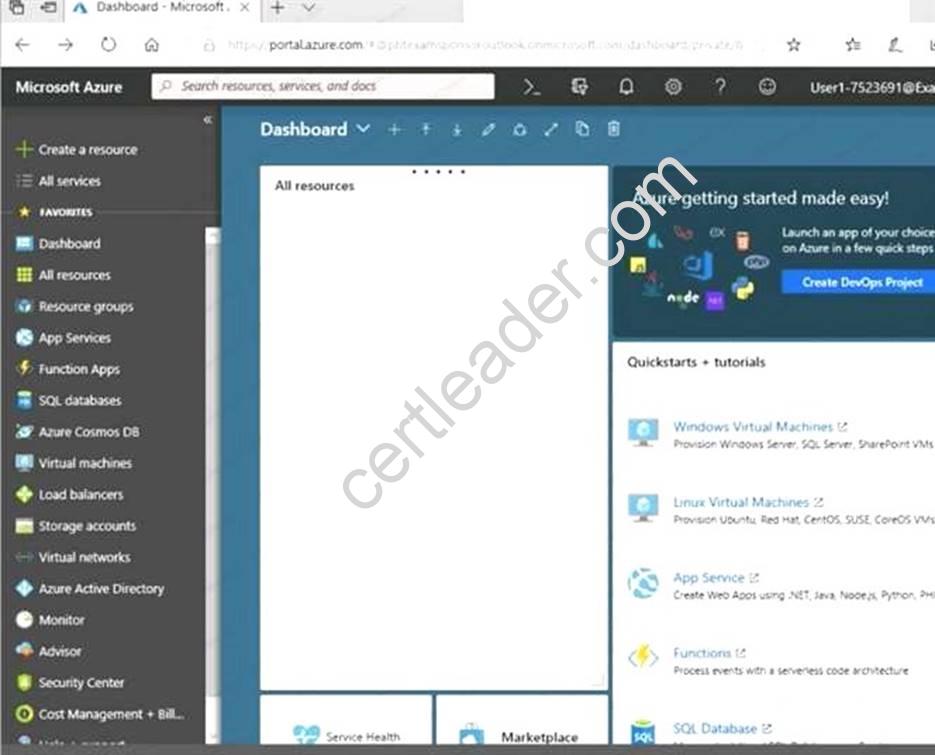
When you are finished performing all the tasks, click the ‘Next’ button.
Note that you cannot return to the lab once you click the ‘Next’ button. Scoring occur in the background while you complete the rest of the exam.
Overview
The following section of the exam is a lab. In this section, you will perform a set of tasks in a live environment. While most functionality will be available to you as it would be in a live environment, some functionality (e.g., copy and paste, ability to navigate to external websites) will not be possible by design. Scoring is based on the outcome of performing the tasks stated in the lab. In other words, it doesn’t matter how you accomplish the task, if you successfully perform it, you will earn credit for that task.
Labs are not timed separately, and this exam may have more than one lab that you must complete. You can use as much time as you would like to complete each lab. But, you should manage your time appropriately to ensure that you are able to complete the lab(s) and all other sections of the exam in the time provided.
Please note that once you submit your work by clicking the Next button within a lab, you will NOT be able to return to the lab.
To start the lab
You may start the lab by clicking the Next button.
You plan to migrate a large amount of corporate data to Azure Storage and to back up files stored on old hardware to Azure Storage.
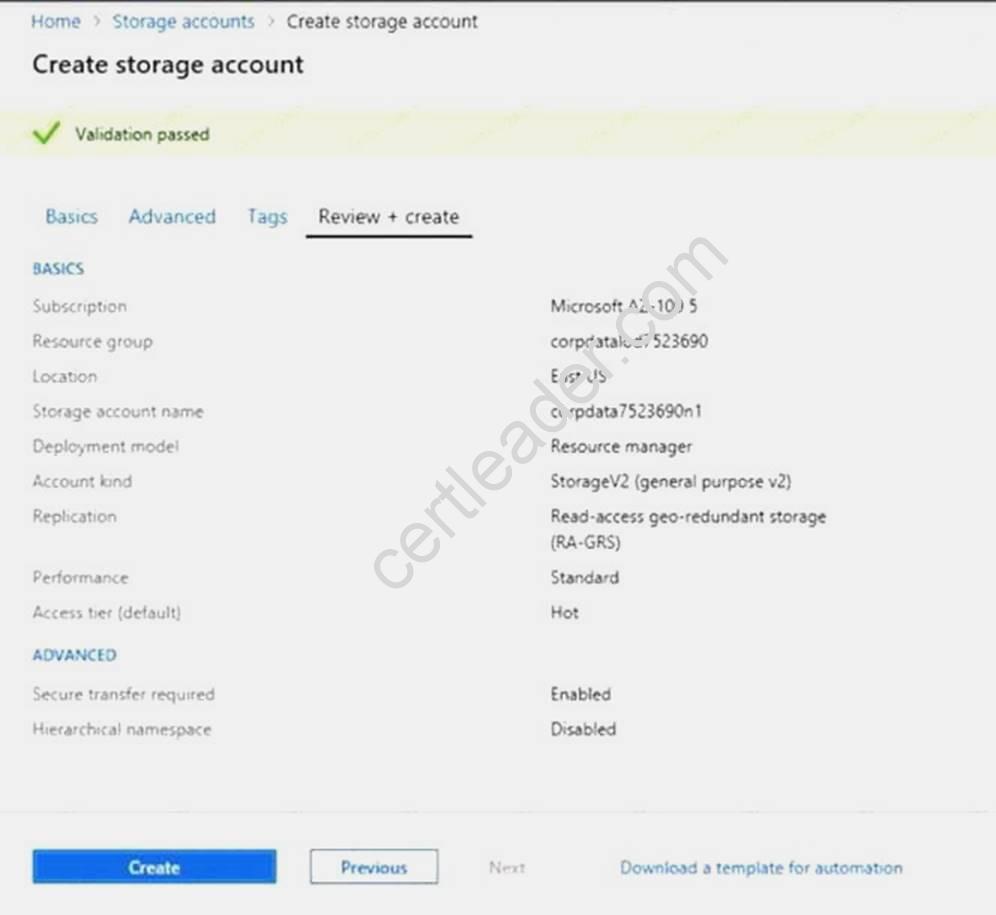
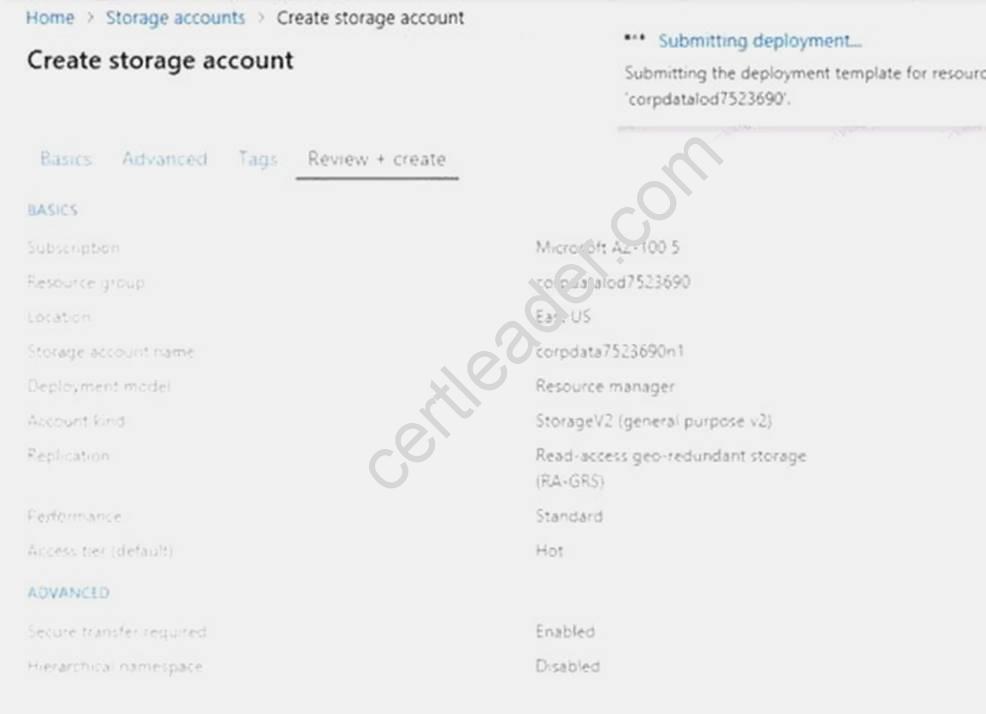
You need to create a storage account named corpdata7523690n1 in the corpdatalog7523690 resource group. The solution must meet the following requirements:
Corpdata7523690n1 must be able to host the virtual disk files for Azure virtual machines. The cost of accessing the files must be minimized.
Replication costs must be minimized. What should you do from the Azure portal?
Answer:
Explanation: Step 1: In the Azure portal, click All services. In the list of resources, type Storage Accounts. As you begin typing, the list filters based on your input. Select Storage Accounts.
Step 2: On the Storage Accounts window that appears, choose Add. Step 3: Select the subscription in which to create the storage account. Step 4: Under the Resource group field, select corpdatalog7523690.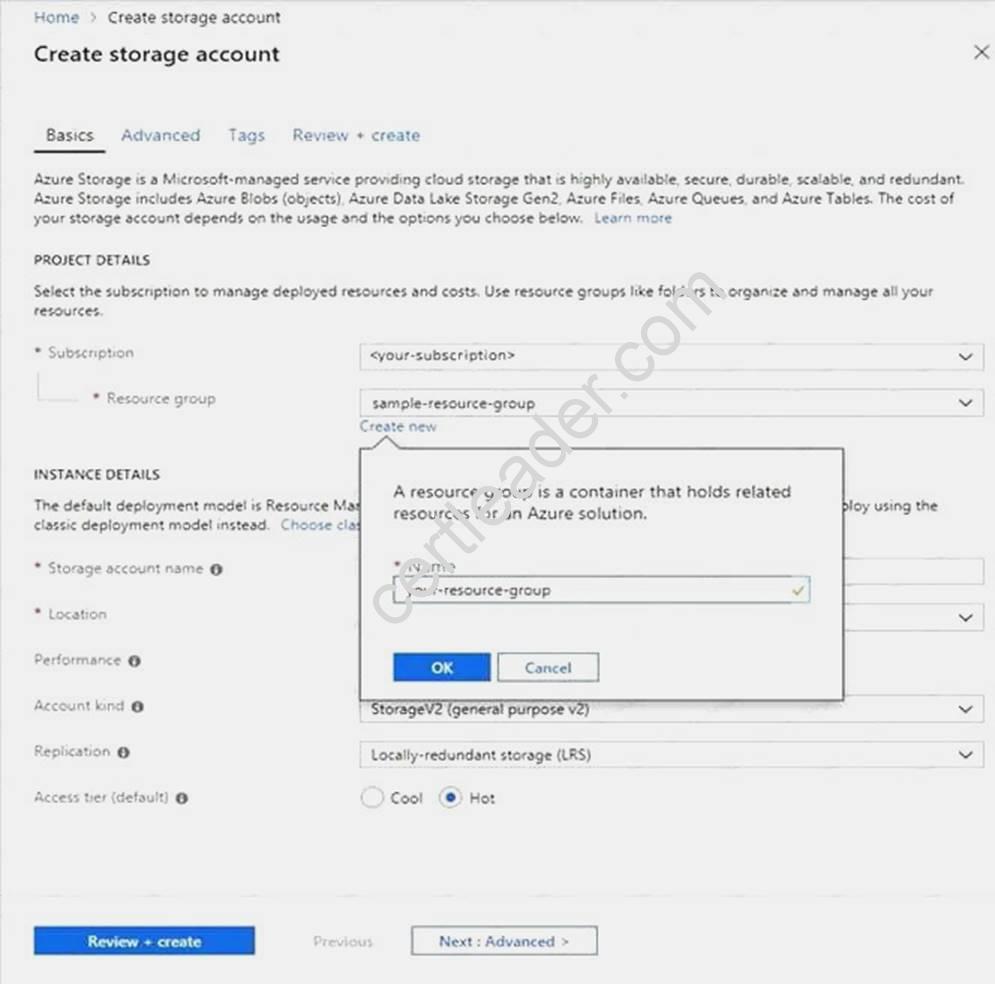
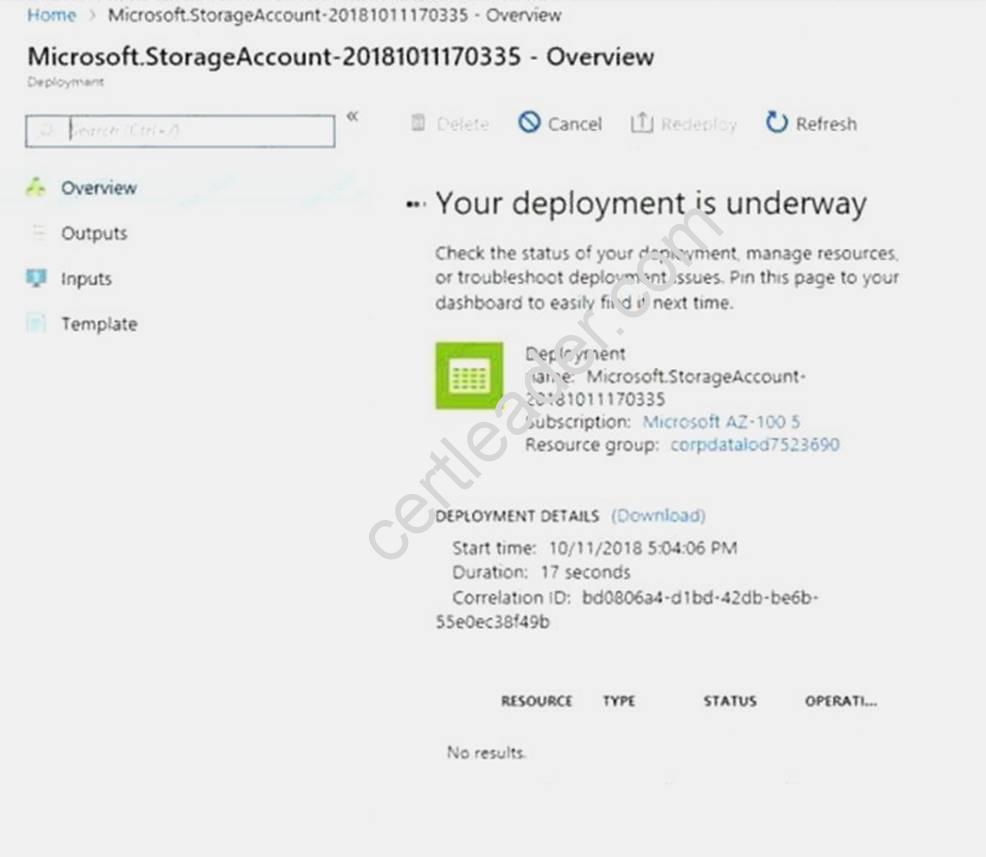
Step 5: Enter a name for your storage account: corpdata7523690n1
Step 6: For Account kind select: General-purpose v2 accounts (recommended for most scenarios) General-purpose v2 accounts is recommended for most scenarios. . General-purpose v2 accounts deliver the lowest per-gigabyte capacity prices for Azure Storage, as well as industry-competitive transaction prices.
Step 7: For replication select: Read-access geo-redundant storage (RA-GRS)
Read-access geo-redundant storage (RA-GRS) maximizes availability for your storage account. RA-GRS provides read-only access to the data in the secondary location, in addition to geo-replication across
two regions. References:
https://docs.microsoft.com/en-us/azure/storage/common/storage-quickstart-create-account https://docs.microsoft.com/en-us/azure/storage/common/storage-account-overview
NEW QUESTION 6
You have an Azure Active Directory (Azure AD) tenant named contoso.onmicrosoft.com that contains 100 user accounts.
You purchase 10 Azure AD Premium P2 licenses for the tenant.
You need to ensure that 10 users can use all the Azure AD Premium features. What should you do?
- A. From the Groups blade of each user, invite the users to a group.
- B. From the Licenses blade of Azure AD, assign a license.
- C. From the Directory role blade of each user, modify the directory role.
- D. From the Azure AD domain, add an enterprise applicatio
Answer: B
Explanation: To assign a license, under Azure Active Directory > Licenses > All Products, select one or more
products, and then select Assign on the command bar.
References: https://docs.microsoft.com/en-us/azure/active-directory/fundamentals/license-usersgroups
NEW QUESTION 7
You have an Azure Service Bus.
You create a queue named Queue1. Queue1 is configured as shown in the following exhibit.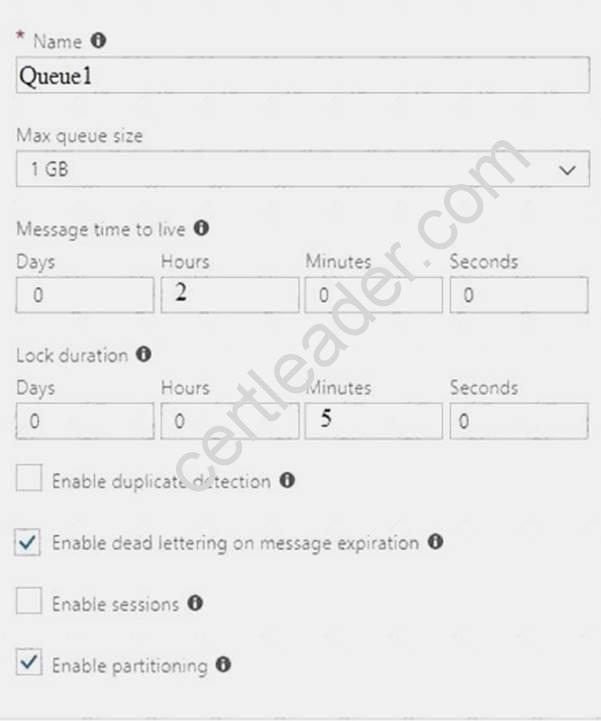
Use the drop-down menus to select the answer choice that completes each statement based on the information presented in the graphic.
NOTE: Each correct selection is worth one point.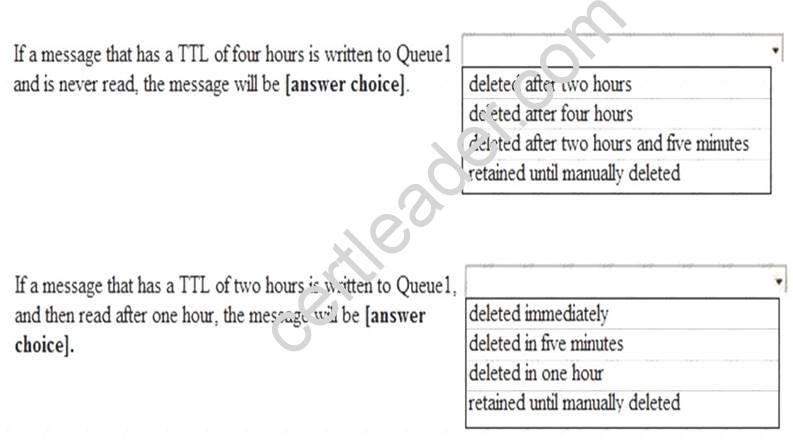
Answer:
Explanation: Box 1: deleted after two hours
All messages sent into a queue or topic are subject to a default expiration that is set at the entity level with the defaultMessageTimeToLive property and which can also be set in the portal during creation and adjusted later. The default expiration is used for all messages sent to the entity where TimeToLive is not explicitly set. The default expiration also functions as a ceiling for the TimeToLive value. Messages that have a longer TimeToLive expiration than the default value are silently adjusted to the defaultMessageTimeToLive value before being enqueued.
Box 2: deleted in one hour References:
https://docs.microsoft.com/en-us/azure/service-bus-messaging/message-expiration
NEW QUESTION 8
You have an Azure Active Directory (Azure AD) tenant.
You have an existing Azure AD conditional access policy named Policy1. Policy1 enforces the use of Azure AD-joined devices when members of the Global Administrators group authenticate to Azure AD from untrusted locations.
You need to ensure that members of the Global Administrators group will also be forced to use multi- factor authentication when authenticating from untrusted locations.
What should you do?
- A. From the multi-factor authentication page, modify the service settings.
- B. From the multi-factor authentication page, modify the user settings.
- C. From the Azure portal, modify grant control of Policy1.
- D. From the Azure portal, modify session control of Policy1.
Answer: C
Explanation: There are two types of controls: Grant controls – To gate access
Session controls – To restrict access to a session
Grant controls oversee whether a user can complete authentication and reach the resource that they’re attempting to sign-in to. If you have multiple controls selected, you can configure whether all of them are required when your policy is processed. The current implementation of Azure Active Directory enables you to set the following grant control requirements: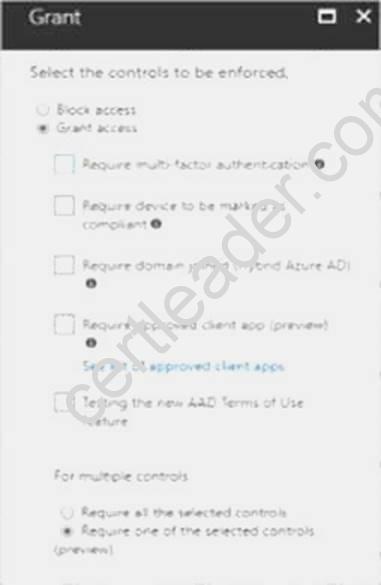
References:
https://blog.lumen21.com/2021/12/15/conditional-access-in-azure-active-directory/
NEW QUESTION 9
From the MFA Server blade, you open the Block/unblock users blade as shown in the exhibit.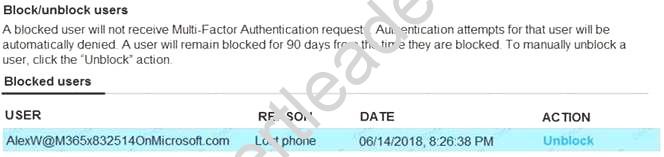
What caused AlexW to be blocked?
- A. An administrator manually blocked the user.
- B. The user reports a fraud alert when prompted for additional authentication.
- C. The user account password expired.
- D. The user entered an incorrect PIN four times within 10 minute
Answer: B
NEW QUESTION 10
DRAG DROP
You have an on-premises file server named Server1 that runs Windows Server 2021. You have an Azure subscription that contains an Azure file share.
You deploy an Azure File Sync Storage Sync Service, and you create a sync group. You need to synchronize files from Server1 to Azure.
Which three actions should you perform in sequence? To answer, move the appropriate actions from the list of actions to the answer area and arrange them in the correct order.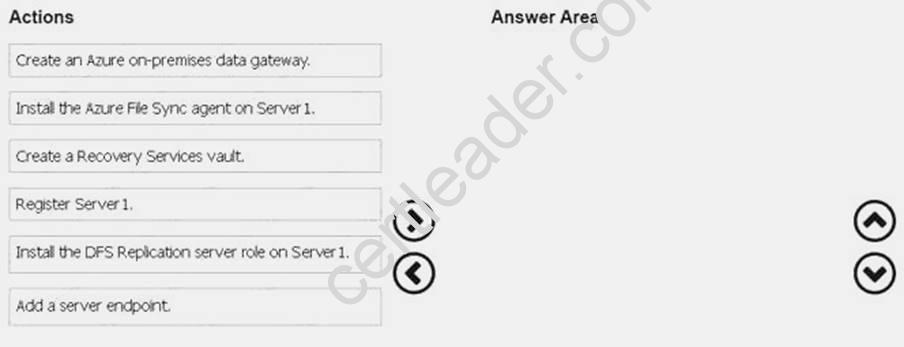
Answer:
Explanation: Step 1: Install the Azure File Sync agent on Server1
The Azure File Sync agent is a downloadable package that enables Windows Server to be synced with an Azure file share
Step 2: Register Server1.
Register Windows Server with Storage Sync Service
Registering your Windows Server with a Storage Sync Service establishes a trust relationship between your server (or cluster) and the Storage Sync Service.
Step 3: Add a server endpoint
Create a sync group and a cloud endpoint.
A sync group defines the sync topology for a set of files. Endpoints within a sync group are kept in sync with each other. A sync group must contain one cloud endpoint, which represents an Azure file share and one or more server endpoints. A server endpoint represents a path on registered server. References: https://docs.microsoft.com/en-us/azure/storage/files/storage-sync-files-deploymentguide
NEW QUESTION 11
SIMULATION
Click to expand each objective. To connect to the Azure portal, type https://portal.azure.com in the browser address bar.
When you are finished performing all the tasks, click the ‘Next’ button.
Note that you cannot return to the lab once you click the ‘Next’ button. Scoring occur in the background while you complete the rest of the exam.
Overview
The following section of the exam is a lab. In this section, you will perform a set of tasks in a live environment. While most functionality will be available to you as it would be in a live environment, some functionality (e.g., copy and paste, ability to navigate to external websites) will not be possible by design. Scoring is based on the outcome of performing the tasks stated in the lab. In other words, it doesn’t matter how you accomplish the task, if you successfully perform it, you will earn credit for that task.
Labs are not timed separately, and this exam may have more than one lab that you must complete. You can use as much time as you would like to complete each lab. But, you should manage your time appropriately to ensure that you are able to complete the lab(s) and all other sections of the exam in the time provided.
Please note that once you submit your work by clicking the Next button within a lab, you will NOT be able to return to the lab.
To start the lab
You may start the lab by clicking the Next button.
Your on-premises network uses an IP address range of 131.107.2.0 to 131.107.2.255. You need to ensure that only devices from the on-premises network can connect to the rg1lod7523691n1 storage account.
What should you do from the Azure portal?
Answer:
Explanation: Step 1: Navigate to the rg1lod7523691n1 storage account.
Step 2: Click on the settings menu called Firewalls and virtual networks. Step 3: Ensure that you have elected to allow access from 'Selected networks'.
Step 4: To grant access to an internet IP range, enter the address range of 131.107.2.0 to 131.107.2.255 (in CIDR format) under Firewall, Address Ranges.
References: https://docs.microsoft.com/en-us/azure/storage/common/storage-network-security
NEW QUESTION 12
Note: This question is part of a series of questions that present the same scenario. Each question in the series contains a unique solution that might meet the stated goals. Some question sets might have more than one correct solution, while others might not have a correct solution.
After you answer a question in this section, you will NOT be able to return to it. As a result, these questions will not appear in the review screen.
You have an Azure Active Directory (Azure AD) tenant named Adatum and an Azure Subscription named Subscription1. Adatum contains a group named Developers. Subscription1 contains a resource group named Dev.
You need to provide the Developers group with the ability to create Azure logic apps in the Dev resource group.
Solution: On Subscription1, you assign the DevTest Labs User role to the Developers group. Does this meet the goal?
- A. Yes
- B. No
Answer: B
Explanation: DevTest Labs User role only lets you connect, start, restart, and shutdown virtual machines in your Azure DevTest Labs.
You would need the Logic App Contributor role. References:
https://docs.microsoft.com/en-us/azure/role-based-access-control/built-in-roles https://docs.microsoft.com/en-us/azure/logic-apps/logic-apps-securing-a-logic-app
NEW QUESTION 13
HOT SPOT
You have an Azure subscription named Subscription1. Subscription1 contains the resources in the following table.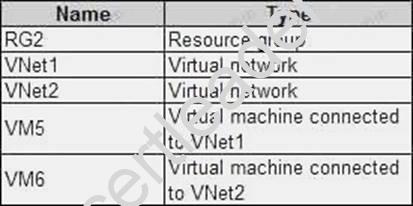
In Azure, you create a private DNS zone named adatum.com. You set the registration virtual network to VNet2. The adatum.com zone is configured as shown in the following exhibit.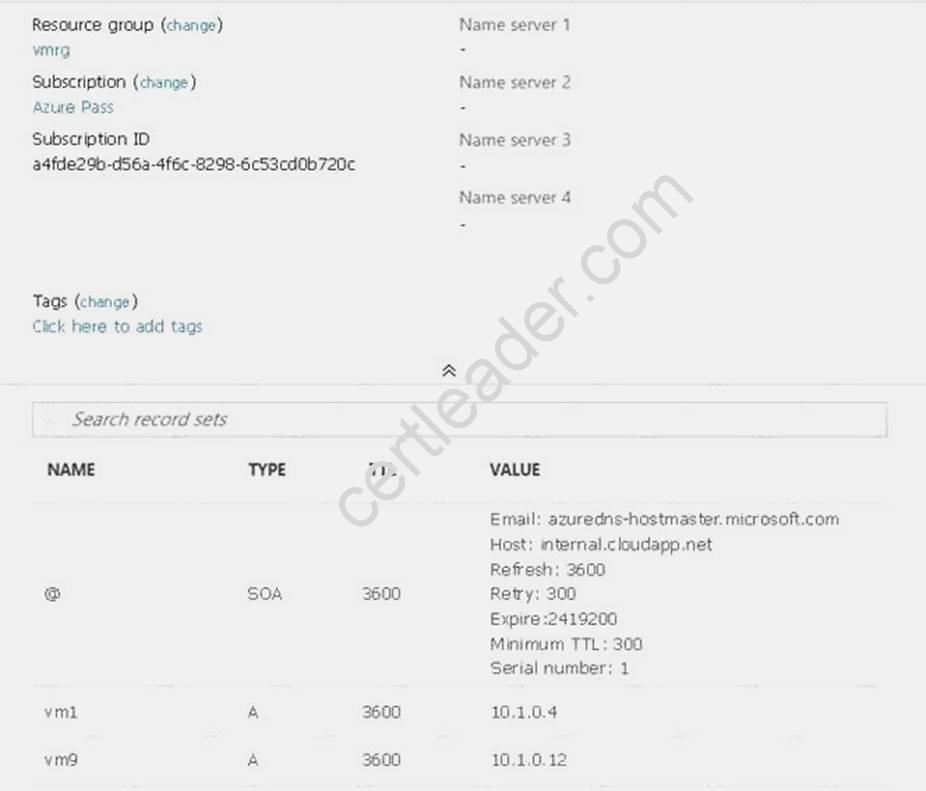
For each of the following statements, select Yes if the statement is true. Otherwise, select No. NOTE: Each correct selection is worth one point.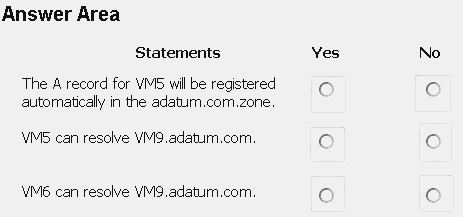
Answer:
Explanation: Box 1: No
Azure DNS provides automatic registration of virtual machines from a single virtual network that's linked to a private zone as a registration virtual network. VM5 does not belong to the registration virtual network though.
Box 2: No
Forward DNS resolution is supported across virtual networks that are linked to the private zone as resolution virtual networks. VM5 does belong to a resolution virtual network.
Box 3: Yes
VM6 belongs to registration virtual network, and an A (Host) record exists for VM9 in the DNS zone. By default, registration virtual networks also act as resolution virtual networks, in the sense that DNS resolution against the zone works from any of the virtual machines within the registration virtual network.
References: https://docs.microsoft.com/en-us/azure/dns/private-dns-overview
NEW QUESTION 14
HOT SPOT
Your network contains an Active Directory domain named adatum.com and an Azure Active Directory (Azure AD) tenant named adatum.onmicrosoft.com.
Adatum.com contains the user accounts in the following table.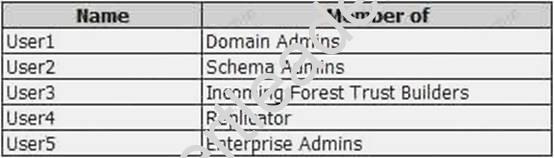
Adatum.onmicrosoft.com contains the user accounts in the following table.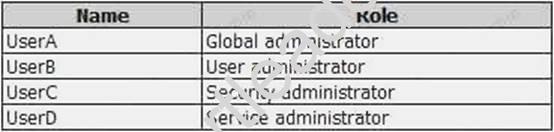
You need to implement Azure AD Connect. The solution must follow the principle of least privilege. Which user accounts should you use? To answer, select the appropriate options in the answer area. NOTE: Each correct selection is worth one point.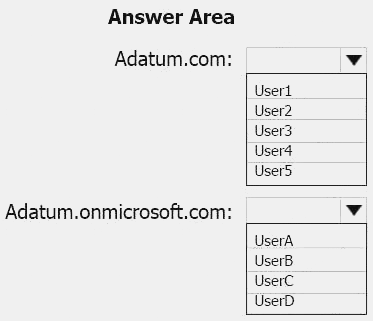
Answer:
Explanation: Box 1: User5
In Express settings, the installation wizard asks for the following: AD DS Enterprise Administrator credentials
Azure AD Global Administrator credentials
The AD DS Enterprise Admin account is used to configure your on-premises Active Directory. These credentials are only used during the installation and are not used after the installation has
completed. The Enterprise Admin, not the Domain Admin should make sure the permissions in Active Directory can be set in all domains.
Box 2: UserA
Azure AD Global Admin credentials credentials are only used during the installation and are not used after the installation has completed. It is used to create the Azure AD Connector account used for synchronizing changes to Azure AD. The account also enables sync as a feature in Azure AD. References: https://docs.microsoft.com/en-us/azure/active-directory/connect/active-directoryaadconnect- accounts-permissions
NEW QUESTION 15
HOT SPOT
You have an Azure Storage accounts as shown in the following exhibit.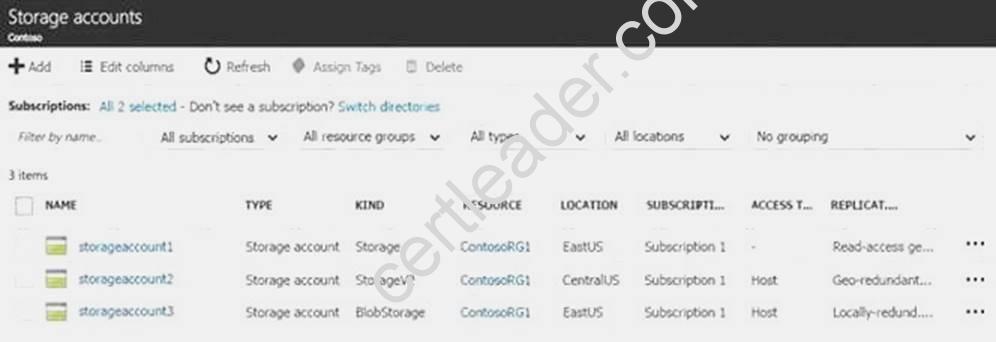
Use the drop-down menus to select the answer choice that completes each statement based on the information presented in the graphic.
NOTE: Each correct selection is worth one point.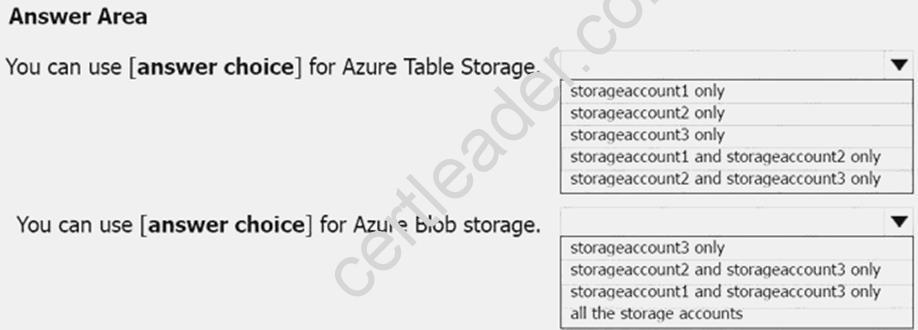
Answer:
Explanation: Box 1: storageaccount1 and storageaccount2 only Box 2: All the storage accounts
Note: The three different storage account options are: General-purpose v2 (GPv2) accounts, Generalpurpose v1 (GPv1) accounts, and Blob storage accounts.
General-purpose v2 (GPv2) accounts are storage accounts that support all of the latest features for blobs, files, queues, and tables.
Blob storage accounts support all the same block blob features as GPv2, but are limited to supporting only block blobs.
General-purpose v1 (GPv1) accounts provide access to all Azure Storage services, but may not have the latest features or the lowest per gigabyte pricing.
References: https://docs.microsoft.com/en-us/azure/storage/common/storage-account-options
NEW QUESTION 16
You need to implement a backup solution for App1 after the application is moved. What should you create first?
- A. a recovery plan
- B. an Azure Backup Server
- C. a backup policy
- D. a Recovery Services vault
Answer: D
Explanation: A Recovery Services vault is a logical container that stores the backup data for each protected resource, such as Azure VMs. When the backup job for a protected resource runs, it creates a recovery point inside the Recovery Services vault.
Scenario:
There are three application tiers, each with five virtual machines.
Move all the virtual machines for App1 to Azure.
Ensure that all the virtual machines for App1 are protected by backups.
References: https://docs.microsoft.com/en-us/azure/backup/quick-backup-vm-portal
NEW QUESTION 17
HOT SPOT
You have an Azure subscription named Subscription1.
In Subscription1, you create an Azure file share named share1.
You create a shared access signature (SAS) named SAS1 as shown in the following exhibit.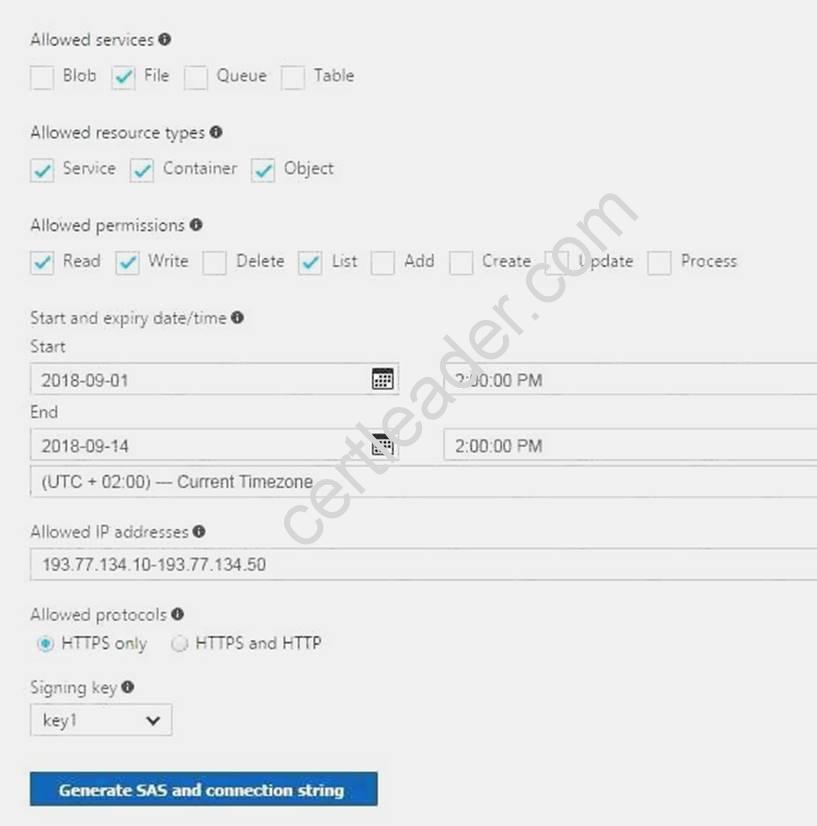
To answer, select the appropriate options in the answer area. NOTE: Each correct selection is worth one point.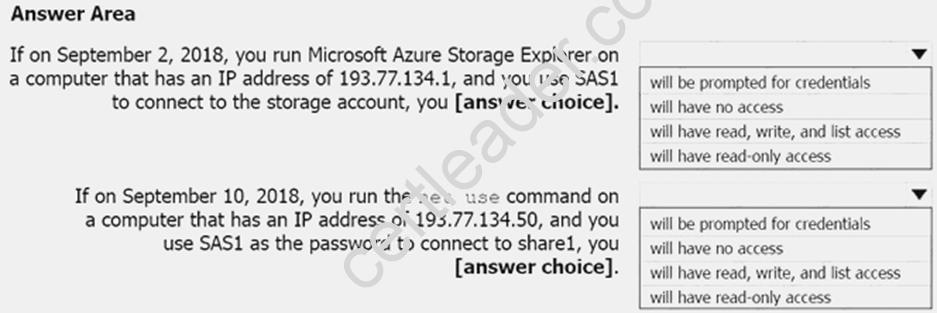
Answer:
Explanation: Box 1: Will be prompted for credentials
Azure Storage Explorer is a standalone app that enables you to easily work with Azure Storage data on Windows, macOS, and Linux. It is used for connecting to and managing your Azure storage accounts.
Box 2: Will have read, write, and list access
The net use command is used to connect to file shares. References:
https://docs.microsoft.com/en-us/azure/storage/common/storage-dotnet-shared-access-signaturepart- https://docs.microsoft.com/en-us/azure/vs-azure-tools-storage-manage-with-storageexplorer? tabs=windows
NEW QUESTION 18
You are configuring serverless computing in Azure.
You need to receive an email message whenever a resource is created in or deleted from a resource group. Which three actions should you perform in sequence? To answer, move the appropriate actions from the list of actions to the answer area and arrange them in the correct order.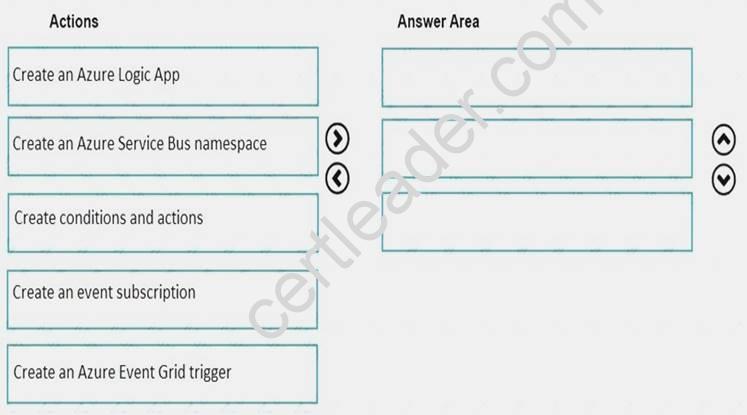
Answer:
Explanation: Step 1: Create an event subscription
When you subscribe to events for a resource group, your endpoint receives all events for that resource group. Step 2: Create an Azure Event Grid trigger
Step 3: Create conditions and actions References:
https://docs.microsoft.com/en-us/azure/event-grid/event-schema-resource-groups
NEW QUESTION 19
SIMULATION
Click to expand each objective. To connect to the Azure portal, type https://portal.azure.com in the browser address bar.
When you are finished performing all the tasks, click the ‘Next’ button.
Note that you cannot return to the lab once you click the ‘Next’ button. Scoring occur in the background while you complete the rest of the exam.
Overview
The following section of the exam is a lab. In this section, you will perform a set of tasks in a live environment. While most functionality will be available to you as it would be in a live environment, some functionality (e.g., copy and paste, ability to navigate to external websites) will not be possible by design. Scoring is based on the outcome of performing the tasks stated in the lab. In other words, it doesn’t matter how you accomplish the task, if you successfully perform it, you will earn credit for that task.
Labs are not timed separately, and this exam may have more than one lab that you must complete. You can use as much time as you would like to complete each lab. But, you should manage your time appropriately to ensure that you are able to complete the lab(s) and all other sections of the exam in the time provided.
Please note that once you submit your work by clicking the Next button within a lab, you will NOT be able to return to the lab.
To start the lab
You may start the lab by clicking the Next button.
Another administrator attempts to establish connectivity between two virtual networks named VNET1 and VNET2.
The administrator reports that connections across the virtual networks fail.
You need to ensure that network connections can be established successfully between VNET1 and VNET2 as quickly as possible.
What should you do from the Azure portal?
Answer:
Explanation: You can connect one VNet to another VNet using either a Virtual network peering, or an Azure VPN Gateway.
To create a virtual network gateway
Step1 : In the portal, on the left side, click +Create a resource and type 'virtual network gateway' in search. Locate Virtual network gateway in the search return and click the entry. On the Virtual network gateway page, click Create at the bottom of the page to open the Create virtual network gateway page.
Step 2: On the Create virtual network gateway page, fill in the values for your virtual network gateway.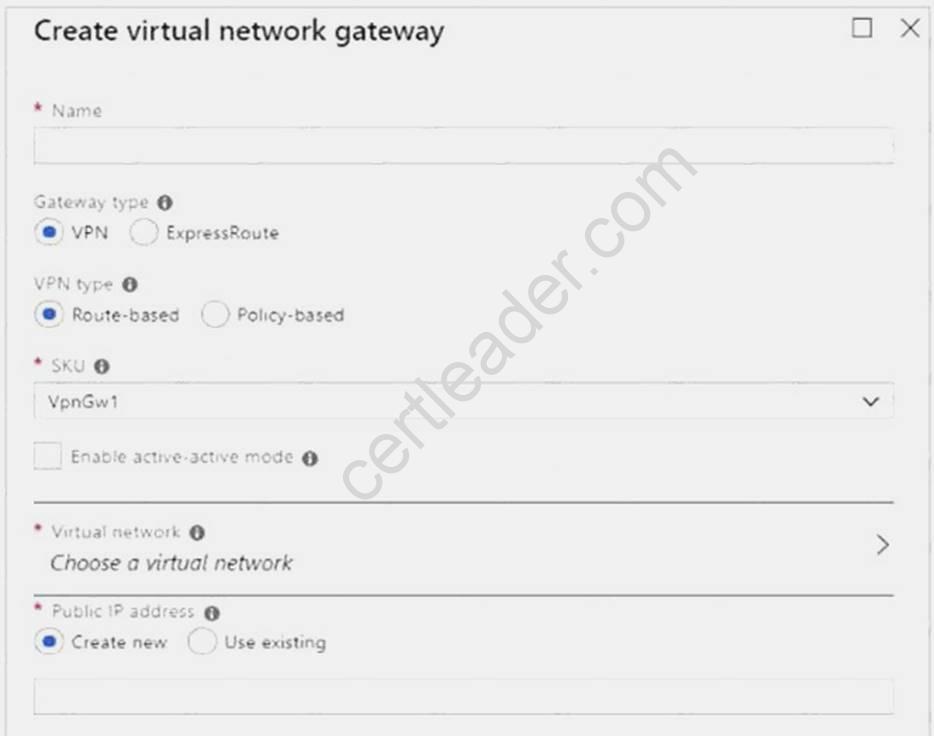
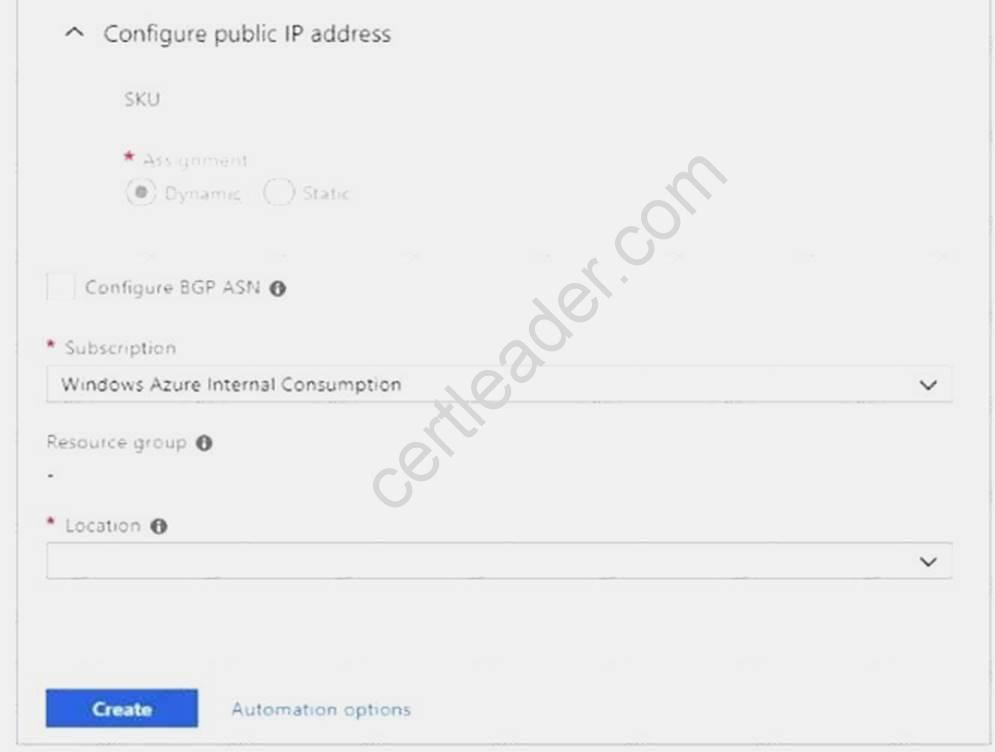
Name: Name your gateway. This is not the same as naming a gateway subnet. It's the name of the gateway object you are creating.
Gateway type: Select VPN. VPN gateways use the virtual network gateway type VPN.
Virtual network: Choose the virtual network to which you want to add this gateway. Click Virtual network to open the 'Choose a virtual network' page. Select the VNet. If you don't see your VNet, make sure the Location field is pointing to the region in which your virtual network is located. Gateway subnet address range: You will only see this setting if you did not previously create a gateway subnet for your virtual network. If you previously created a valid gateway subnet, this setting will not appear.
Step 4: Select Create New to create a Gateway subnet.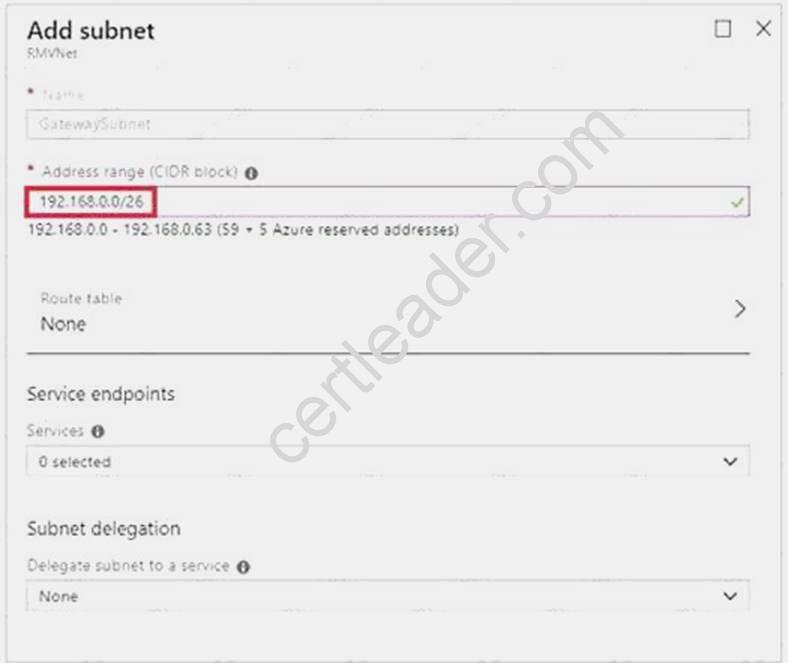
Step 5: Click Create to begin creating the VPN gateway. The settings are validated and you'll see the "Deploying Virtual network gateway" tile on the dashboard. Creating a gateway can take up to 45 minutes. You may need to refresh your portal page to see the completed status.
References: https://docs.microsoft.com/en-us/azure/vpn-gateway/vpn-gateway-howto-vnet-vnetresource-manager-portal?
P.S. Easily pass AZ-102 Exam with 195 Q&As Certleader Dumps & pdf Version, Welcome to Download the Newest Certleader AZ-102 Dumps: https://www.certleader.com/AZ-102-dumps.html (195 New Questions)