AZ-102 Study Guides for Microsoft certification, Real Success Guaranteed with Updated AZ-102 Dumps Questions. 100% PASS AZ-102 Microsoft Azure Administrator Certification Transition exam Today!
Online AZ-102 free questions and answers of New Version:
NEW QUESTION 1
You recently deployed a web app named homepagelod7509087.
You need to back up the code used for the web app and to store the code in the homepagelod7509Q87 storage account. The solution must ensure that a new backup is created daily. What should you do from the Azure portal?
Answer:
Explanation: Step 1:
Locate and select the web app homepagelod7509087, select Backups. The Backups page is displayed.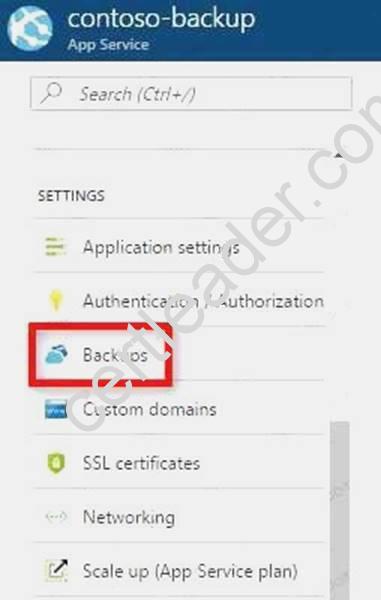
Step 2:
In the Backup page, Click Configure. Step 3:
In the Backup Configuration page, click Storage: Not configured to configure a storage account.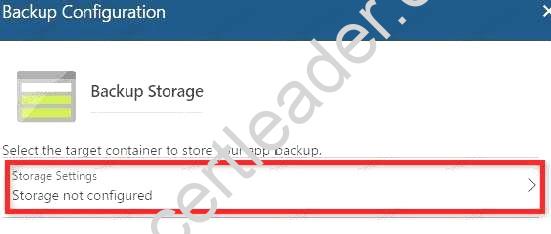
Step 4:
Choose your backup destination by selecting a Storage Account and Container. Select the homepagelod7509087 storage account.
Step 5:
In the Backup Configuration page that is still left open, select Scheduled backup On, and configure daily backups.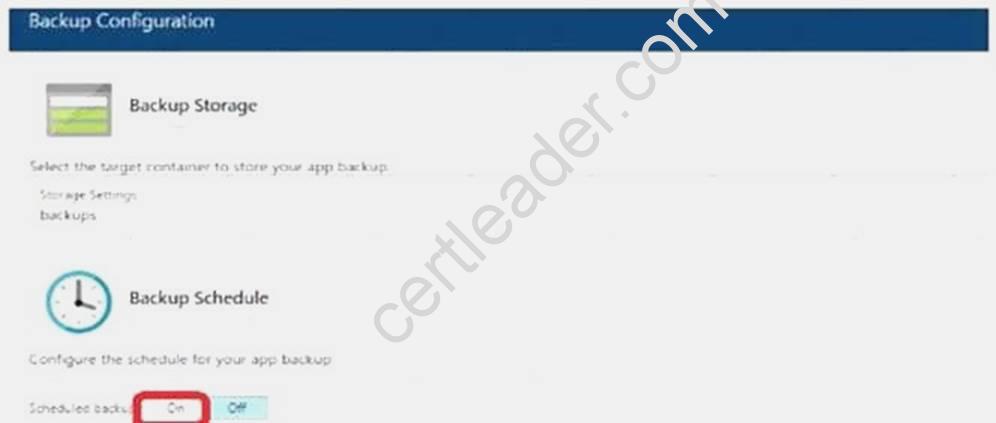
Step 6:
In the Backup Configuration page, click Save. Step 7:
In the Backups page, click Backup.
References:
https://docs.microsoft.com/en-us/azure/app-service/web-sites-backup
NEW QUESTION 2
HOT SPOT
Your network contains an Active Directory domain named adatum.com and an Azure Active Directory (Azure AD) tenant named adatum.onmicrosoft.com.
Adatum.com contains the user accounts in the following table.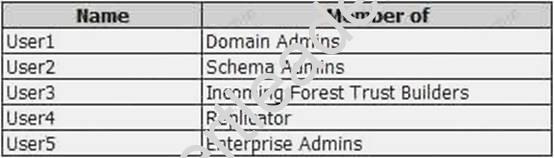
Adatum.onmicrosoft.com contains the user accounts in the following table.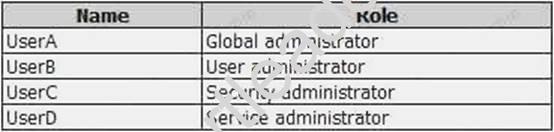
You need to implement Azure AD Connect. The solution must follow the principle of least privilege. Which user accounts should you use? To answer, select the appropriate options in the answer area. NOTE: Each correct selection is worth one point.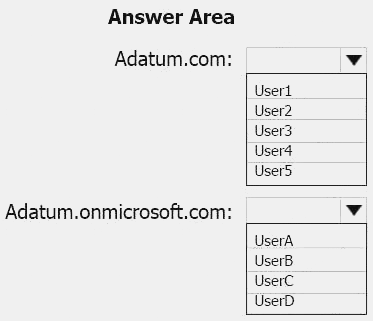
Answer:
Explanation: Box 1: User5
In Express settings, the installation wizard asks for the following: AD DS Enterprise Administrator credentials
Azure AD Global Administrator credentials
The AD DS Enterprise Admin account is used to configure your on-premises Active Directory. These credentials are only used during the installation and are not used after the installation has
completed. The Enterprise Admin, not the Domain Admin should make sure the permissions in Active Directory can be set in all domains.
Box 2: UserA
Azure AD Global Admin credentials credentials are only used during the installation and are not used after the installation has completed. It is used to create the Azure AD Connector account used for synchronizing changes to Azure AD. The account also enables sync as a feature in Azure AD. References: https://docs.microsoft.com/en-us/azure/active-directory/connect/active-directoryaadconnect- accounts-permissions
NEW QUESTION 3
HOT SPOT
You have an Azure subscription named Subscroption1. In Subscription1, you create an alert rule named Alert1.
The Alert1 action group is configured as shown in the following exhibit.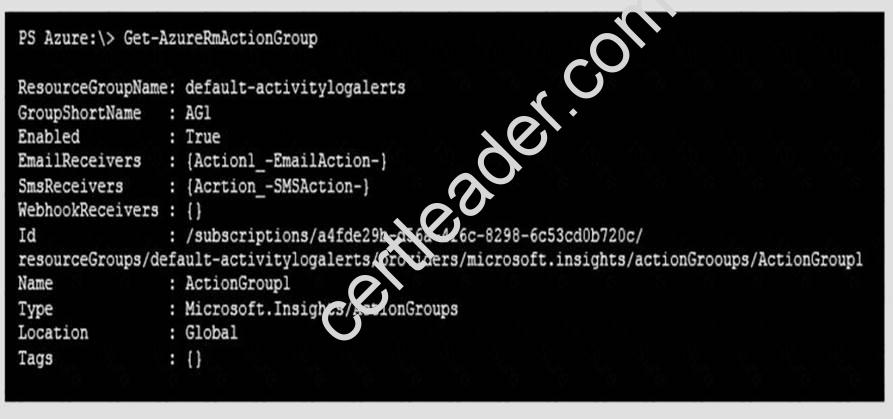
Alert1 alert criteria is triggered every minute.
Use the drop-down menus to select the answer choice that completes each statement based on the information presented in the graphic.
NOTE: Each correct selection is worth one point.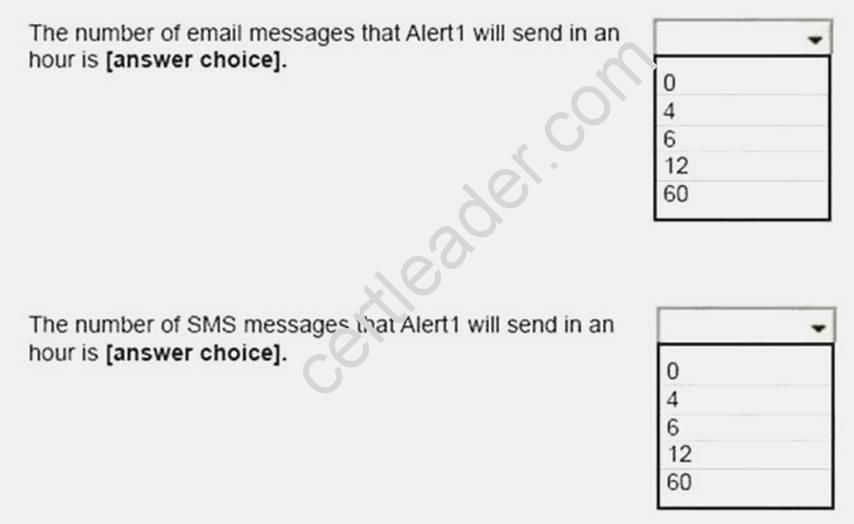
Answer:
Explanation: Box 1: 60
One alert per minute will trigger one email per minute. Box 2: 12
No more than 1 SMS every 5 minutes can be send, which equals 12 per hour.
Note: Rate limiting is a suspension of notifications that occurs when too many are sent to a particular phone number, email address or device. Rate limiting ensures that alerts are manageable and actionable.
The rate limit thresholds are:
SMS: No more than 1 SMS every 5 minutes. Voice: No more than 1 Voice call every 5 minutes. Email: No more than 100 emails in an hour. Other actions are not rate limited.
References:
https://github.com/MicrosoftDocs/azure-docs/blob/master/articles/monitoring-anddiagnostics/ monitoring-overview-alerts.md
NEW QUESTION 4
HOT SPOT
You are evaluating the name resolution for the virtual machines after the planned implementation of the Azure networking infrastructure.
For each of the following statements, select Yes if the statement is true. Otherwise, select No.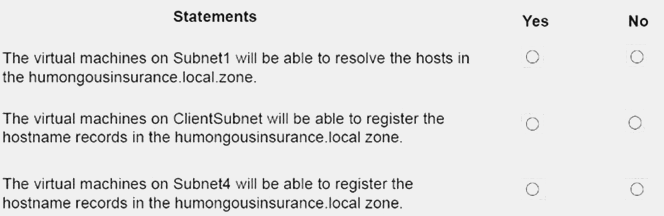
Answer:
Explanation: Scenario: You plan to create a private DNS zone named humongousinsurance.local and set the registration network to the ClientResources-VNet virtual network.
There is a virtual network named ClientResources-VNet that will contain one subnet named ClientSubnet
Note: Azure DNS provides the following capabilities:
Automatic registration of virtual machines from a single virtual network that's linked to a private zone as a registration virtual network.
Forward DNS resolution is supported across virtual networks that are linked to the private zone as resolution virtual networks.
Reverse DNS lookup is supported within the virtual-network scope.
References:
https://docs.microsoft.com/en-us/azure/dns/private-dns-overview
NEW QUESTION 5
HOT SPOT
You need to recommend a solution for App1. The solution must meet the technical requirements. What should you include in the recommendation? To answer, select the appropriate options in the answer area.
NOTE: Each correct selection is worth one point.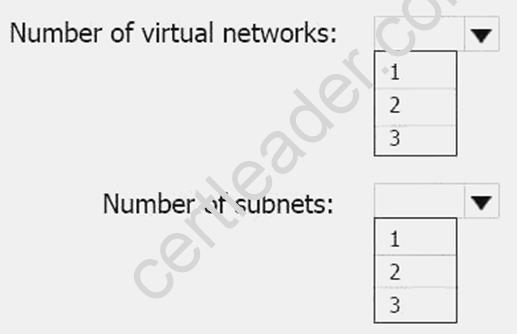
Answer:
Explanation: This reference architecture shows how to deploy VMs and a virtual network configured for an N-tier application, using SQL Server on Windows for the data tier.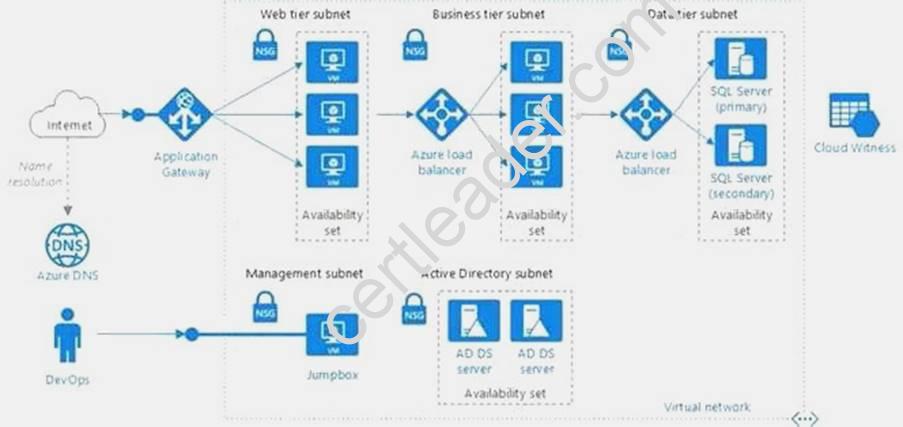
Scenario: You have a public-facing application named App1. App1 is comprised of the following three tiers:
A SQL database A web front end
A processing middle tier
Each tier is comprised of five virtual machines. Users access the web front end by using HTTPS only. Technical requirements include:
Move all the virtual machines for App1 to Azure. Minimize the number of open ports between the App1 tiers.
References: https://docs.microsoft.com/en-us/azure/architecture/reference-architectures/n-tier/n-tier-sql-server
NEW QUESTION 6
Note This question is part of a series of questions that present the same seer Some question sets might have more than one correct solution, while others might not have a correct solution.
After you answer a question in this section, you will NOT be able to return to it. As a result, these questions will not appear in the review screen.
You manage a virtual network named VNet1 that is hosted in the West US Azure region. VNet1 hosts two virtual machines named VM1 and VM2 that run Windows Server.
You need to inspect all the network traffic from VM1 to VM2 for a period of three hours. Solution: From Performance Monitor, you create a Data Collector Set (DCS)
Does this meet the goal?
- A. Yes
- B. No
Answer: B
Explanation: You should use Azure Network Watcher. References:
https://docs.microsoft.com/en-us/azure/network-watcher/network-watcher-monitoring-overview
NEW QUESTION 7
Note: This questions is part of a series of questions that present the same scenario. Each questions in the series contains a unique solution that might meet the stated goals. Some questions sets might have more than one correct solution, while others might not have a correct solution. After you answer a questions in this section, you will NOT be able to return to it. As a result, these questions will not appear in the review screen.
You have an Azure subscription that contains 10 virtual networks. The virtual networks are hosted in separate resource groups.
Another administrator plans to create several network security groups (NSGs) in the subscription. You need to ensure that when an NSG is created, it automatically blocks TCP port 8080 between the virtual networks.
Solution: You configure a custom policy definition, and then you assign the policy to the subscription. Does this meet the goal?
- A. Yes
- B. No
Answer: A
Explanation: Resource policy definition used by Azure Policy enables you to establish conventions for resources in your organization by describing when the policy is enforced and what effect to take. By defining conventions, you can control costs and more easily manage your resources.
References: https://docs.microsoft.com/en-us/azure/azure-policy/policy-definition
NEW QUESTION 8
You have two Azure virtual networks named VNet1 and VNet2. VNet1 contains an Azure virtual
machine named VM1. VNet2 contains an Azure virtual machine named VM2. VM1 hosts a frontend application that connects to VM2 to retrieve data. Users report that the frontend application is slower than usual.
You need to view the average round-trip time (RTT) of the packets from VM1 to VM2. Which Azure Network Watcher feature should you use?
- A. NSG flow logs
- B. Connection troubleshoot
- C. IP flow verify
- D. Connection monitor
Answer: D
Explanation: The Connection Monitor feature in Azure Network Watcher is now generally available in all public regions. Connection Monitor provides you RTT values on a per-minute granularity. You can monitor a direct TCP connection from a virtual machine to a virtual machine, FQDN, URI, or IPv4 address. References:
https://azure.microsoft.com/en-us/updates/general-availability-azure-network-watcher-connectionmonitor- in-all-public-regions/
NEW QUESTION 9
Which blade should you instruct the finance department auditors to use?
- A. invoices
- B. partner information
- C. cost analysis
- D. External services
Answer: A
NEW QUESTION 10
SIMULATION
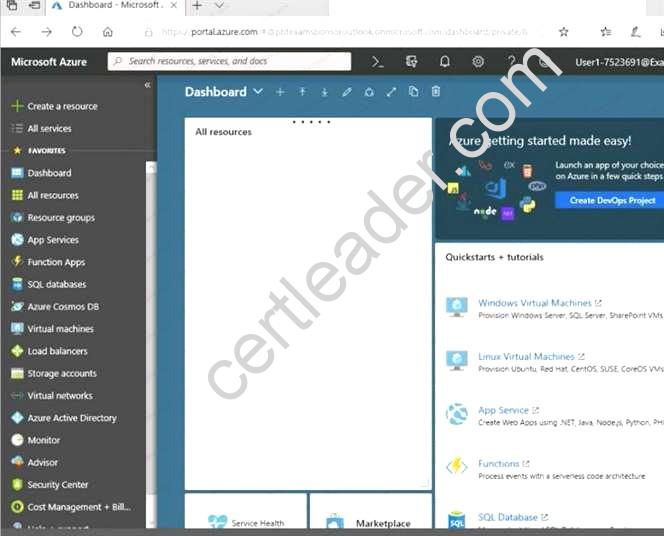
Click to expand each objective. To connect to the Azure portal, type https://portal.azure.com in the browser address bar.
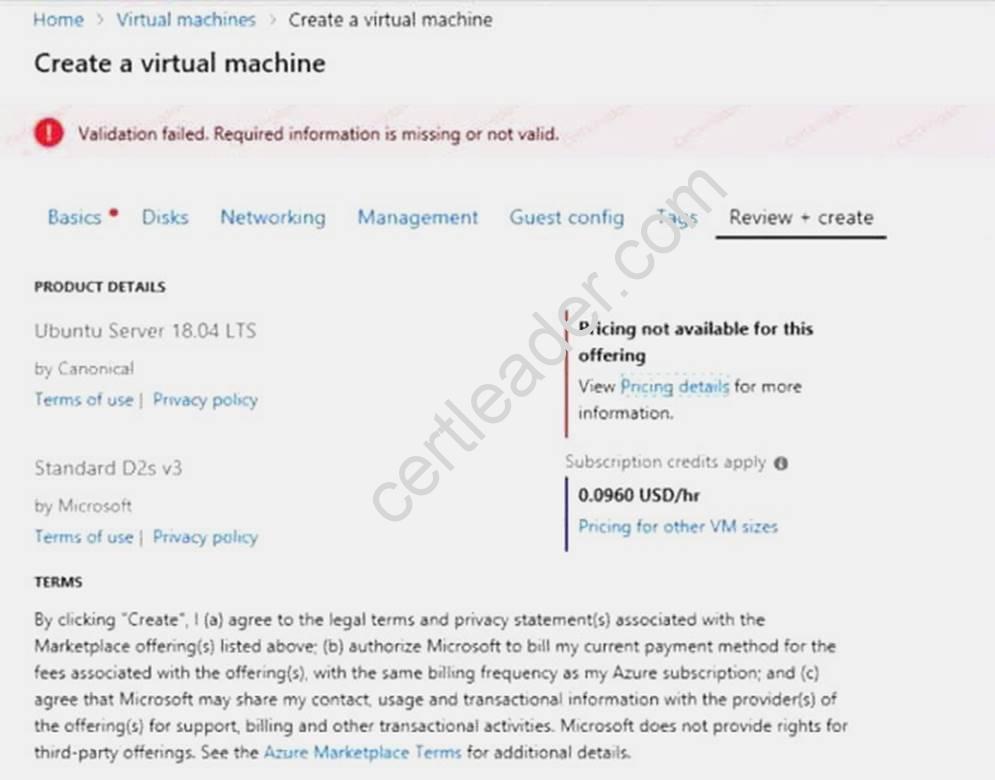
When you are finished performing all the tasks, click the ‘Next’ button.
Note that you cannot return to the lab once you click the ‘Next’ button. Scoring occur in the background while you complete the rest of the exam.
Overview
The following section of the exam is a lab. In this section, you will perform a set of tasks in a live environment. While most functionality will be available to you as it would be in a live environment, some functionality (e.g., copy and paste, ability to navigate to external websites) will not be possible by design. Scoring is based on the outcome of performing the tasks stated in the lab. In other words, it doesn’t matter how you accomplish the task, if you successfully perform it, you will earn credit for that task.
Labs are not timed separately, and this exam may have more than one lab that you must complete. You can use as much time as you would like to complete each lab. But, you should manage your time appropriately to ensure that you are able to complete the lab(s) and all other sections of the exam in the time provided.
Please note that once you submit your work by clicking the Next button within a lab, you will NOT be able to return to the lab.
To start the lab
You may start the lab by clicking the Next button.
You plan to deploy several Azure virtual machines and to connect them to a virtual network named VNET1007.
You need to ensure that future virtual machines in VNET1007 can register their name in an internal DNS zone named corp7523690.com. The zone must NOT be hosted on a virtual machine.
What should you do from Azure Cloud Shell?
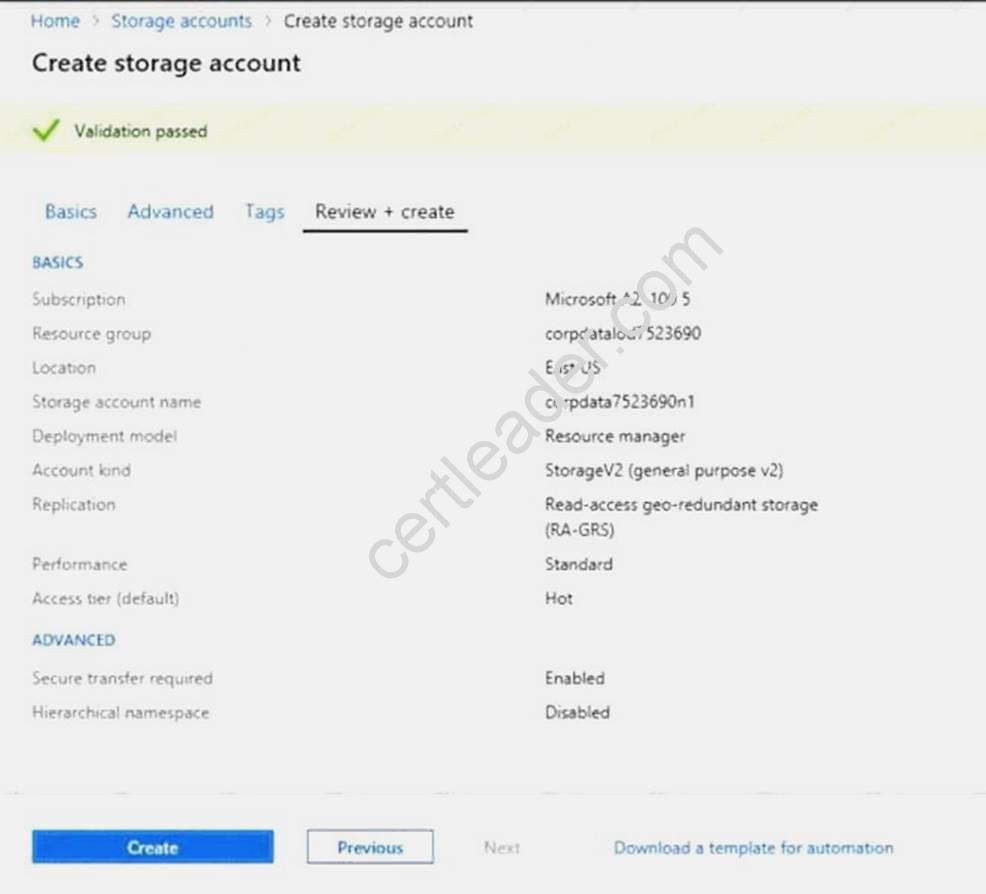
To complete this task, start Azure Cloud Shell and select PowerShell(Linux). Click Show Advanced Settings, and then enter corp7523690n1 in the Storage account text box and File1 in the File share text box. Click Create storage, and then complete the task.
Answer:
Explanation: Step 1: New-AzureRMResourceGroup -name MyResourceGroup
Before you create the DNS zone, create a resource group to contain the DNS zone.
Step 2: New-AzureRmDnsZone -Name corp7523690.com -ResourceGroupName MyResourceGroup A DNS zone is created by using the New-AzureRmDnsZone cmdlet. This creates a DNS zone called corp7523690.com in the resource group called MyResourceGroup.
References: https://docs.microsoft.com/en-us/azure/dns/dns-getstarted-powershell
NEW QUESTION 11
You have an Azure subscription that contains a storage account named account1.
You plan to upload the disk files of a virtual machine to account1 from your on-premises network. The on-premises network uses a public IP address space of 131.107.1.0/24.
You plan to use the disk files to provision an Azure virtual machine named VM1. VM1 will be attached to a virtual network named VNet1. VNet1 uses an IP address space of 192.168.0.0/24. You need to configure account1 to meet the following requirements:
Ensure that you can upload the disk files to account1. Ensure that you can attach the disks to VM1. Prevent all other access to account1.
Which two actions should you perform? Each correct selection presents part of the solution. NOTE: Each correct selection is worth one point.
- A. From the Firewalls and virtual networks blade of account1, add the 131.107.1.0/24 IP address range.
- B. From the Firewalls and virtual networks blade of account1, select Selected networks.
- C. From the Firewalls and virtual networks blade of acount1, add VNet1.
- D. From the Firewalls and virtual networks blade of account1, select Allow trusted Microsoft services toaccess this storage account.
- E. From the Service endpoints blade of VNet1, add a service endpoin
Answer: BE
Explanation: B: By default, storage accounts accept connections from clients on any network. To limit access to selected networks, you must first change the default action.
Azure portal
Navigate to the storage account you want to secure.
Click on the settings menu called Firewalls and virtual networks.
To deny access by default, choose to allow access from 'Selected networks'. To allow traffic from all networks, choose to allow access from 'All networks'.
Click Save to apply your changes.
E: Grant access from a Virtual Network
Storage accounts can be configured to allow access only from specific Azure Virtual Networks. By enabling a Service Endpoint for Azure Storage within the Virtual Network, traffic is ensured an optimal route to the Azure Storage service. The identities of the virtual network and the subnet are also transmitted with each request.
References: https://docs.microsoft.com/en-us/azure/storage/common/storage-network-security
NEW QUESTION 12
SIMULATION
Click to expand each objective. To connect to the Azure portal, type https://portal.azure.com in the browser address bar.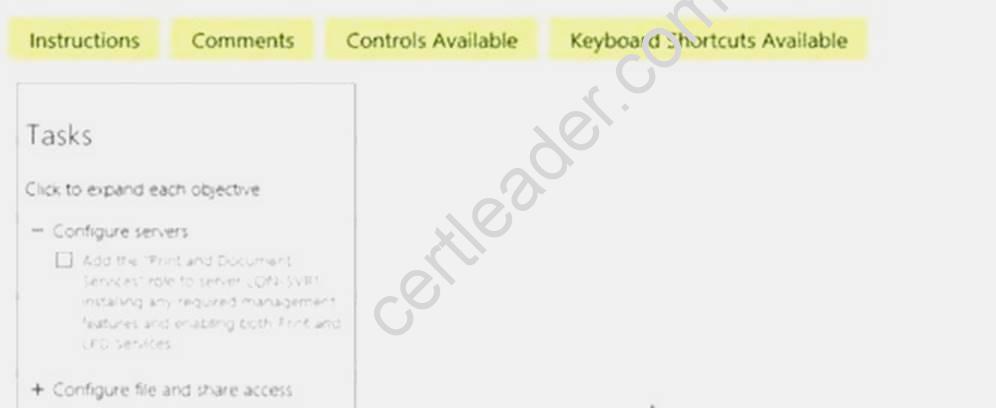
When you are finished performing all the tasks, click the ‘Next’ button.
Note that you cannot return to the lab once you click the ‘Next’ button. Scoring occur in the background while you complete the rest of the exam.
Overview
The following section of the exam is a lab. In this section, you will perform a set of tasks in a live environment. While most functionality will be available to you as it would be in a live environment, some functionality (e.g., copy and paste, ability to navigate to external websites) will not be possible by design. Scoring is based on the outcome of performing the tasks stated in the lab. In other words, it doesn’t matter how you accomplish the task, if you successfully perform it, you will earn credit for that task.
Labs are not timed separately, and this exam may have more than one lab that you must complete. You can use as much time as you would like to complete each lab. But, you should manage your time appropriately to ensure that you are able to complete the lab(s) and all other sections of the exam in the time provided.
Please note that once you submit your work by clicking the Next button within a lab, you will NOT be able to return to the lab.
To start the lab
You may start the lab by clicking the Next button.
Another administrator attempts to establish connectivity between two virtual networks named VNET1 and VNET2.
The administrator reports that connections across the virtual networks fail.
You need to ensure that network connections can be established successfully between VNET1 and VNET2 as quickly as possible.
What should you do from the Azure portal?
Answer:
Explanation: You can connect one VNet to another VNet using either a Virtual network peering, or an Azure VPN Gateway.
To create a virtual network gateway
Step1 : In the portal, on the left side, click +Create a resource and type 'virtual network gateway' in search. Locate Virtual network gateway in the search return and click the entry. On the Virtual network gateway page, click Create at the bottom of the page to open the Create virtual network gateway page.
Step 2: On the Create virtual network gateway page, fill in the values for your virtual network gateway.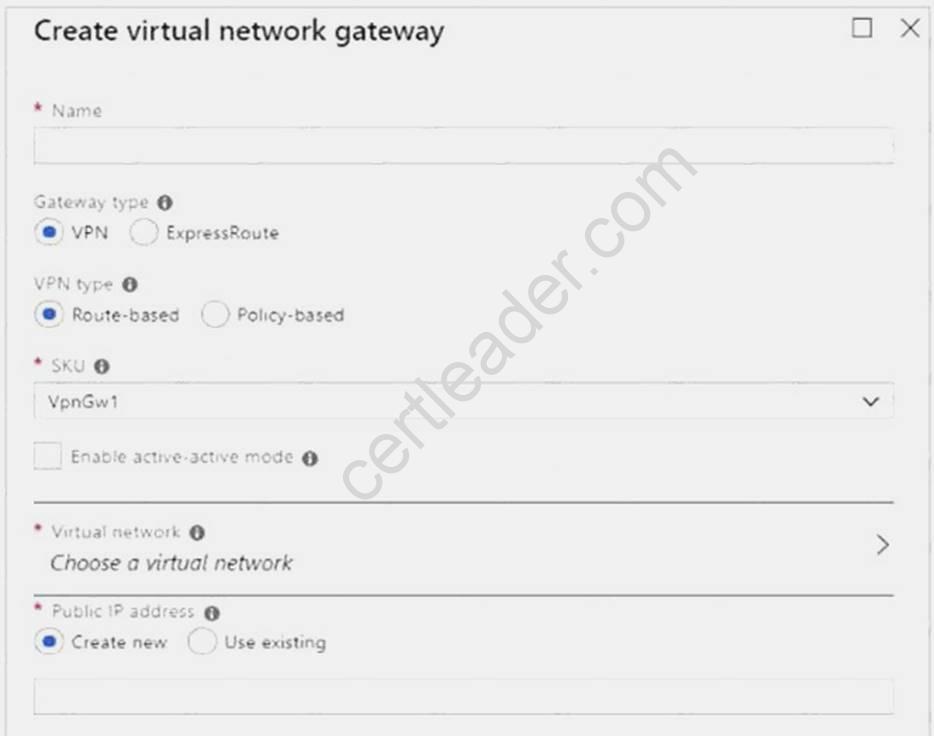
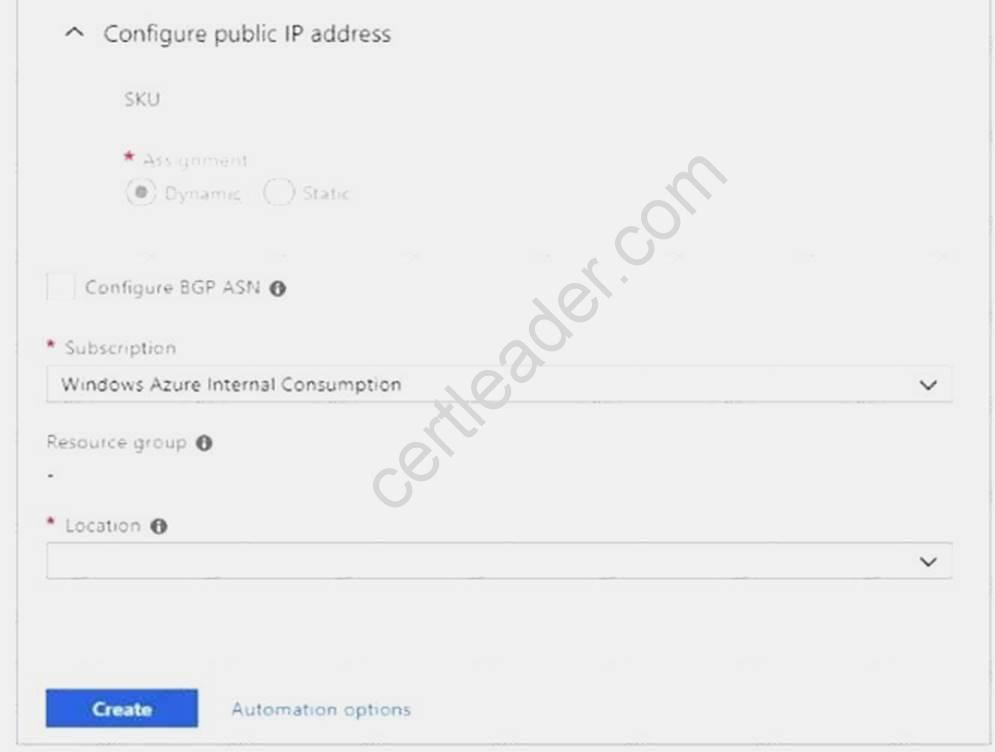
Name: Name your gateway. This is not the same as naming a gateway subnet. It's the name of the gateway object you are creating.
Gateway type: Select VPN. VPN gateways use the virtual network gateway type VPN.
Virtual network: Choose the virtual network to which you want to add this gateway. Click Virtual network to open the 'Choose a virtual network' page. Select the VNet. If you don't see your VNet, make sure the Location field is pointing to the region in which your virtual network is located. Gateway subnet address range: You will only see this setting if you did not previously create a gateway subnet for your virtual network. If you previously created a valid gateway subnet, this setting will not appear.
Step 4: Select Create New to create a Gateway subnet.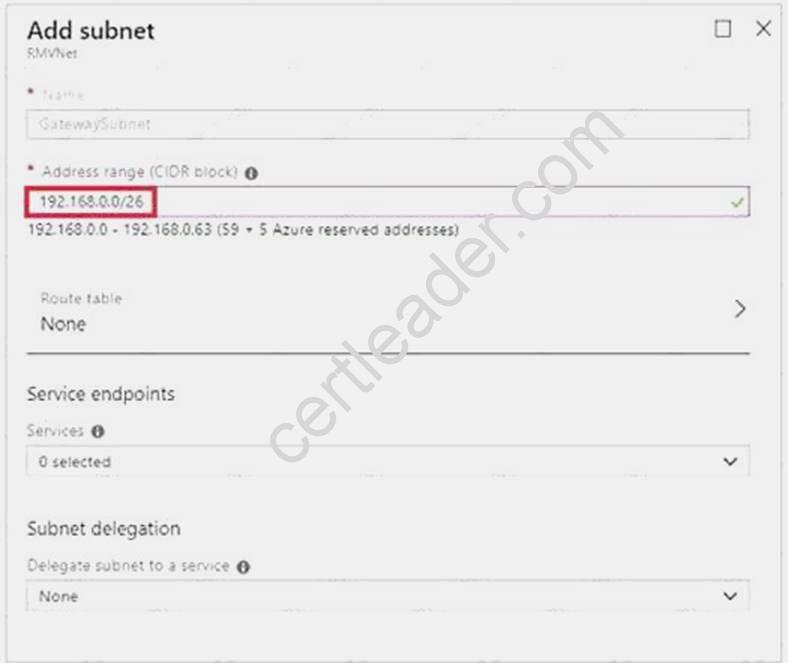
Step 5: Click Create to begin creating the VPN gateway. The settings are validated and you'll see the "Deploying Virtual network gateway" tile on the dashboard. Creating a gateway can take up to 45 minutes. You may need to refresh your portal page to see the completed status.
References: https://docs.microsoft.com/en-us/azure/vpn-gateway/vpn-gateway-howto-vnet-vnetresource-manager-portal?
NEW QUESTION 13
Your marketing team creates a new website that you must load balance for 99.99 percent availability. You need to deploy and configure a solution for both machines in the Web-AS availability set to load balance the website over HTTP. The solution must use the load balancer your resource group.
What should you do from the Azure portal?
Answer:
Explanation: To distribute traffic to the VMs in the availability set, a back-end address pool contains the IP addresses of the virtual NICs that are connected to the load balancer. Create the back-end address pool to include the VMs in the availability set.
Step 1:
Select All resources on the left menu, and then select LoadBalancer from the resource list. Step 2:
Under Settings, select Backend pools, and then select Add. Step 3:
On the Add a backend pool page, select the Web-AS availability set, and then select OK: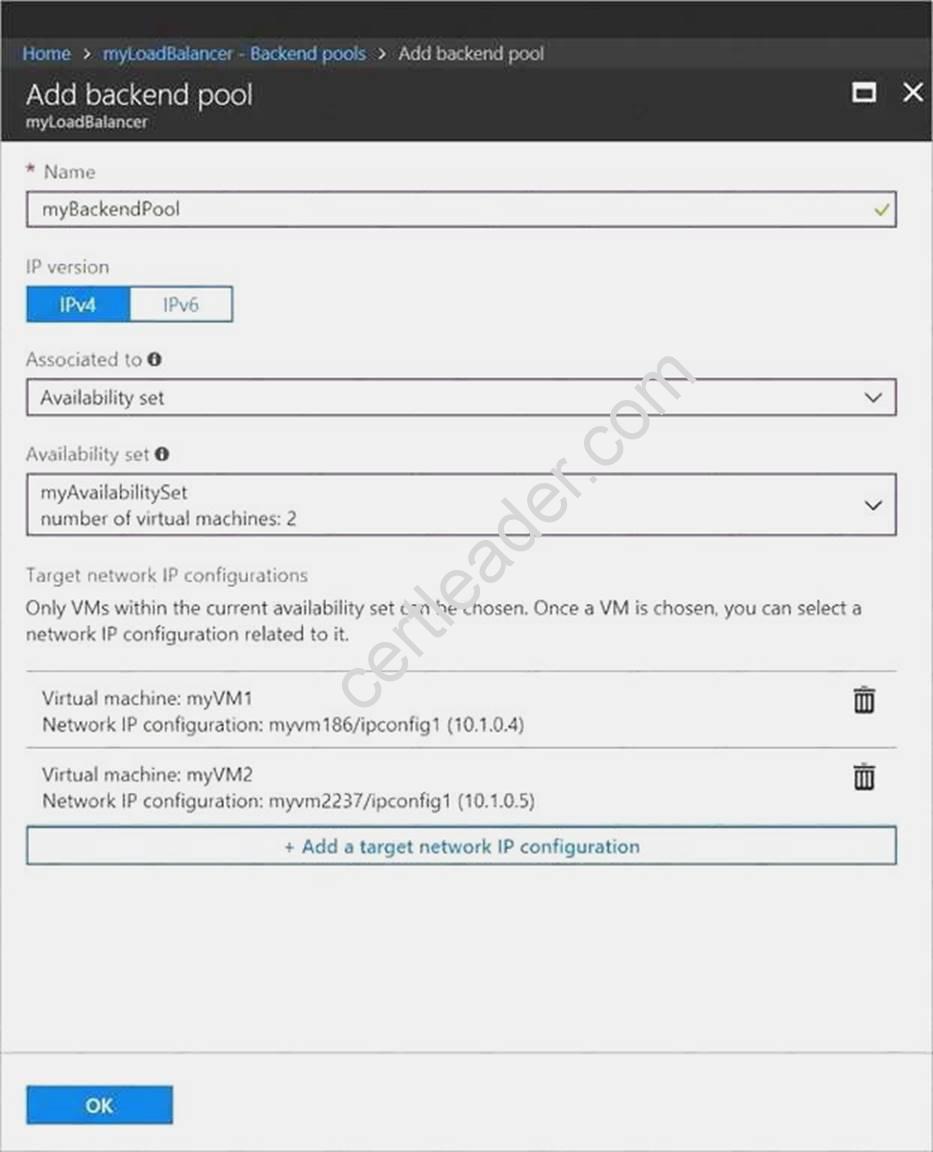
References:
https://docs.microsoft.com/en-us/azure/load-balancer/quickstart-create-basic-load-balancer-portal
NEW QUESTION 14
You have a Microsoft SQL Server Always On availability group on Azure virtual machines. You need to configure an Azure internal load balancer as a listener for the availability group. What should you do?
- A. Enable Floating IP.
- B. Set Session persistence to Client IP and protocol.
- C. Set Session persistence to Client IP.
- D. Create an HTTP health probe on port 1433.
Answer: A
Explanation: Incorrect Answers:
D: The Health probe is created with the TCP protocol, not with the HTTP protocol. References:
https://docs.microsoft.com/en-us/azure/virtual-machines/windows/sql/virtual-machines-windowsportal- sql-alwayson-int-listener
Case Study: 6
Lab 1 SIMULATION
The following section of the exam is a lab. In this section, you will perform a set of tasks in a live environment. While most functionality will be available to you as it would be in a live environment, some functionality (e.g., copy and paste, ability to navigate to external websites) will not be possible by design.
Scoring is based on the outcome of performing the tasks stated in the lab. In other words, it doesn’t matter how you accomplish the task, if you successfully perform it, you will earn credit for that task.
Labs are not timed separately, and this exam may have more than one lab that you must complete. You can use as much time as you would like to complete each lab. But, you should manage your time appropriately to ensure that you are able to complete the lab(s) and all other sections of the exam in the time provided.
Please, note that once you submit your work by clicking the Next button within a lab, you will NOT be able to return to the lab.
To start the lab
You may start lab by clicking the Next button Tasks
Click to expand each objective
To connect to the Azure portal, type https:/portal.azure.com in the browser address bar. Instructions
Performance Based Lab
This type of question asks you to perform tasks in a virtual environment.
The screen for this type of question includes a virtual machine window and a tasks pane.
The window is a remotely connected live environment where you perform tasks on real software and applications.
On the right is a Tasks pane that lists the tasks you need to perform in the lab. Each task can be expanded or collapsed using the “+” or “-” symbols. A checkbox is provided for each task. This is provided for convenience, so you can mark each task as you complete it.
Tasks
Click to expand each objective
-Configure servers
Add the “Print and Document Services” role to server LON-SVR1, installing any required management features and enabling both Print and LPD Services.
+Configure file and share access
When you are finished performing all the tasks, click the ‘Next’ button.
Note that you cannot return to the lab once you click the ‘Next’ button. Scoring occur in the background while you complete the rest of the exam.
Comments
Once the exam completes, the comment period will begin and you will have the opportunity to provide comments to Microsoft about the exam questions. To launch the comment period, click the “Finish” and then “Comment” buttions. To skip the comment period and the exam, click Exit.
You can navigate to a question from the Review screen to provide a comment. Please, see the Review Screen tab in the Review Screen help Menu (which can be accessed from the Review Screen) for details on accessing questions from the Review Screen.
To comment on a question, navigate to that question and click the Give Feedback icon. When you have entered your comment in the comment window, click Submit to close the window. To navigate to the Review screen again, click the Review button. You may navigate through all questions using the Next and Previous buttions. To skip commenting, go to the Review Screen by selecting the Review Screen button in the upper left-hand corner and from the Review Screen, select “Finished”.
Controls Available
For any question, one or more of the following controls might be available.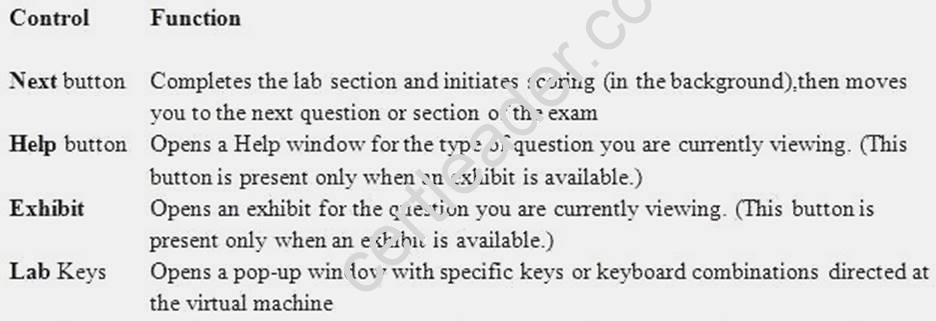
Keyboard Shortcuts Available
Exam features may be accessed using keyboard shortcuts. The following table describes the keyboard shortcuts that are available during this exam.
Some keyboard shortcuts require that you press two or more keys at the same time. These keys are separated by a plus sign (+) in the table below.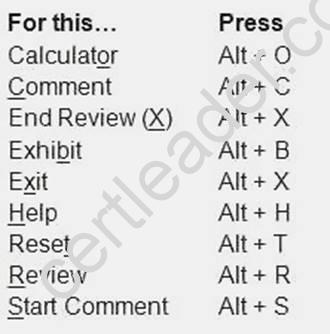
NEW QUESTION 15
You create an Azure Storage account named contosostorage. You plan to create a file share named data.
Users need to map a drive to the data file share from home computers that run Windows 10. Which port should be open between the home computers and the data file share?
- A. 80
- B. 443
- C. 445
- D. 3389
Answer: C
Explanation: Ensure port 445 is open: The SMB protocol requires TCP port 445 to be open; connections will fail if port 445 is blocked.
References: https://docs.microsoft.com/en-us/azure/storage/files/storage-how-to-use-files-windows
NEW QUESTION 16
You have an Azure subscription that contains 100 virtual machines. You regularly create and delete virtual machines.
You need to identify unused disks that can be deleted. What should you do?
- A. From Microsoft Azure Storage Explorer, view the Account Management properties.
- B. From the Azure portal, configure the Advisor recommendations.
- C. From Cloudyn, open the Optimizer tab and create a report.
- D. From Cloudyn, create a Cost Management repor
Answer: A
Explanation: You can find unused disks in the Azure Storage Explorer console. Once you drill down to the Blob containers under a storage account, you can see the lease state of the residing VHD (the lease state determines if the VHD is being used by any resource) and the VM to which it is leased out. If you find that the lease state and the VM fields are blank, it means that the VHD in question is unused.
Note: The ManagedBy property stores the Id of the VM to which Managed Disk is attached to. If the ManagedBy property is $null then it means that the Managed Disk is not attached to a VM References:
https://cloud.netapp.com/blog/reduce-azure-storage-costs
NEW QUESTION 17
HOT SPOT
You plan to create an Azure Storage account in the Azure region of East US 2. You need to create a storage account that meets the following requirements: Replicates synchronously
Remains available if a single data center in the region fails
How should you configure the storage account? To answer, select the appropriate options in the answer area.
NOTE: Each correct selection is worth one point.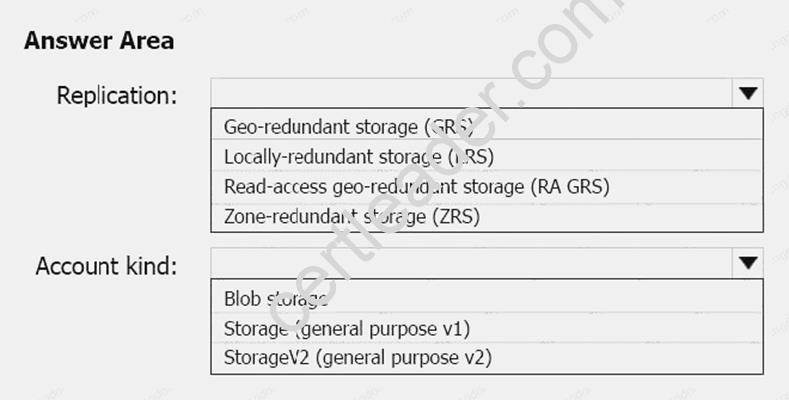
Answer:
Explanation: Box 1: Zone-redundant storage (ZRS)
Zone-redundant storage (ZRS) replicates your data synchronously across three storage clusters in a single region.
LRS would not remain available if a data center in the region fails GRS and RA GRS use asynchronous replication.
Box 2: StorageV2 (general purpose V2) ZRS only support GPv2.
References:
https://docs.microsoft.com/en-us/azure/storage/common/storage-redundancy https://docs.microsoft.com/en-us/azure/storage/common/storage-redundancy-zrs
NEW QUESTION 18
You have a public load balancer that balancer ports 80 and 443 across three virtual machines. You need to direct all the Remote Desktop protocol (RDP) to VM3 only.
What should you configure?
- A. an inbound NAT rule
- B. a load public balancing rule
- C. a new public load balancer for VM3
- D. a new IP configuration
Answer: A
Explanation: To port forward traffic to a specific port on specific VMs use an inbound network address translation (NAT) rule.
Incorrect Answers:
B: Load-balancing rule to distribute traffic that arrives at frontend to backend pool instances. References:
https://docs.microsoft.com/en-us/azure/load-balancer/load-balancer-overview
NEW QUESTION 19
HOT SPOT
You have an Azure subscription named Subscription1. Subscription1 contains the resources in the following table.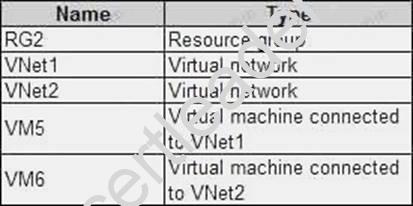
In Azure, you create a private DNS zone named adatum.com. You set the registration virtual network to VNet2. The adatum.com zone is configured as shown in the following exhibit.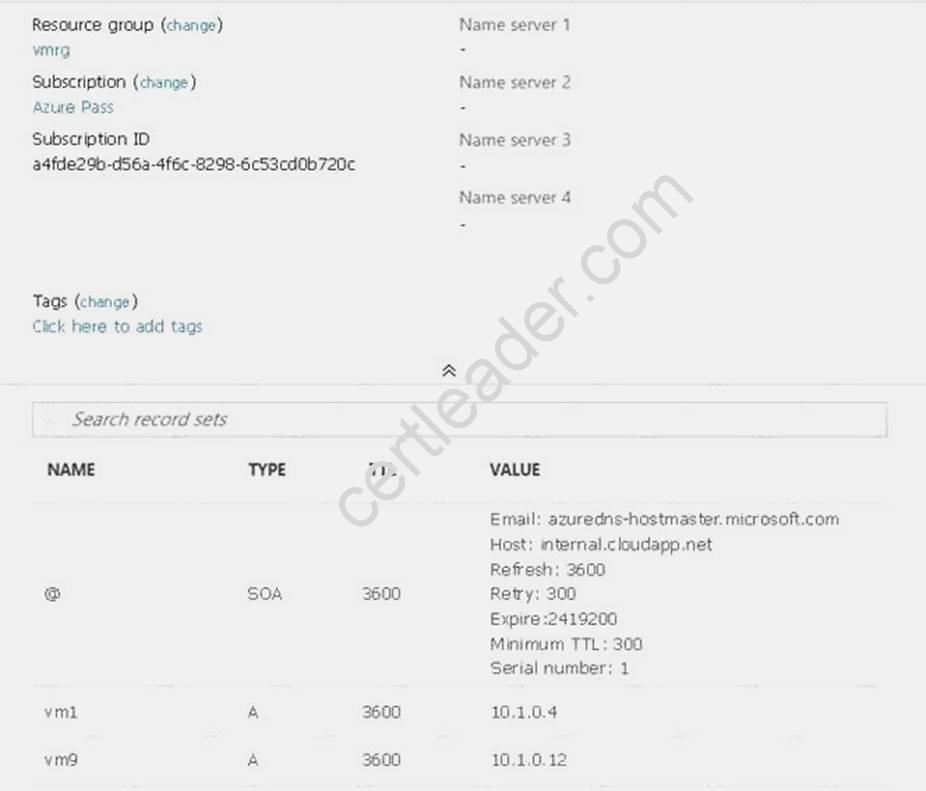
For each of the following statements, select Yes if the statement is true. Otherwise, select No. NOTE: Each correct selection is worth one point.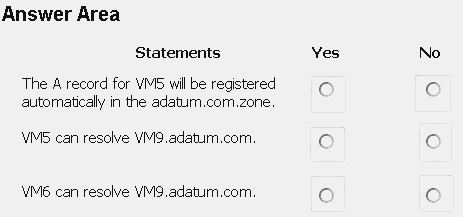
Answer:
Explanation: Box 1: No
Azure DNS provides automatic registration of virtual machines from a single virtual network that's linked to a private zone as a registration virtual network. VM5 does not belong to the registration virtual network though.
Box 2: No
Forward DNS resolution is supported across virtual networks that are linked to the private zone as resolution virtual networks. VM5 does belong to a resolution virtual network.
Box 3: Yes
VM6 belongs to registration virtual network, and an A (Host) record exists for VM9 in the DNS zone. By default, registration virtual networks also act as resolution virtual networks, in the sense that DNS resolution against the zone works from any of the virtual machines within the registration virtual network.
References: https://docs.microsoft.com/en-us/azure/dns/private-dns-overview
NEW QUESTION 20
HOT SPOT
You need to prepare the environment to implement the planned changes for Server2. What should you do? To answer, select the appropriate options in the answer area. NOTE: Each correct selection is worth one point.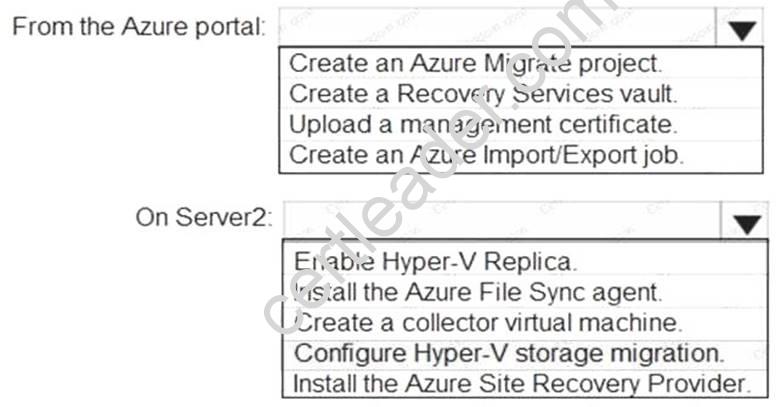
Answer:
Explanation: Box 1: Create a Recovery Services vault
Create a Recovery Services vault on the Azure Portal. Box 2: Install the Azure Site Recovery Provider
Azure Site Recovery can be used to manage migration of on-premises machines to Azure. Scenario: Migrate the virtual machines hosted on Server1 and Server2 to Azure.
Server2 has the Hyper-V host role. References:
https://docs.microsoft.com/en-us/azure/site-recovery/migrate-tutorial-on-premises-azure
Case Study: 8
Mix Questions Set C (Evaluate and perform server migration to Azure)
Thanks for reading the newest AZ-102 exam dumps! We recommend you to try the PREMIUM DumpSolutions AZ-102 dumps in VCE and PDF here: https://www.dumpsolutions.com/AZ-102-dumps/ (195 Q&As Dumps)