AZ-102 Study Guides for Microsoft certification, Real Success Guaranteed with Updated AZ-102 Braindumps. 100% PASS AZ-102 Microsoft Azure Administrator Certification Transition exam Today!
Also have AZ-102 free dumps questions for you:
NEW QUESTION 1
Note: This questions is part of a series of questions that present the same scenario. Each questions in the series contains a unique solution that might meet the stated goals. Some questions sets might have more than one correct solution, while others might not have a correct solution. After you answer a questions in this section, you will NOT be able to return to it. As a result, these questions will not appear in the review screen.
You have an Azure subscription that contains 10 virtual networks. The virtual networks are hosted in separate resource groups.
Another administrator plans to create several network security groups (NSGs) in the subscription. You need to ensure that when an NSG is created, it automatically blocks TCP port 8080 between the virtual networks.
Solution: You configure a custom policy definition, and then you assign the policy to the subscription. Does this meet the goal?
- A. Yes
- B. No
Answer: A
Explanation: Resource policy definition used by Azure Policy enables you to establish conventions for resources in your organization by describing when the policy is enforced and what effect to take. By defining conventions, you can control costs and more easily manage your resources.
References: https://docs.microsoft.com/en-us/azure/azure-policy/policy-definition
NEW QUESTION 2
You have an Azure subscription named Subscription1 that has the following providers registered: Authorization
Automation Resources Compute KeyVault Network Storage Billing Web
Subscription1 contains an Azure virtual machine named VM1 that has the following configurations: Private IP address: 10.0.0.4 (dynamic)
Network security group (NSG): NSG1 Public IP address: None
Availability set: AVSet Subnet: 10.0.0.0/24 Managed disks: No Location: East US
You need to record all the successful and failed connection attempts to VM1.
Which three actions should you perform? Each correct answer presents part of the solution.
NOTE: Each correct selection is worth one point.
- A. Register the Microsoft.Insights resource provider
- B. Add an Azure Network Watcher connection monitor
- C. Register the Microsoft.LogAnalytics provider
- D. Enable Azure Network Watcher in the East US Azure region
- E. Create an Azure Storage account
- F. Enable Azure Network Watcher flow logs
Answer: ADF
Explanation:
Step 1: (D)
We must have a network watcher enabled in the East US region Step 2: (A+F)
A: NSG flow logging requires the Microsoft.Insights provider, which must be registered.
F: Network security groups (NSG) allow or deny inbound or outbound traffic to a network interface in a VM. The NSG flow log capability allows you to log the source and destination IP address, port, protocol, and whether traffic was allowed or denied by an NSG.
References:
https://docs.microsoft.com/en-us/azure/network-watcher/network-watcher-nsg-flow-logging-portal
NEW QUESTION 3
HOT SPOT
You need to identify the storage requirements for Contoso.
For each of the following statements, select Yes if the statement is true. Otherwise, select No. NOTE: Each correct selection is worth one point.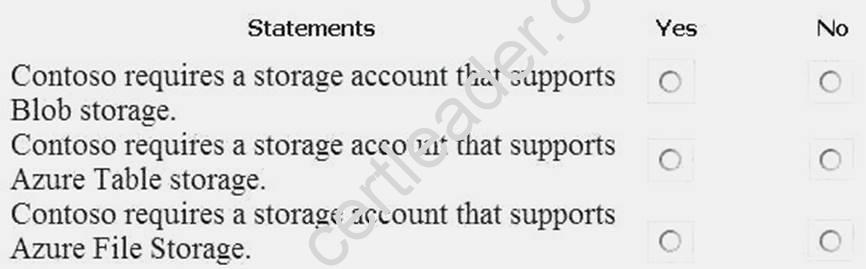
Answer:
Explanation:
Box 1: Yes
Contoso is moving the existing product blueprint files to Azure Blob storage.
Use unmanaged standard storage for the hard disks of the virtual machines. We use Page Blobs for these.
Box 2: No
Box 3: No
Case Study: 3
Mix Questions
NEW QUESTION 4
HOT SPOT
You have an Azure web app named WebApp1 that runs in an Azure App Service plan named ASP1. ASP1 is based on the D1 pricing tier.
You need to ensure that WebApp1 can be accessed only from computers on your on-premises network. The solution must minimize costs.
What should you configure? To answer, select the appropriate options in the answer area. NOTE: Each correct selection is worth one point.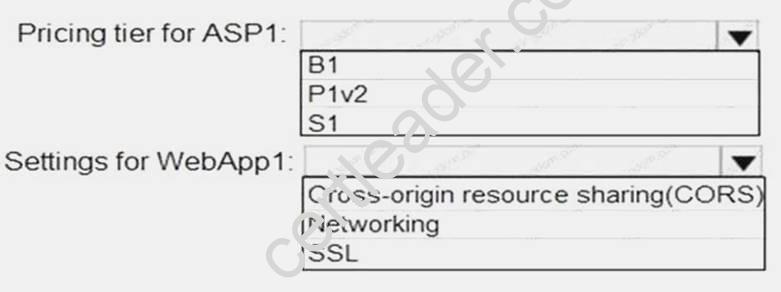
Answer:
Explanation: Box 1: B1
B1 (Basic) would minimize cost compared P1v2 (premium) and S1 (standard). Box 2: Cross Origin Resource Sharing (CORS)
Once you set the CORS rules for the service, then a properly authenticated request made against the service from a different domain will be evaluated to determine whether it is allowed according to the rules you have specified.
Note: CORS (Cross Origin Resource Sharing) is an HTTP feature that enables a web application running under one domain to access resources in another domain. In order to reduce the possibility of cross-site scripting attacks, all modern web browsers implement a security restriction known as
same-origin policy. This prevents a web page from calling APIs in a different domain. CORS provides a secure way to allow one origin (the origin domain) to call APIs in another origin.
References:
https://azure.microsoft.com/en-us/pricing/details/app-service/windows/ https://docs.microsoft.com/en-us/azure/cdn/cdn-cors
NEW QUESTION 5
You have an Azure subscription named Subscnption1 that contains an Azure virtual machine named VM1. VM1 is in a resource group named RG1.
VM1 runs services that will be used to deploy resources to RG1.
You need to ensure that a service running on VM1 can manage the resources in RG1 by using the identity of VM1. What should you do fit -
- A. From the Azure portal modify the Access control (1AM) settings of VM1.
- B. From the Azure portal, modify the Policies settings of RG1.
- C. From the Azure portal, modify the value of the Managed Service Identity option for VM1.
- D. From the Azure portal, modify the Access control (IAM) settings of RG1.
Answer: C
Explanation: A managed identity from Azure Active Directory allows your app to easily access other AADprotected
resources such as Azure Key Vault. The identity is managed by the Azure platform and does not require you to provision or rotate any secrets.
User assigned managed identities can be used on Virtual Machines and Virtual Machine Scale Sets. References:
https://docs.microsoft.com/en-us/azure/app-service/app-service-managed-service-identity
NEW QUESTION 6
You are the global administrator for an Azure Active Directory (Azure AD) tenant named adatum.com. From the Azure Active Directory blade, you assign the Conditional Access Administrator role to a user You need to ensure that Admin1 has just-in-time access as a conditional access administrator.
What should you do next?
- A. Enable Azure AD Multi-Factor Authentication (MFA).
- B. Set Admin1 as Eligible for the Privileged Role Administrator role.
- C. Admin1 as Eligible for the Conditional Access Administrator role.
- D. Enable Azure AD Identity Protectio
Answer: A
Explanation: Require MFA for admins is a baseline policy that requires MFA for the following directory roles: Global administrator
SharePoint administrator Exchange administrator Conditional access administrator Security administrator References:
https://docs.microsoft.com/en-us/azure/active-directory/conditional-access/baseline-protection
NEW QUESTION 7
HOT SPOT
You have an Azure web app named WebApp1.
You need to provide developers with a copy of WebApp1 that they can modify without affecting the production WebApp1. When the developers finish testing their changes, you must be able to switch the current line version of WebApp1 to the new version.
Which command should you run prepare the environment? To answer, select the appropriate options in the answer area.
NOTE: Each correct selection is worth one point.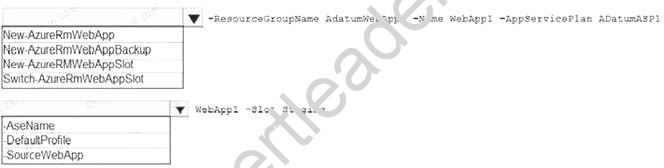
Answer:
Explanation: Box 1: New-AzureRmWebAppSlot
The New-AzureRmWebAppSlot cmdlet creates an Azure Web App Slot in a given a resource group that uses the specified App Service plan and data center.
Box 2: -SourceWebApp References:
https://docs.microsoft.com/en-us/powershell/module/azurerm.websites/new-azurermwebappslot
NEW QUESTION 8
You plan to use the Azure Import/Export service to copy files to a storage account.
Which two files should you create before you prepare the drives for the import job? Each correct answer presents part of the solution.
NOTE: Each correct selection is worth one point.
- A. an XML manifest file
- B. a driveset CSV file
- C. a dataset CSV file
- D. a PowerShell PS1 file
- E. a JSON configuration file
Answer: BC
Explanation: B: Modify the driveset.csv file in the root folder where the tool resides.
C: Modify the dataset.csv file in the root folder where the tool resides. Depending on whether you want to import a file or folder or both, add entries in the dataset.csv file
References: https://docs.microsoft.com/en-us/azure/storage/common/storage-import-export-datato- files
NEW QUESTION 9
HOT SPOT
You have an Azure Active Directory (Azure AD) tenant named adatum.com. Adatum.com contains the groups in the following table.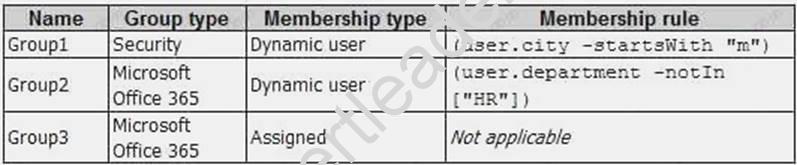
You create two user accounts that are configured as shown in the following table.
To which groups do User1 and User2 belong? To answer. select the appropriate options in the answer area.
NOTE: Each correct selection is worth one point.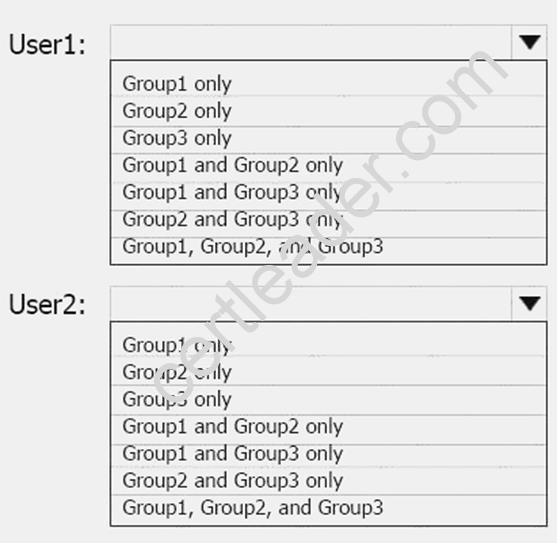
Answer:
Explanation: Box 1: Group 1 only First rule applies
Box 2: Group1 and Group2 only Both membership rules apply.
References: https://docs.microsoft.com/en-us/sccm/core/clients/manage/collections/createcollections
NEW QUESTION 10
Which blade should you instruct the finance department auditors to use?
- A. Cost analysis
- B. Usage + quotas
- C. External services
- D. Payment methods
Answer: B
Explanation: Subscription costs are based on usage. Microsoft Azure limits are also called quotas.
Scenario: During the testing phase, auditors in the finance department must be able to review all Azure costs from the past week.
Incorrect Answers:
C: External services are published by third party software vendors in the Azure marketplace. References: https://docs.microsoft.com/en-us/azure/azure-subscription-service-limits
NEW QUESTION 11
SIMULATION
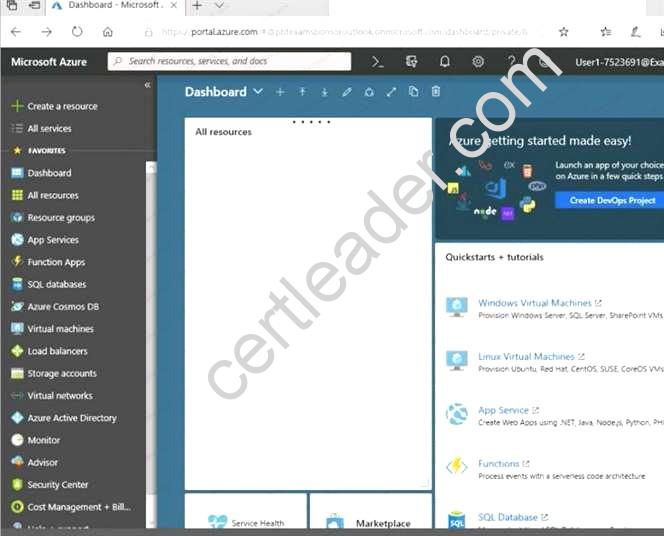
Click to expand each objective. To connect to the Azure portal, type https://portal.azure.com in the browser address bar.
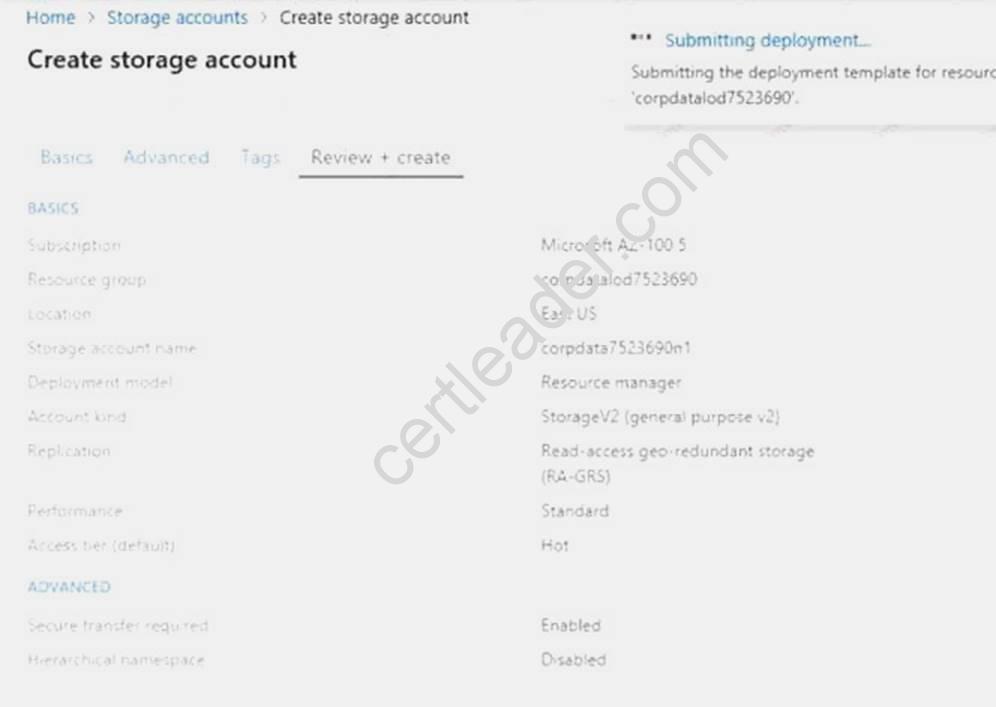
When you are finished performing all the tasks, click the ‘Next’ button.
Note that you cannot return to the lab once you click the ‘Next’ button. Scoring occur in the background while you complete the rest of the exam.
Overview
The following section of the exam is a lab. In this section, you will perform a set of tasks in a live environment. While most functionality will be available to you as it would be in a live environment, some functionality (e.g., copy and paste, ability to navigate to external websites) will not be possible by design. Scoring is based on the outcome of performing the tasks stated in the lab. In other words, it doesn’t matter how you accomplish the task, if you successfully perform it, you will earn credit for that task.
Labs are not timed separately, and this exam may have more than one lab that you must complete. You can use as much time as you would like to complete each lab. But, you should manage your time appropriately to ensure that you are able to complete the lab(s) and all other sections of the exam in the time provided.
Please note that once you submit your work by clicking the Next button within a lab, you will NOT be able to return to the lab.
To start the lab
You may start the lab by clicking the Next button.
You need to create a virtual network named VNET1008 that contains three subnets named subnet0, subnet1, and subnet2. The solution must meet the following requirements:
Connections from any of the subnets to the Internet must be blocked. Connections from the Internet to any of the subnets must be blocked.
The number of network security groups (NSGs) and NSG rules must be minimized. What should you do from the Azure portal?
Answer:
Explanation: Step 1: Click Create a resource in the portal.
Step 2: Enter Virtual network in the Search the Marketplace box at the top of the New pane that appears. Click Virtual network when it appears in the search results.
Step 3: Select Classic in the Select a deployment model box in the Virtual Network pane that appears, then click Create.
Step 4: Enter the following values on the Create virtual network (classic) pane and then click Create: Name: VNET1008
Address space: 10.0.0.0/16 Subnet name: subnet0 Resource group: Create new
Subnet address range: 10.0.0.0/24
Subscription and location: Select your subscription and location.
Step 5: In the portal, you can create only one subnet when you create a virtual network. Click Subnets (in the SETTINGS section) on the Create virtual network (classic) pane that appears. Click +Add on the VNET1008 - Subnets pane that appears.
Step 6: Enter subnet1 for Name on the Add subnet pane. Enter 10.0.1.0/24 for Address range. Click OK.
Step 7: Create the third subnet: Click +Add on the VNET1008 - Subnets pane that appears. Enter subnet2 for Name on the Add subnet pane. Enter 10.0.2.0/24 for Address range. Click OK. References: https://docs.microsoft.com/en-us/azure/virtual-network/create-virtual-network-classic
Case Study: 4,
Mix Questions Set A (Implement and manage application services)
NEW QUESTION 12
HOT SPOT
You have an Azure Migrate project that has the following assessment properties: Target location: East US
Storage redundancy: Locally redundant. Comfort factor: 2.0
Performance history: 1 month Percentile utilization: 95th
Pricing tier: Standard Offer: Pay as you go
You discover the following two virtual machines:
A virtual machine named VM1 that runs Windows Server 2021 and has 10 CPU cores at 20 percent utilization
A virtual machine named VM2 that runs Windows Server 2012 and has four CPU cores at 50 percent utilization
How many CPU cores will Azure Migrate recommend for each virtual machine? To answer, select the appropriate options in the answer area.
NOTE: Each correct selection is worth one point.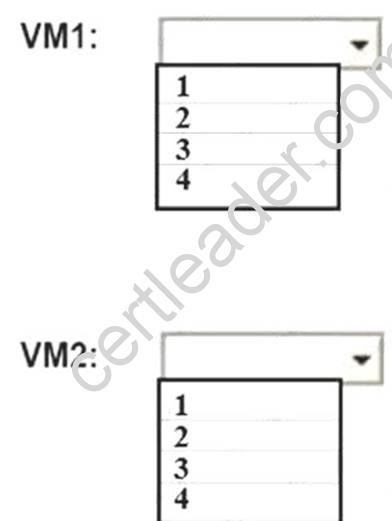
Answer:
Explanation: Box 2: 4
4 *0.50 * 0.95* 2 = 3.8
Note: The number of cores in the machines must be equal to or less than the maximum number of cores (128 cores) supported for an Azure VM.
If performance history is available, Azure Migrate considers the utilized cores for comparison. If a comfort factor is specified in the assessment settings, the number of utilized cores is multiplied by the comfort factor.
If there's no performance history, Azure Migrate uses the allocated cores, without applying the comfort factor.
References:
https://docs.microsoft.com/en-us/azure/migrate/concepts-assessment-calculation
NEW QUESTION 13
Another administrator reports that she is unable to configure a web app named corplod7509086n3 to prevent all connections from an IP address of 11.0.0.11.
You need to modify corplod7509086n3 to successfully prevent the connections from the IP address. The solution must minimize Azure-related costs.
What should you do from the Azure portal?
Answer:
Explanation: Step 1:
Find and select application corplod7509086n3:
1. In the Azure portal, on the left navigation panel, click Azure Active Directory.
2. In the Azure Active Directory blade, click Enterprise applications. Step 2:
To add an IP restriction rule to your app, use the menu to open Network>IP Restrictions and click on Configure IP Restrictions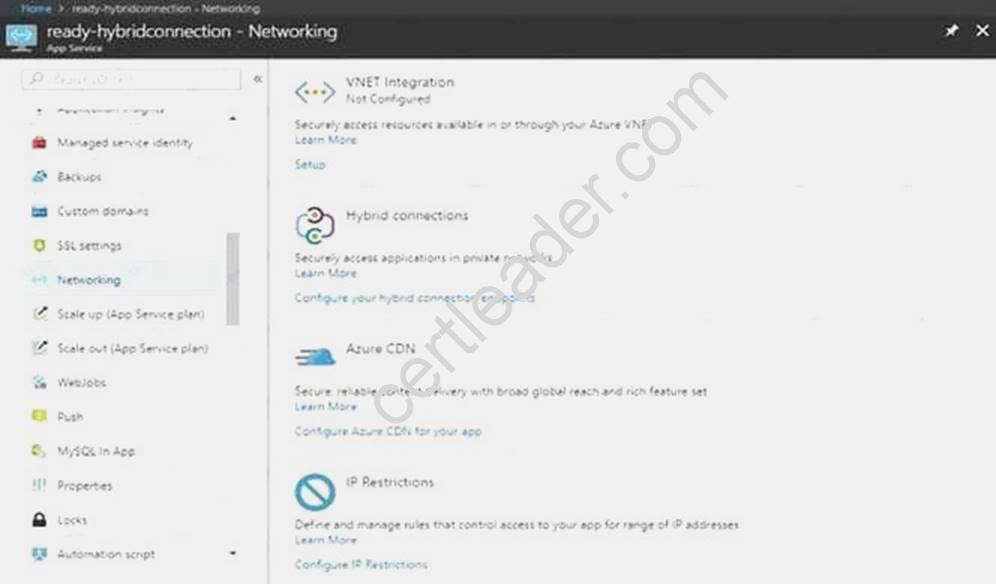
Step 3:
Click Add rule
You can click on [+] Add to add a new IP restriction rule. Once you add a rule, it will become effective immediately.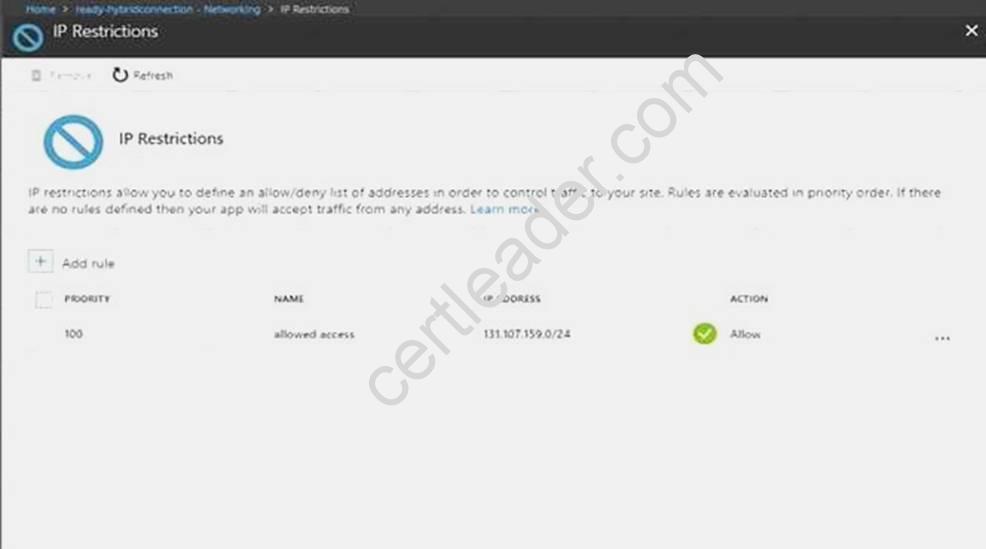
Step 4:
Add name, IP address of 11.0.0.11, select Deny, and click Add Rule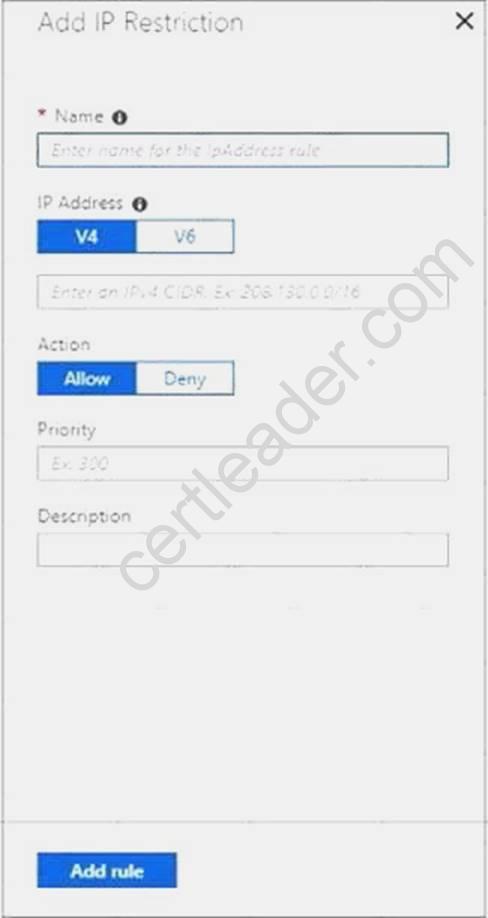
References:
https://docs.microsoft.com/en-us/azure/app-service/app-service-ip-restrictions
NEW QUESTION 14
HOT SPOT
You have an Azure subscription named Subscription1 that contains the resources in the following table.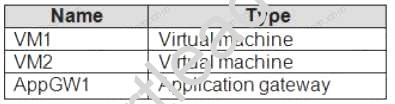
VM1 and VM2 run the websites in the following table.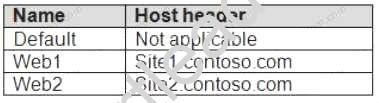
AppGW1 has the backend pools in the following table.
DNS resolves site1.contoso.com, site2.contoso.com, and site3.contoso.com to the IP address of AppGW1.
AppGW1 has the listeners in the following table.
AppGW1 has the rules in the following table.
For each of the following statements, select Yes if the statement is true. Otherwise, select No. NOTE: Each correct selection is worth one point.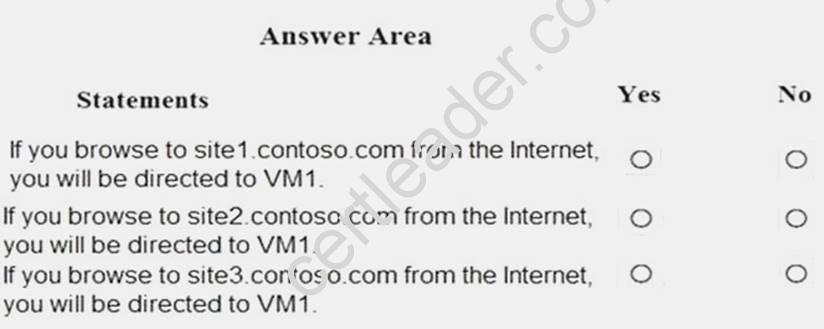
Answer:
Explanation: Vm1 is in Pool1. Rule2 applies to Pool1, Listener 2, and site2.contoso.com
NEW QUESTION 15
You have an Azure App Service plan named AdatumASP1 that uses the P2v2 pricing tier. AdatumASP1 hosts Ml Azure web app named adatumwebapp1. You need to delegate the management of adatumwebapp1 to a group named Devs. Devs must be able to perform the following tasks:
• Add deployment slots.
• View the configuration of AdatumASP1.
• Modify the role assignment for adatumwebapp1. Which role should you assign to the Devs group?
- A. Owner
- B. Contributor
- C. Web Plan Contributor
- D. Website Contributor
Answer: B
Explanation: The Contributor role lets you manage everything except access to resources. Incorrect Answers:
A: The Owner role lets you manage everything, including access to resources.
C: The Web Plan Contributor role lets you manage the web plans for websites, but not access to them.
D: The Website Contributor role lets you manage websites (not web plans), but not access to them. References:
https://docs.microsoft.com/en-us/azure/role-based-access-control/built-in-roles
NEW QUESTION 16
You are building a custom Azure function app to connect to Azure Event Grid.
You need to ensure that resources are allocated dynamically to the function app. Billing must be based on the executions of the app.
What should you configure when you create the function app?
- A. the Windows operating system and the Consumption plan hosting plan
- B. the Windows operating system and the App Service plan hosting plan
- C. the Docker container and an App Service plan that uses the Bl1 pricing tier
- D. the Docker container and an App Service plan that uses the SI pricing
Answer: A
Explanation: Azure Functions runs in two different modes: Consumption plan and Azure App Service plan. The Consumption plan automatically allocates compute power when your code is running. Your app is scaled out when needed to handle load, and scaled down when code is not running.
Incorrect Answers:
B: When you run in an App Service plan, you must manage the scaling of your function app. References:
https://docs.microsoft.com/en-us/azure/azure-functions/functions-create-first-azure-function
NEW QUESTION 17
From the MFA Server blade, you open the Block/unblock users blade as shown in the exhibit. Block/unblock users
A blocked user will not receive Multi-Factor Authentication requests. Authentication attempts for that user will be automatically denied. A user will remain blocked for 90 days from the time they are blocked. To manually unblock a user, click the “Unblock” action.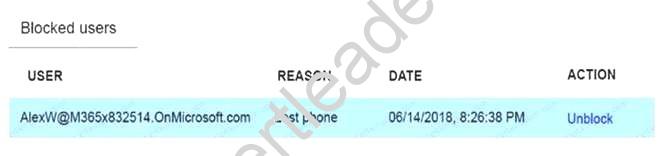
What caused AlexW to be blocked?
- A. The user entered an incorrect PIN four times within 10 minutes.
- B. The user account password expired.
- C. An administrator manually blocked the user.
- D. The user reported a fraud alert when prompted for additional authenticatio
Answer: D
NEW QUESTION 18
SIMULATION
Click to expand each objective. To connect to the Azure portal, type https://portal.azure.com in the browser address bar.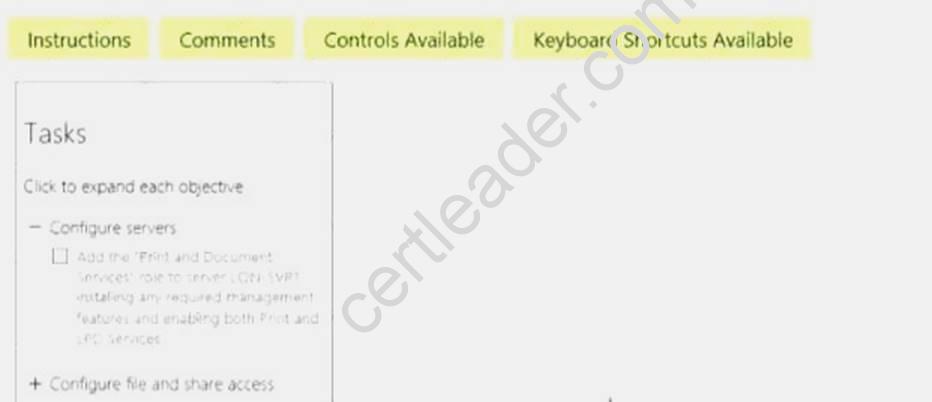
When you are finished performing all the tasks, click the ‘Next’ button.
Note that you cannot return to the lab once you click the ‘Next’ button. Scoring occur in the background while you complete the rest of the exam.
Overview
The following section of the exam is a lab. In this section, you will perform a set of tasks in a live environment. While most functionality will be available to you as it would be in a live environment, some functionality (e.g., copy and paste, ability to navigate to external websites) will not be possible by design.
Scoring is based on the outcome of performing the tasks stated in the lab. In other words, it doesn’t matter how you accomplish the task, if you successfully perform it, you will earn credit for that task. Labs are not timed separately, and this exam may have more than one lab that you must complete. You can use as much time as you would like to complete each lab. But, you should manage your time appropriately to ensure that you are able to complete the lab(s) and all other sections of the exam in the time provided.
Please note that once you submit your work by clicking the Next button within a lab, you will NOT be able to return to the lab.
To start the lab
You may start the lab by clicking the Next button.
You plan to store media files in the rg1lod7523691n1 storage account.
You need to configure the storage account to store the media files. The solution must ensure that only users who have access keys can download the media files and that the files are accessible only over HTTPS.
What should you do from Azure portal?
Answer:
Explanation: We should create an Azure file share.
Step 1: In the Azure portal, select All services. In the list of resources, type Storage Accounts. As you begin typing, the list filters based on your input. Select Storage Accounts.
On the Storage Accounts window that appears.
Step 2: Locate the rg1lod7523691n1 storage account.
Step 3: On the storage account page, in the Services section, select Files.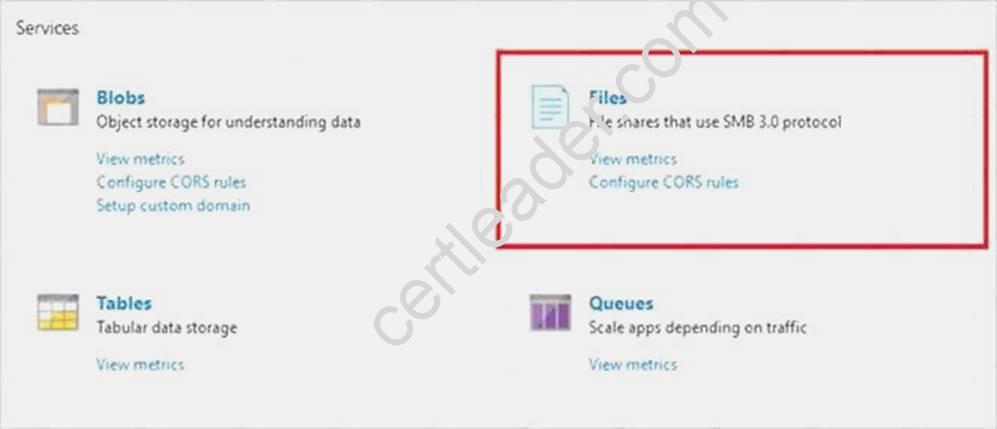
Step 4: On the menu at the top of the File service page, click + File share. The New file share page drops down.
Step 5: In Name type myshare. Click OK to create the Azure file share.
References: https://docs.microsoft.com/en-us/azure/storage/files/storage-how-to-use-files-portal
NEW QUESTION 19
DRAG DROP
You have an Azure subscription. The subscription includes a virtual network named VNet1. Currently, VNet1 does not contain any subnets.
You plan to create subnets on VNet1 and to use application security groups to restrict the traffic between the subnets. You need to create the application security groups and to assign them to the
subnets.
Which four cmdlets should you run in sequence? To answer, move the appropriate cmdlets from the list of cmdlets to the answer area and arrange them in the correct order.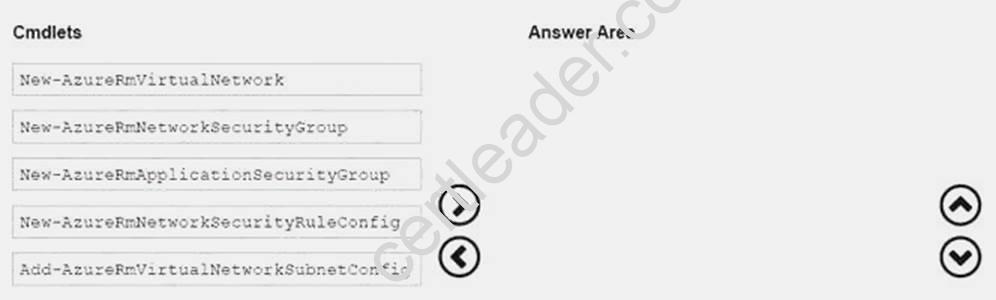
Answer:
Explanation: Step 1: New-AzureRmNetworkSecurityRuleConfig
Step 2: New-AzureRmNetworkSecurityGroup
Step 3: New-AzureRmVirtualNetworkSubnetConfig
Step 4: New-AzureRmVirtualNetwork
Example: Create a virtual network with a subnet referencing a network security group New-AzureRmResourceGroup -Name TestResourceGroup -Location centralus
$rdpRule = New-AzureRmNetworkSecurityRuleConfig -Name rdp-rule -Description "Allow RDP" - Access Allow -Protocol Tcp -Direction Inbound -Priority 100 -SourceAddressPrefix Internet - SourcePortRange * -DestinationAddressPrefix * -DestinationPortRange 3389
$networkSecurityGroup = New-AzureRmNetworkSecurityGroup -ResourceGroupName TestResourceGroup -Location centralus -Name "NSG-FrontEnd" -SecurityRules $rdpRule
$frontendSubnet = New-AzureRmVirtualNetworkSubnetConfig -Name frontendSubnet - AddressPrefix "10.0.1.0/24" -NetworkSecurityGroup $networkSecurityGroup
$backendSubnet = New-AzureRmVirtualNetworkSubnetConfig -Name backendSubnet - AddressPrefix "10.0.2.0/24" -NetworkSecurityGroup $networkSecurityGroup
New-AzureRmVirtualNetwork -Name MyVirtualNetwork -ResourceGroupName TestResourceGroup - Location centralus -AddressPrefix "10.0.0.0/16" -Subnet $frontendSubnet,$backendSubnet References: https://docs.microsoft.com/en-us/powershell/module/azurerm.network/newQuestions
& Answers PDF P-44 azurermvirtualnetwork?view=azurermps-6.7.0
P.S. Easily pass AZ-102 Exam with 195 Q&As 2passeasy Dumps & pdf Version, Welcome to Download the Newest 2passeasy AZ-102 Dumps: https://www.2passeasy.com/dumps/AZ-102/ (195 New Questions)